
Share
Turn images into videos with AI. Control camera movement and action via text to create professional ads and visual content.
What is Motiofy?
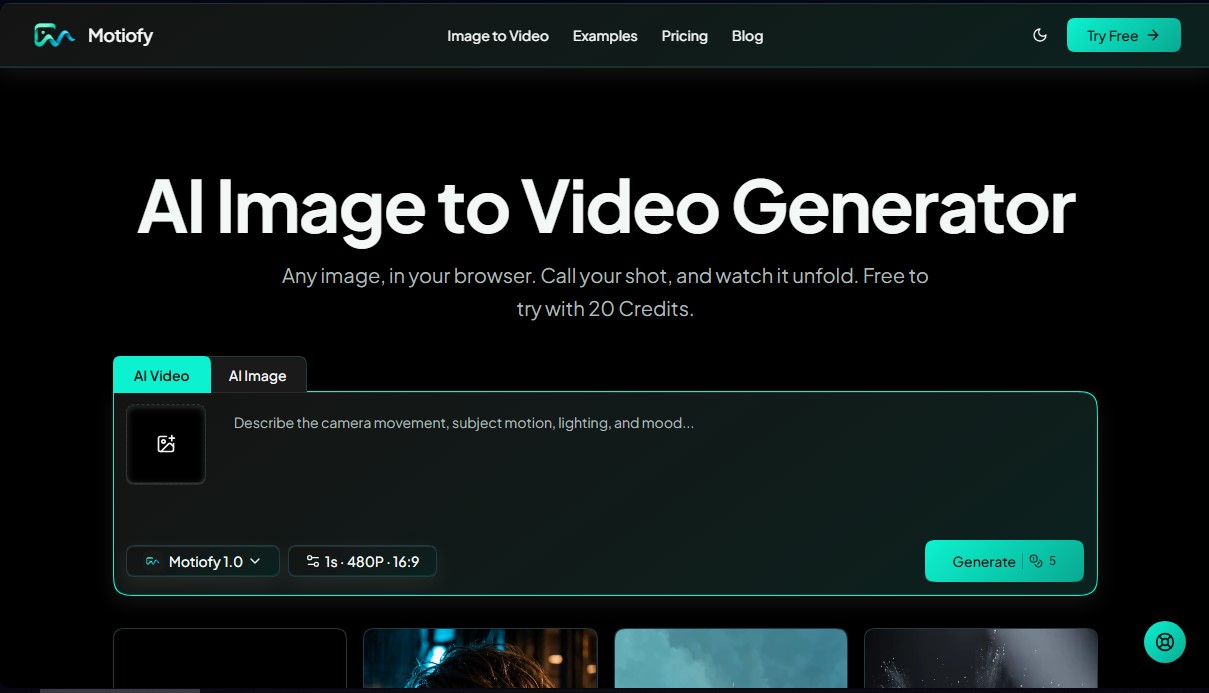
Motiofy is a specialized tool for generating video from images using artificial intelligence. Its primary function is to allow any user, regardless of technical editing skills, to transform a static photograph into a dynamic clip with fluid motion. The platform operates entirely within the browser, eliminating the need to install heavy software on your computer or own professional recording equipment.
Motiofy's operation is based on a simplified three-step process. First, the user uploads an image in JPG, PNG, or WebP format. Second, they describe the desired movement using natural language, specifying aspects such as camera movement (for example, a smooth zoom or a lateral pan), subject behavior, lighting, or the scene's atmosphere. Finally, one of the AI video models integrated into the workspace is selected to process the creation and generate the final clip.
Its technical capabilities include advanced control over visual storytelling. Unlike other automated tools, Motiofy allows you to define a start frame and an end frame, making it easy to create precise transitions, product reveals, or "before and after" transformation effects. Additionally, it allows the use of reference images to ensure visual consistency for characters, products, or artistic styles throughout the generated footage.
This solution is particularly useful for various professional profiles:
- E-commerce sellers: To convert catalog photos into dynamic product ads without the need to organize new video shoots.
- Social media content creators: Looking to transform their still photos into short videos for Reels, TikTok, or Shorts.
- Artists and illustrators: Who want to animate their paintings or digital works while maintaining the original composition and style.
- Marketing teams: To produce video ad variations at scale starting from a single brand image.
Motiofy's technology brings together several leading artificial intelligence models into a single workspace. This allows users to choose the technology that best fits their goal, whether they are seeking realism for advertising or more fluid movement for illustrations. By eliminating the need to manage complex timelines or manual keyframes, the tool optimizes audiovisual content production, reducing turnaround times from days to just a few minutes. Every project and creation is stored in an organized history, facilitating an iterative workflow for professionals and businesses.
Motiofy features and use cases
How to use Motiofy
Motiofy FAQ
What is Motiofy and what is it used for?
It is an artificial intelligence platform designed to transform static images into dynamic video clips using text descriptions.
Can I use Motiofy for free?
Yes, when you sign up, you receive 20 free credits to try out image-to-video generation with no commitment.
What file types can I upload to the tool?
The platform supports JPG, PNG, and WebP image formats for video conversions.
Do I need prior video editing experience?
No, you only need to upload a photo and describe the desired movement in natural language for the system to automatically generate the clip.
How do I control the start and end of the animation in Motiofy?
You can define a starting frame and an ending frame so the tool creates a smooth and precise transition between the two images.
What are the benefits of Motiofy's paid plans?
Subscriptions allow you to generate videos without watermarks, access advanced models, get high-definition downloads, and enjoy faster processing speeds.
How long does it take to generate a video from an image?
The time depends on the selected model and resolution, but you can check the status of your creation at any time in your personal dashboard.
What happens if I run out of free credits?
You can purchase additional one-time credit packs or subscribe to one of our monthly plans to continue creating content.
Motiofy pricing and plans
Free Plan - 0 $
20 free trial credits upon sign-up.
One-time use credits (do not renew monthly).
Starter - 20 $ per month (billed as 240 $ per year)
2,000 credits per month.
Access to more image and video models.
HD downloads without watermarks.
Fast image and video generation.
Early access to new models and experimental features.
Priority support with response in under 24 hours.
Creator - 40 $ per month (or 33.33 $ per month with 400 $ annual billing)
6,000 credits per month.
Unlock all available models.
HD downloads without watermarks.
Run up to 3 simultaneous generations.
Fast image and video generation.
Early access to new models and experimental features.
Priority support with response in under 24 hours.
Pro - 100 $ per month (or 83.33 $ per month with 1,000 $ annual billing)
15,000 credits per month.
Unlock all available models.
HD downloads without watermarks.
Run up to 10 simultaneous generations.
Fast image and video generation.
Early access to new models and experimental features.
Priority support with response in under 24 hours.
Priority consideration for feature requests.
Flex Pack - 15 $ (one-time payment)
1,000 credits that never expire.
HD downloads without watermarks.
Access to standard paid models.
Project Pack - 39 $ (one-time payment)
3,000 credits that never expire.
HD downloads without watermarks.
Access to standard paid models.
Motiofy Screenshots
Motiofy user reviews
Write a review
Checking your session...
Motiofy Reviews
Loading reviews...
Motiofy alternatives

Growing Up Video AI
Growing Up Video AI uses AI to create a keepsake video that moves from someone's baby photos to today, with animated story moments between ages and original music.


OpenClips.AI
OpenClips.AI is an AI video and image generator with 100+ models such as Seedance, Veo and Kling, plus templates, an ad studio and MCP access on one credit wallet.

Meme Video Maker
Meme Video Maker is an AI meme video generator: pick a template or paste a TikTok link, add your photo and download a vertical MP4 with sound and no watermark.