Share
Create AI music with voice cloning, text-to-instrumental generation, and track separation. Train your own voices and use community models.
What is Musicfy AI?
Musicfy AI is an advanced AI-powered music creation platform designed for musicians, producers, and content creators looking to innovate in audio production. Its core functionality focuses on sound transformation and generation through voice models and digital processing tools. It allows users to convert existing vocal tracks into entirely different voices—whether using pre-configured models, community voices, or custom models—while maintaining the original recording's intonation and rhythm.
One of the most standout features of Musicfy AI is voice cloning and custom model training. Users can upload audio files to train the AI with their own voice, creating a unique digital asset for their projects. This technological process goes beyond simple timbre modification; the tool utilizes high-precision pitch detection algorithms to accurately convert notes and pitch. Thanks to this approach, the platform is functional in any language, as the system works based on the musicality of the voice rather than just the text.
The tool integrates professional production-oriented features that optimize workflow from a computer or web browser:
Stem Splitter: This feature allows users to separate any audio file into individual tracks or "stems" (vocals, drums, bass, and other instruments), facilitating remixing and technical editing.
Text to Instrumental: This enables the generation of musical pieces and instrumental tracks from text descriptions, streamlining the creative songwriting process.
Vocal Cleanup: A utility to improve audio quality by removing background noise, echoes, or reverb using upsampling techniques.
Voice Library: Access to a wide variety of community-created models and parody voices for creative experimentation.
On the technical side, Musicfy AI offers different conversion quality levels, most notably Master Quality mode, which ensures superior fidelity in frequency translation between voices. Additionally, the platform provides a Developer API, allowing its AI music generation capabilities to be integrated into external applications.
For creators requiring professional use, the platform makes it easy to manage a personal library and conversion history. It is a practical solution for those who need to demo songs, explore new vocal styles, or generate social media content without depending on complex studio recordings. Since the tool's models are trained with specific data, users can manage their creations with a focus on producing original and versatile content.
Musicfy AI features and use cases
How to use Musicfy AI
Musicfy AI FAQ
What is Musicfy AI and what can it do?
It is an artificial intelligence platform that allows you to create music, clone custom voices, and transform text into instrumental tracks.
Can I use Musicfy AI creations for commercial projects?
Yes, commercial use is permitted for users on the Professional and Studio plans, provided that royalty-free voice models are used.
How many custom voices can I create based on my plan?
The Starter plan allows you to train two voices, the Professional plan offers six, and the Studio plan allows for up to thirty different models.
Does the tool work in any language?
Yes, the system works with all languages because it processes musical notes and pitch rather than translating words literally.
What is the difference between standard quality and master quality?
Master quality uses much more advanced pitch detection, ensuring a far more accurate voice conversion compared to the standard option.
What features are included in the Musicfy AI Pro Tools section?
It includes a track separator that allows you to split any audio file into its individual components so you can work with them separately.
How can I cancel my subscription if I no longer wish to use the service?
You can cancel your plan at any time through your account settings, and you will maintain access to all features until the end of your current billing period.
What exactly does the voice enhancement option do?
This feature improves the quality of the processed audio and removes unwanted elements like echo or reverb from the original vocal track.
Can I retrain a voice if I am not satisfied with the result?
Yes, you can delete and retrain your voice models as many times as you like, as long as you do not exceed your plan's maximum limit.
What happens if I exceed the file upload limit on Musicfy AI?
Each plan has a file size limit, ranging from 25 megabytes for the Starter plan to 150 megabytes per file for the Studio plan.
Musicfy AI pricing and plans
Free
3 voice cloning generations.
3 text-to-music generations.
Standard conversion speed.
Starter – 9.99 US$/mo
Unlimited generations.
2 custom voice models.
Access to all Musicfy and community voices.
25 MB file upload limit.
Voice training with a maximum duration of 10 minutes per dataset.
Standard conversion speed.
Professional – 24.99 US$/mo
Unlimited generations.
6 custom voice models.
Access to all Musicfy and community voices.
100 MB file upload limit.
Voice training with a maximum duration of 30 minutes per dataset.
Commercial license included.
Fastest conversion speed.
Studio – 69.99 US$/mo
Unlimited generations.
30 custom voice models.
Access to all Musicfy and community voices.
150 MB file upload limit.
Voice training with a maximum duration of 1 hour per dataset.
Commercial license included.
Fastest conversion speed.
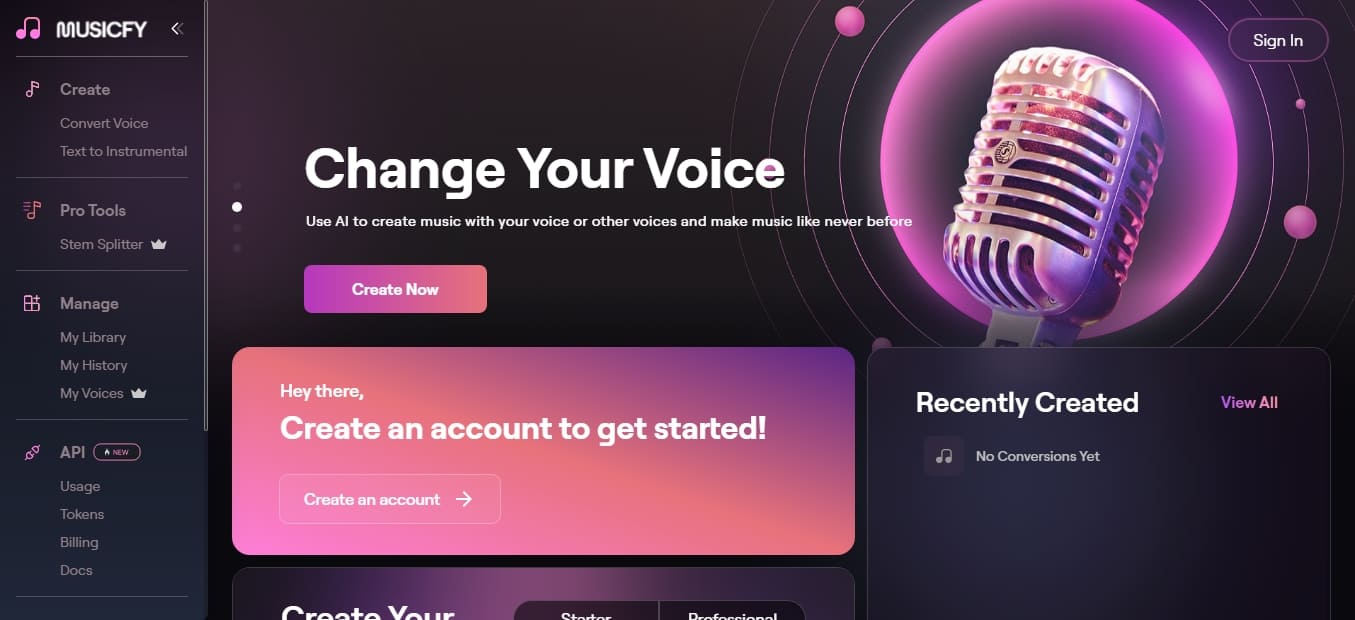
Musicfy AI Screenshots
Musicfy AI user reviews
Write a review
Checking your session...
Musicfy AI Reviews
Loading reviews...
Musicfy AI alternatives
AutoTune Metamorph
Transform voice recordings with ethically sourced professional models. Runs offline in your DAW, supports RVC imports, and automatically adjusts the vocal range.

All Voice Lab
AI platform for text-to-speech, voice cloning, and audio editing. Offers realistic voiceovers in six languages with emotion and tone control for professional projects.