Share
What is tl;dv?
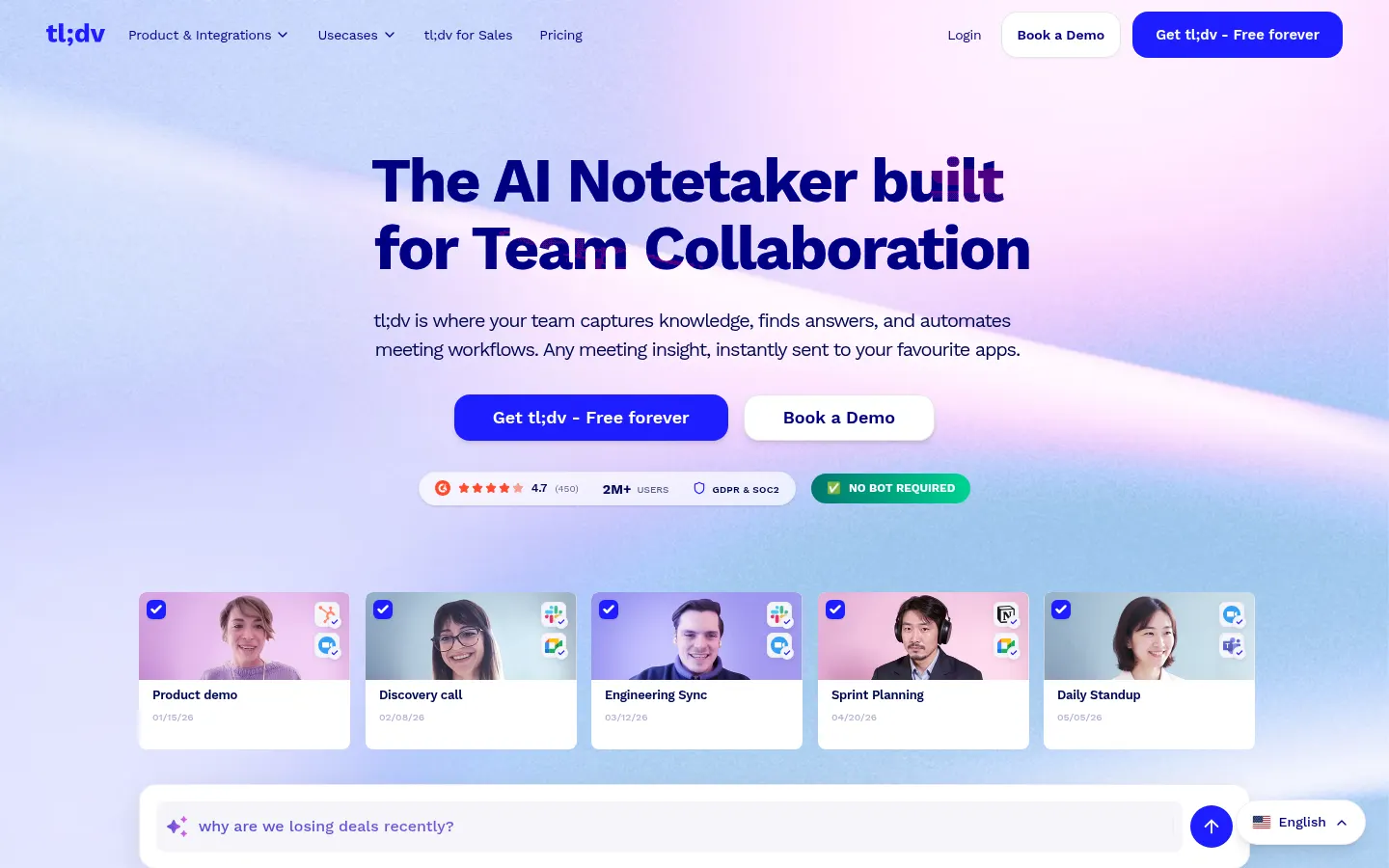
tl;dv is an AI meeting notetaker for Zoom, Google Meet and Microsoft Teams. It records the call, transcribes it and hands you a summary as soon as the meeting ends, so nobody has to take notes or rewatch the full recording. The name stands for "Too Long, Didn't View", and the company says more than 2 million people use it. It can also capture meetings without a bot joining.
What do tl;dv notes and summaries include?
After every call you get a video, a translatable transcript and a shareable summary for the person who only needs the highlights. Notes can follow a sales framework such as MEDDIC, custom topics or your own summary template. Transcription and translation cover 30+ languages, which helps distributed teams read the same meeting in their own language.
How does tl;dv sync notes to your CRM?
tl;dv logs call notes and outcomes in your CRM, captures action items and drafts follow-up emails you just review and send. It connects to CRMs, ticketing tools, knowledge bases and thousands of other apps. Its AI reports look across many meetings to answer questions like "which objections came up this week?" or "which bugs did prospects mention?" and land in your inbox.
Which teams is tl;dv best for?
- Sales: call analysis for coaching, playbook tracking and curated clips to ramp up new reps.
- Customer success and product: pulling feature requests and customer quotes from many calls.
- Internal teams tired of writing minutes for every meeting.
tl;dv pros and cons
- Pro: can take notes without a visible bot in the call.
- Pro: 30+ languages and sales-ready summary formats such as MEDDIC.
- Pro: reports that span multiple meetings.
- Con: only covers Zoom, Google Meet and Microsoft Teams.
- Con: recording calls requires notifying participants and getting consent.
On privacy, the company cites end-to-end encryption, GDPR and SOC 2 compliance and ISO 27001 data centres, and says recordings are never used to train AI models.
tl;dv features and use cases
How to use tl;dv
tl;dv FAQ
What is tl;dv and what does the name mean?
It is an AI assistant that records, transcribes and summarises meetings. The name stands for "Too Long, Didn't View", since it saves you from rewatching long recordings.
Which video platforms does it support?
Zoom, Google Meet and Microsoft Teams, the three platforms the official site names explicitly.
Does a bot have to join my meeting?
Not necessarily. The site highlights that it can take notes without a bot, which helps when external guests would rather not see a recorder in the call.
How many languages does it transcribe?
More than 30, including English, Spanish, German and Japanese, and it can translate both the transcript and the summary.
Can I customise the format of my notes?
Yes. You can use sales frameworks like MEDDIC, custom topics or your own summary template, even in a different language.
Does it integrate with my CRM?
Yes. It logs notes and call outcomes to your CRM automatically and connects with ticketing tools, knowledge bases and thousands of other apps.
What are AI reports?
They are analyses across several meetings that answer specific questions, such as recurring objections or bugs mentioned by customers, delivered to your inbox.
Can it help coach a sales team?
Yes. Managers can track playbook adherence, improve objection handling and build clips from strong calls so new reps learn faster.
Are my recordings used to train AI?
The company says no. It cites end-to-end encryption, GDPR and SOC 2 compliance and storage in ISO 27001-certified data centres.
What are the best tl;dv alternatives?
In this directory, Fathom, Fireflies.ai and Krisp are alternatives for recording, transcribing and summarising meetings.
Is tl;dv free?
Yes, the site advertises a free-forever plan; full plan and pricing details are in the pricing section of this listing.
tl;dv pricing and plans
Reference price: 29 EUR / month. Source · Verified: October 26, 2026
Prices in euros (EUR) per seat. Checked on: 26/10/2026.
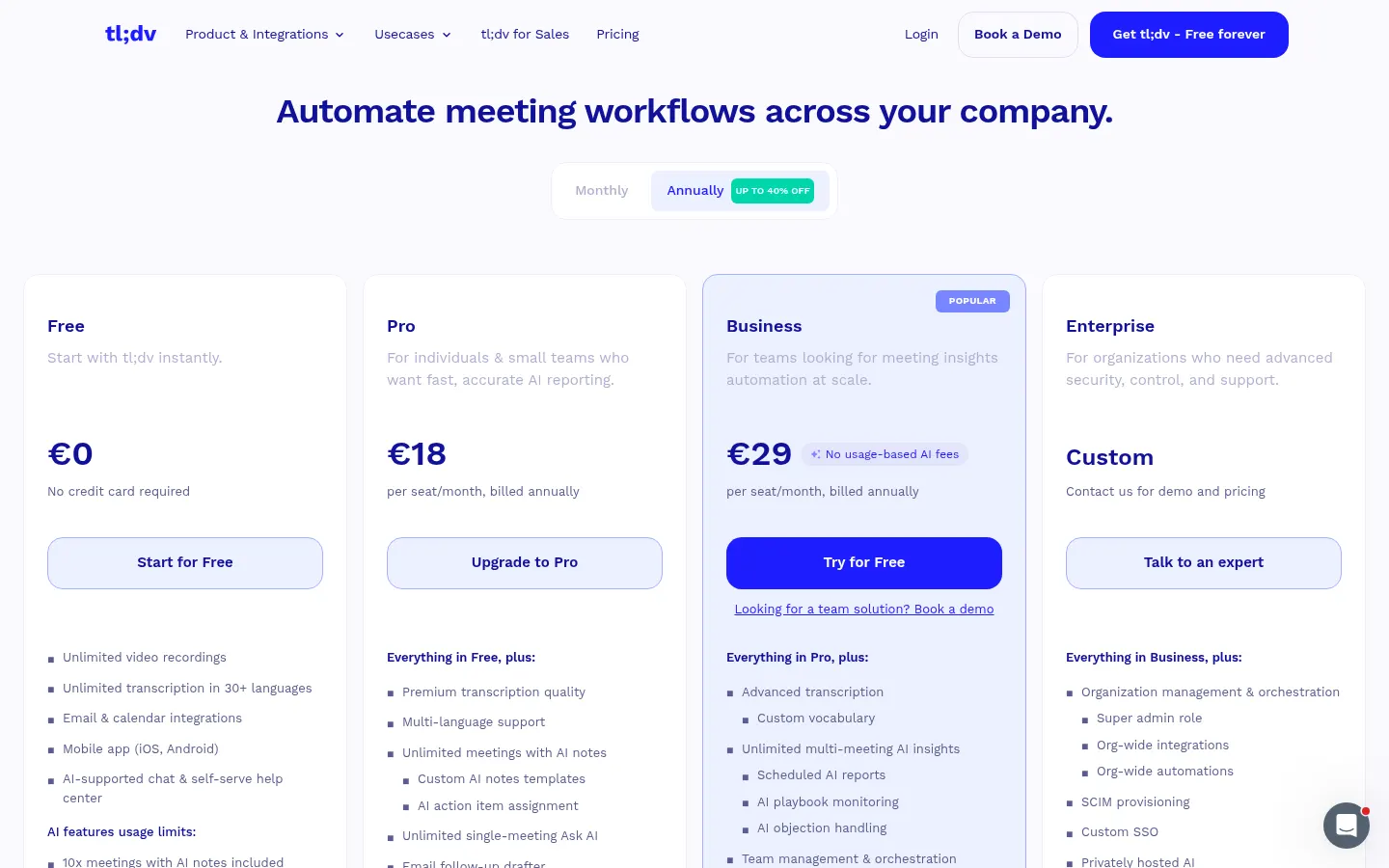
Free: €0
- Free forever
Pro: €29/month, or €18/month billed yearly (€216/year)
Business: €39/month, or €29/month billed yearly (€348/year)
Enterprise: contact sales
tl;dv Screenshots
tl;dv user reviews
Write a review
Checking your session...
tl;dv Reviews
Loading reviews...
tl;dv alternatives


Fireflies.ai
Fireflies.ai joins your meetings, transcribes them, writes summaries and action items, and lets you search or ask questions across every conversation.

OpenWhispr
OpenWhispr is open-source voice dictation for Mac, Windows and Linux: transcribe locally or in the cloud, type into any app and take meeting notes without a bot.