

Share
AI-powered multimedia studio to generate, enhance, and transform images and videos. Features upscaling, object removal, and professional retouching tools all in one place.
What is Nuzza AI?
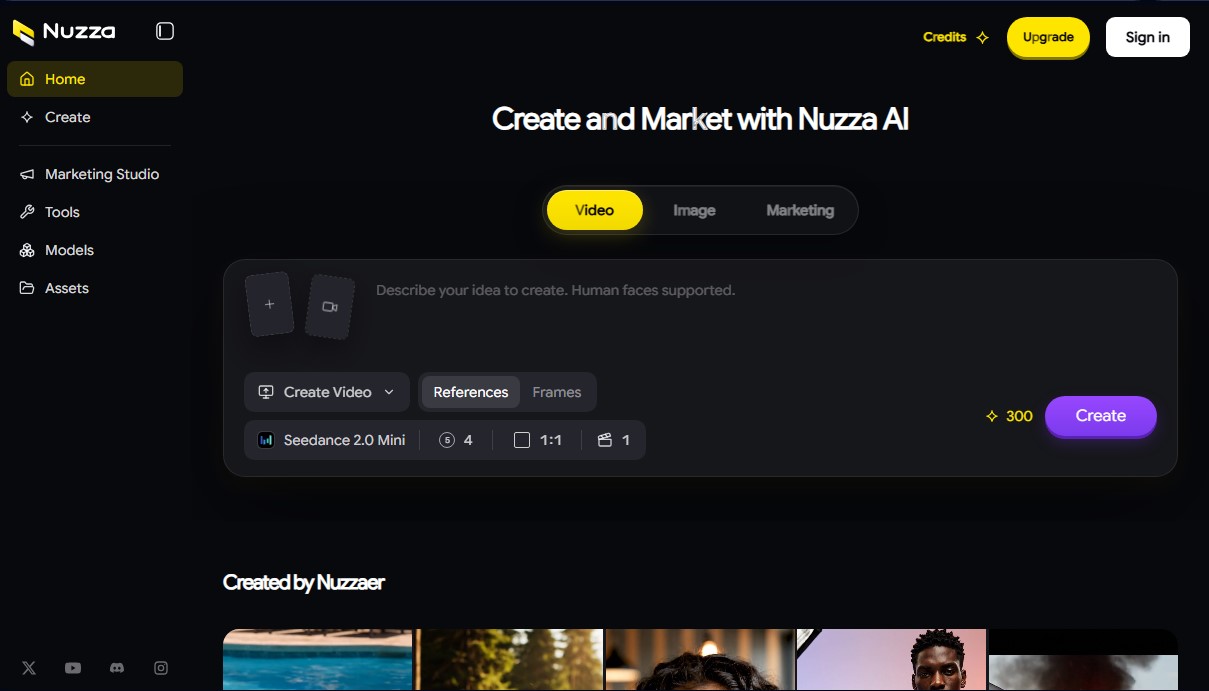
Nuzza AI is a comprehensive platform designed for the creation, enhancement, and transformation of visual content using advanced artificial intelligence. This marketing and creation studio unifies powerful tools for image and video generation into a single interface, allowing users to turn text-based ideas into high-quality visual assets. Its architecture is geared toward both individual creators and professionals who require an agile workflow for producing advertising and creative material directly from their computer.
Nuzza AI technology is backed by a wide selection of cutting-edge AI models, ensuring versatility in results. Available engines include prominent names such as Google Veo 3.1, Kling 3.0, Flux.2 Max, Seedance 2, and Nano Banana Pro, which specialize in different styles and levels of realism. These models can process complex elements, such as the precise representation of human faces, and offer technical customization options by adjusting parameters like the seed, aspect ratio, or frame count for animations.
In the AI video editing section, the tool offers specific functions to optimize existing audiovisual pieces or generate new ones from scratch. Users can utilize the AI Video Upscaler to improve resolution, the AI Video Extender to lengthen shots, and the AI Video Enhancer to correct overall visual quality. Additionally, it includes practical utilities like the video background remover and AI Video Reframe, an essential feature for automatically adapting content to different social media formats.
For image processing, Nuzza AI features a complete ecosystem of generative editing tools. Its core capabilities include:
- AI Image Upscaler and Enhancer to increase sharpness and file size without losing detail.
- AI Image Inpaint and Object Remover, which allow for modifying specific parts of an image or removing unwanted elements with surgical precision.
- AI Image Uncrop and Background Changer, ideal for expanding a photo's canvas or realistically replacing environments using generative artificial intelligence.
- AI Text Remover, a dedicated function for cleaning watermarks or embedded text from visual compositions.
The platform's utility lies in its ability to centralize tasks that previously required multiple complex design programs. By integrating AI marketing tools, it facilitates the creation of consistent and professional assets in a short amount of time. Its processing system allows for parallel tasks, optimizing delivery times in high-volume production environments. It is a robust solution for those looking to generate visual content with AI with high technical control and access to the most powerful models on the market today.
Nuzza AI features and use cases
How to use Nuzza AI
Nuzza AI FAQ
What is Nuzza AI and what is it used for?
It is a comprehensive creative studio that allows you to create, enhance, and transform images and videos using advanced artificial intelligence tools and various generative models.
What video editing tools does Nuzza AI include?
The platform offers features to upscale, extend, enhance, and reframe videos, along with a specific tool for removing backgrounds from your clips.
Can I process images with this platform?
Yes, you have access to tools for upscaling images, removing backgrounds or objects, performing inpainting, changing backgrounds, and automatically removing text.
Does Nuzza AI allow for the creation of human faces?
Yes, the system is fully compatible with generating human faces based on the text prompts you provide.
How do subscription plan credits work?
Credits included in monthly plans renew every month, while credits purchased through one-time payment packages never expire.
What pricing plans are available on Nuzza AI?
There are four subscription tiers—Lite, Pro, Ultra, and Creator—designed to accommodate different production volumes and parallel processing needs.
Which AI models can I use?
You will have access to cutting-edge models such as Seedance 2, Google Veo 3.1, Kling 3.0, Flux.2 Max, and Nano Banana Pro, depending on your chosen plan.
Is it possible to perform multiple tasks at the same time?
Yes, depending on your subscription plan, you can run between two and eight simultaneous tasks to streamline your creative workflow.
How are payments securely processed?
All payments are securely processed through the Stripe platform, which accepts various payment methods depending on your location.
Where can I check the refund policy?
You can review the refund policy and detailed terms and conditions via the links located in the footer of the official website.
Nuzza AI pricing and plans
Lite Plan
$15/mo ($10.35/mo with annual billing)
3,000 credits per month.
Generate up to ~1,500 images.
Generate up to ~100 videos.
Up to 2 concurrent tasks.
Access to all base models.
Access to advanced models: Nano Banana Pro, Seedance 2, Google Veo 3.1, Kling 3.0, and Flux.2 Max.
Pro Plan
$30/mo ($18.60/mo with annual billing)
16,000 credits per month.
Generate up to ~8,000 images.
Generate up to ~533 videos.
Up to 3 concurrent tasks.
Access to all base and premium models.
Access to advanced models: Nano Banana Pro, Seedance 2, Google Veo 3.1, Kling 3.0, and Flux.2 Max.
Ultra Plan
$60/mo ($33.60/mo with annual billing)
16,000 credits per month.
Generate up to ~8,000 images.
Generate up to ~533 videos.
Up to 5 concurrent tasks.
Access to all base and premium models.
Access to advanced models: Nano Banana Pro, Seedance 2, Google Veo 3.1, Kling 3.0, and Flux.2 Max.
Creator Plan
$350/mo ($175/mo with annual billing)
100,000 credits per month.
Generate up to ~50,000 images.
Generate up to ~3,333 videos.
Up to 8 concurrent tasks.
Access to all base and premium models.
Access to advanced models: Nano Banana Pro, Seedance 2, Google Veo 3.1, Kling 3.0, and Flux.2 Max.
Nuzza AI Screenshots
Nuzza AI alternatives



NeotypeLab
NeotypeLab uses AI to plan paint schemes for Gunpla, mecha girls and Zoids, with real hobby paint codes, a spraying sequence, a shopping list and an HD preview.

AlreadyRan
AlreadyRan brings dozens of AI image, video and audio models into one web studio with a single credit balance and the cost shown before every generation.


Vidverse AI
Vidverse AI brings several AI video, image and voice models into one web and mobile app, so you can turn text or photos into clips, images and voiceovers.