

Share
Create interactive presentations with AI voice narration and animations. This open-source tool generates slides from documents with no registration required.
What is OpenDeck?
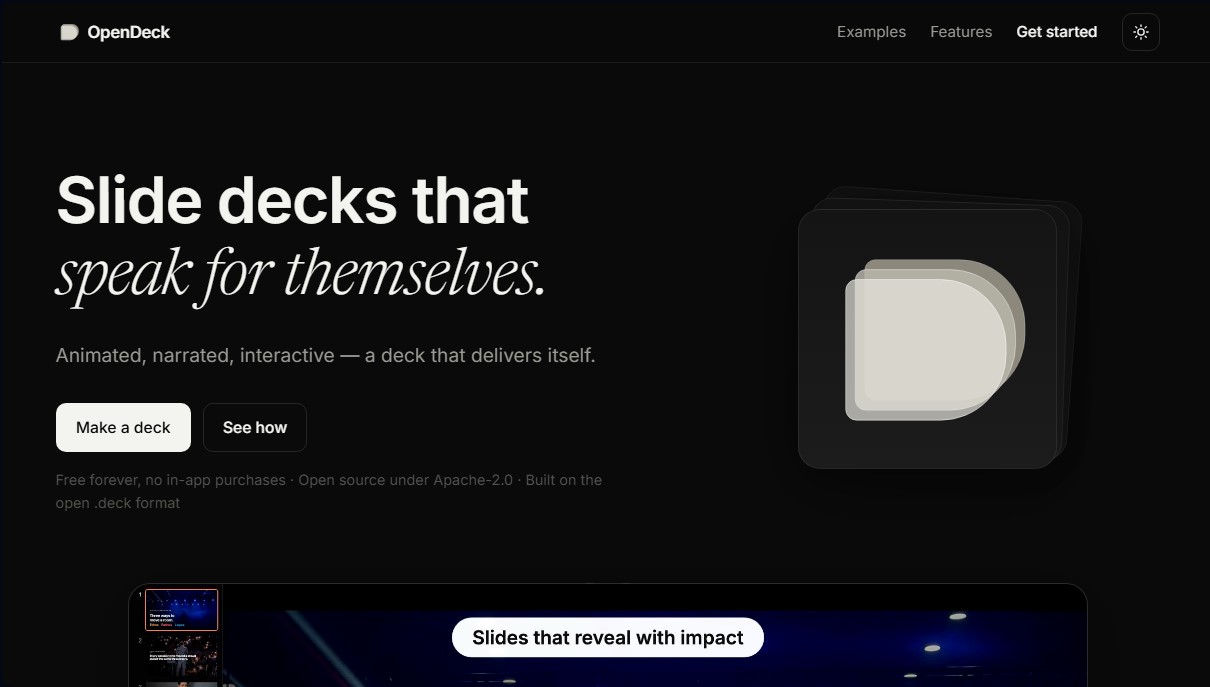
OpenDeck is an open-source tool designed for creating interactive, animated, and automatically narrated presentations. Unlike traditional slide platforms, this software allows users to generate content that "speaks for itself," ensuring the message reaches the audience even without the speaker's physical presence. It is based on the open .deck format and stands out for its focus on privacy and portability, allowing any computer or mobile device to view files without the need to install complex applications or create user accounts.
OpenDeck technology integrates directly with AI agents (such as Claude) to automate the entire design and structuring process. Users can provide a document, a spreadsheet, or simply describe the topic of the talk, and the artificial intelligence will generate the structure, slides, transitions, and narrative voice. This approach eliminates the need for manual adjustments to visual elements, allowing the AI agent to manage the pace and consistency of the content from start to finish.
Its primary features and capabilities include:
- Integrated automatic narration: Each slide incorporates a natural-sounding voice that reads the content, allowing the file to explain itself whenever it is shared.
- Fluid interactivity: The format supports elements such as toggles, drag-to-reorder functions, and tap-to-reveal information, turning the presentation into an exploratory experience.
- Controlled animation and pacing: Ideas appear sequentially and are animated, ensuring the viewer maintains focus on the exact point being discussed.
- Total portability: Presentations are consolidated into a single file that includes audio, motion, and slides. They can be exported as a standalone HTML page that works in any browser.
- Data sovereignty: As a tool that runs locally or in the browser, it does not require an external cloud connection or storage on third-party servers.
From a technical standpoint, OpenDeck operates under Apache-2.0 and MIT licenses. The software is compatible with native applications for macOS, Windows, and iOS, in addition to its web version. By requiring no registration or subscriptions, it positions itself as an efficient solution for professionals seeking high-impact, self-executing presentations without depending on closed platforms. It is a valuable option for developers and creators looking to use AI tools to transform raw data into coherent, ready-to-distribute visual narratives.
OpenDeck features and use cases
How to use OpenDeck
OpenDeck FAQ
What is OpenDeck and what is it used for?
It is an open-source tool for creating interactive, animated, and narrated presentations that are distributed as a single, self-contained file.
Do I have to pay for a subscription to use OpenDeck?
No, the tool is completely free and open-source under the Apache-2.0 license, and it includes no in-app purchases or monthly fees.
Do I need to create a user account to get started?
No registration or account creation is required because the application does not store your data or host your presentations on external servers.
How does the automatic narration in the presentations work?
OpenDeck integrates a natural-sounding voice that reads the content of each slide directly from the file, allowing the presentation to be self-explanatory without human intervention.
Can I use artificial intelligence to generate slides in OpenDeck?
Yes, you can ask your AI agent to build the entire presentation—including the structure, animations, and voice—from a document or a description.
What is the .deck format and how is it shared?
It is an open, self-contained file format that you can send via email or publish to the web so anyone can open it in their browser.
On what devices can I view my OpenDeck presentations?
You can view them in any modern web browser or through the native applications available for macOS, Windows, iPhone, and iPad.
Are my data and content secure with this tool?
Your presentations belong exclusively to you and remain on your device, as the application runs locally and does not have access to your information.
OpenDeck pricing and plans
Free (Open Source)
0 $
Free lifetime access with no subscriptions or in-app purchases.
Open-source software under the Apache-2.0 license and public domain file format.
Create interactive, animated presentations with built-in natural-sounding voice narration.
AI-powered generation of structures, slides, and voiceovers (compatible with Claude and specific plugins).
Export to .deck format or as a standalone HTML page that works in any browser.
Runs locally with no registration, user accounts, or cloud storage required.
Available for web browsers, macOS, Windows, iPhone, and iPad (Android version in development).
No usage limits, as the software runs directly on the user's device.
OpenDeck Screenshots
OpenDeck user reviews
Write a review
Checking your session...
OpenDeck Reviews
Loading reviews...
OpenDeck alternatives


Cue by Manus
Personal AI agents from Manus with their own phone, email, wallet and computer that make calls, book things and run errands, checking with you first.



TriggerFlow
Automate Windows apps without APIs using computer vision and AI. Manage PC fleets, monitor processes, and provide centralized remote control.