
Share
Turn a selfie into a professional ID photo in 60 seconds. Fix lighting, background, and perspective for a print-ready studio finish.
What is PasWow?
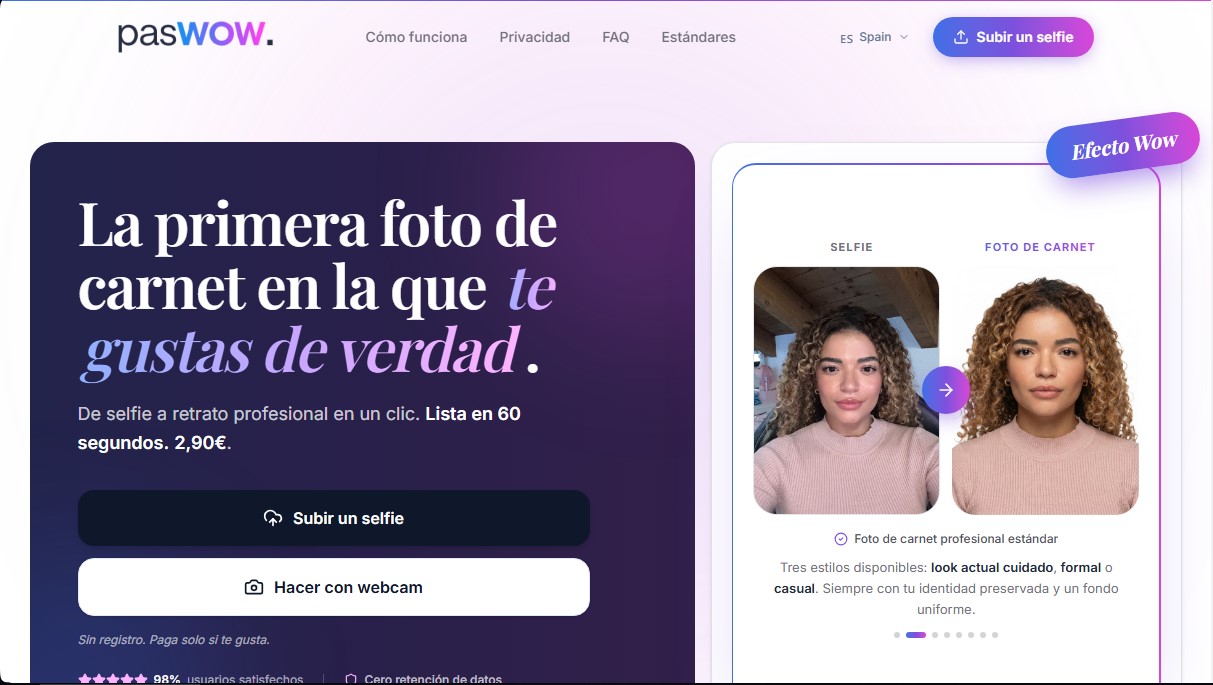
PasWow is an AI-driven technological solution specializing in creating professional ID photos from a simple selfie. This tool allows any user to generate high-quality portraits suitable for identification documents in a processing time of approximately 60 seconds. Its main objective is to make it easy to obtain images that meet uniform background and correct framing standards, avoiding the unflattering results of conventional photo booths or the complexity of an in-person photo session.
The operation of PasWow is powered by an AI system trained by photographers with extensive experience in the fashion and portrait industries. The technology applies medium format rendering that automatically corrects the perspective distortion common in front-facing smartphone cameras, restoring natural facial proportions with DSLR sharpness. Additionally, the software implements a professional lighting setup that enhances facial features and eliminates flat shadows, ensuring optimal lighting in every shot.
Regarding its functional capabilities, the application offers three finish styles: formal, casual, or a polished modern look. The system segments the subject to place them against a neutral background, automatically aligning the eyes and centering the face. The final result is delivered in a 4x6 inch (10x15 cm) template ready to print on photo paper at 300 DPI, which includes four cut-out poses.
Key features of the tool include:
- Preserved Identity: The AI improves technical quality without altering the user's physical features, ensuring a natural result.
- Privacy by Design: It applies a Zero Data Retention policy, deleting photos immediately after processing and delivery.
- Advanced Security: It uses HTTPS encryption for data transfer and does not store biometric information or share data with third parties.
- No Registration Required: Users can obtain their images without needing to create a personal account, streamlining the process.
To use PasWow, you only need to upload an image from your computer or take a selfie with your device following a few basic guidelines: maintain a distance of about 20 inches (50 cm), look for natural front-facing light, and remove accessories like hats. Once processed, the photo is sent directly to the provided email address. It is an ideal tool for users who require a standard ID photo with a superior aesthetic finish, guaranteeing a professional result that is true to life. Although the system handles all professional technical parameters, it is recommended to verify the specific requirements of the official office or agency before printing.
PasWow features and use cases
How to use PasWow
PasWow FAQ
How much does it cost to get my ID photo with PasWow?
The service costs 2.90 euros for each professional image generated.
Are PasWow photos valid for official documents?
We meet all standard background and framing requirements, but we recommend checking the specific guidelines of your local office before printing.
How long does it take for my photo to be ready?
Processing is instant, and you’ll receive your professional portrait via email in about 60 seconds.
How is my privacy handled when using PasWow?
We follow a zero-data retention policy, meaning we delete your photo after delivery and never store any biometric information.
How do I print the photo I receive?
We send you a 4x6 inch template ready to print on photo paper, featuring four individual photos ready to be cut out.
Do I need to sign up to use the service?
No account is needed—simply upload your selfie and pay securely via credit card or PayPal if you’re happy with the result.
What portrait styles can I choose from?
You can choose from three different styles: a polished modern look, a formal style, and a casual style.
How does PasWow ensure professional lighting?
Our AI uses a lighting setup designed by expert photographers to enhance your features and correct the selfie's perspective.
What should I keep in mind when taking my selfie?
Hold your phone about 20 inches away, stand in front of a window for natural light, and remove accessories like hats or headbands.
Can I see the result before I pay?
Yes, the system lets you preview the image, and you only pay if you’re satisfied with the professional results.
PasWow pricing and plans
Trial Version
- Price: 0 €
- Upload a selfie or take a webcam capture to see the result.
- No registration required.
- Restriction: Payment is required to receive the final photo via email and to download it.
Pay Per Photo
- Price: 2,90 € per photo.
- Convert your selfie into a professional portrait in 60 seconds.
- Three styles available: polished modern, formal, or casual.
- Delivery of a 10x15 cm print-ready template with four passport photos.
- Medium-format rendering with DSLR sharpness and facial perspective correction.
- Professional lighting and a uniform neutral background while preserving the user's likeness.
- "Zero Data Retention" policy: data and photos are deleted immediately after delivery.
- No biometric data storage or mandatory registration.
PasWow Screenshots
PasWow user reviews
Write a review
Checking your session...
PasWow Reviews
Loading reviews...
PasWow alternatives

utilz Background Remover
Remove image backgrounds for free with total privacy in your browser. Create transparent or colored backgrounds without uploading files while maintaining original resolution.

ColorCraft
Create Amazon KDP books. Generate coloring pages, stories, puzzles, and print-ready full covers, plus promotional mockups in a single workflow.



