PhotoEditorAI
Share
PhotoEditorAI
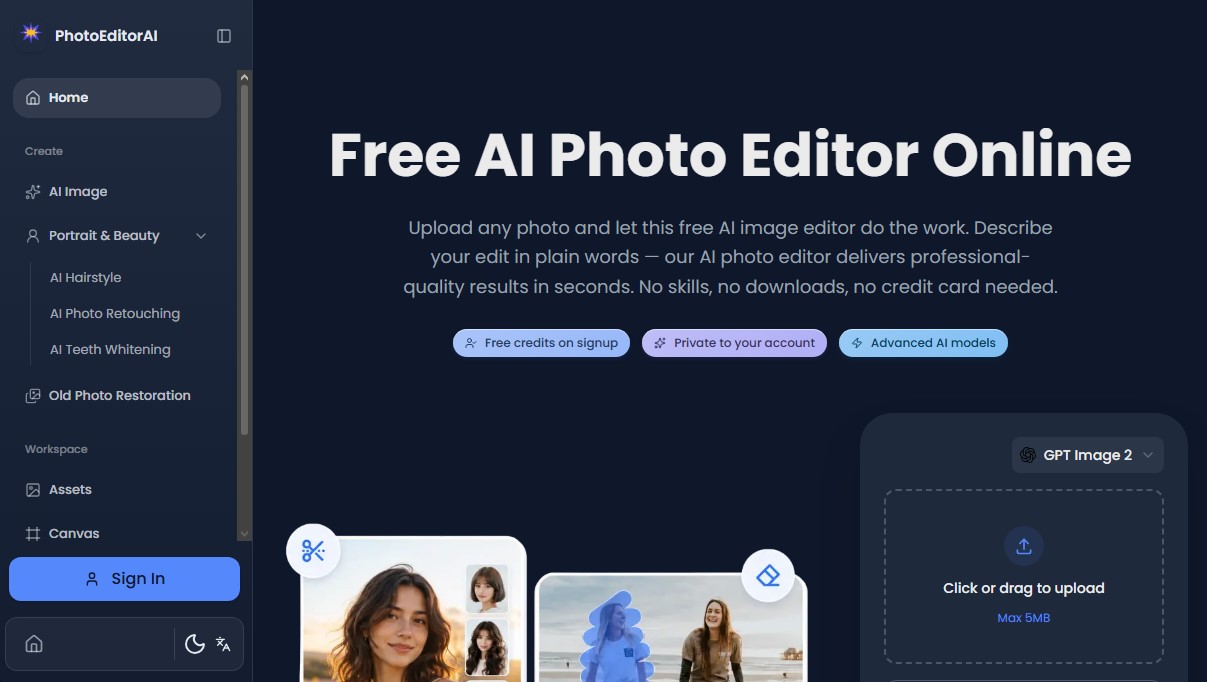
Edit photos for free with AI text prompts. Remove objects, change hairstyles, retouch portraits, and restore old images quickly and professionally.
General Information about PhotoEditorAI
PhotoEditorAI is an advanced AI photo editing platform designed to transform images using natural language. Unlike traditional editors that require manual tools, this application allows for complex modifications simply by describing the desired changes in text. Its architecture is based on cutting-edge generative AI models that interpret instructions to perform retouching, design, and visual manipulation tasks with professional results in seconds, directly from your computer's browser or mobile device.
The functionality of PhotoEditorAI integrates natural language processing and computer vision technologies. The system automatically manages critical technical processes such as masking, edge detection, and consistent lighting adjustment. This enables any user, regardless of prior technical knowledge, to remove unwanted objects, change a subject's clothing, or realistically modify facial expressions. The tool stands out for its ability to maintain character consistency, ensuring that the subject's identity and proportions remain intact across multiple edits.
Its core capabilities include:
- Pixel-level precision editing: Allows for the surgical isolation and modification of specific regions, such as skin textures, skies, or logos.
- Creative style transfer: Applies color palettes, lighting, and textures from a reference image to any photograph while preserving structural details.
- Smart typography integration: Adds text and logos that automatically adapt to the perspective, depth of field, and lighting of the original scene.
- Specific retouching tools: Includes features for teeth whitening, skin smoothing, and an old photo restoration system to repair damage, scratches, or color fading.
For the e-commerce sector and social media content creation, PhotoEditorAI offers practical solutions such as batch background removal and the creation of professional-looking product images. Users can generate stunning visuals for Instagram or commercial catalogs without the need for heavy software or complex workflows.
The application is compatible with JPG, PNG, WebP, and HEIC image formats, supporting files up to 20MB. The process is straightforward: upload the image, type the editing command into the interface, and download the high-resolution result. Regarding security and privacy, PhotoEditorAI processes images in memory and permanently deletes them after editing, ensuring that user content is neither stored nor shared. It is a versatile and accessible AI image editing solution for creators looking to optimize their visual workflow.
Features and Use Cases of PhotoEditorAI
How PhotoEditorAI Works
Frequently Asked Questions about PhotoEditorAI
Is PhotoEditorAI actually free?
Yes, the tool offers a free account with five daily credits, allowing you to achieve professional results without needing a credit card or any downloads.
How do I edit my photos on PhotoEditorAI?
Simply upload your image and describe the changes you want in plain English; the AI automatically handles all the technical work for you.
Are my images secure when using this editor?
Absolutely. Privacy is our top priority; photos are processed in-memory and permanently deleted once you finish editing.
What file types can I upload to PhotoEditorAI?
The platform supports JPG, PNG, WebP, and HEIC formats, with a maximum file size of up to 20 MB per upload.
Do I need any previous design experience to use PhotoEditorAI?
No technical skills are required. The system is designed so anyone can edit like a pro just by typing what they need.
Can I use PhotoEditorAI's results for my online store?
Yes. You own all your edited images and are free to use them for commercial purposes, social media, or marketing campaigns without any restrictions.
What happens if I run out of free daily credits on PhotoEditorAI?
If you need more edits, the platform offers one-time credit packs or monthly subscriptions to fit your specific needs.
Does PhotoEditorAI allow me to maintain a person’s appearance across different edits?
Yes. The tool features a "consistent character" function that locks in facial structure and body proportions, even if you change the clothing or background.
PhotoEditorAI Pricing
Free Account
Price: Free.
5 free daily credits (available upon login).
Unlimited free previews.
Access to advanced AI models.
Private results saved to your account.
Monthly
Price: From $5/mo to $38.29/mo (monthly subscription).
Monthly credits for regular photo editing.
Cancel your subscription at any time.
70-credit pack: $5/mo.
300-credit pack: $10/mo.
700-credit pack: $20.30/mo.
2,000-credit pack: $38.29/mo.
Pay as you go
Price: One-time payment from $7 to $58.90.
Purchased credits never expire and are always available.
Ideal for occasional editing with no monthly commitment.
70-credit pack: $7.
300-credit pack: $15.
700-credit pack: $28.90.
2,000-credit pack: $58.90.
PhotoEditorAI Screenshots