

Share
Turn casual photos into professional headshots for LinkedIn and your resume. Adjust lighting, outfits, and backgrounds with AI for instant studio-quality results.
What is PicFixer?
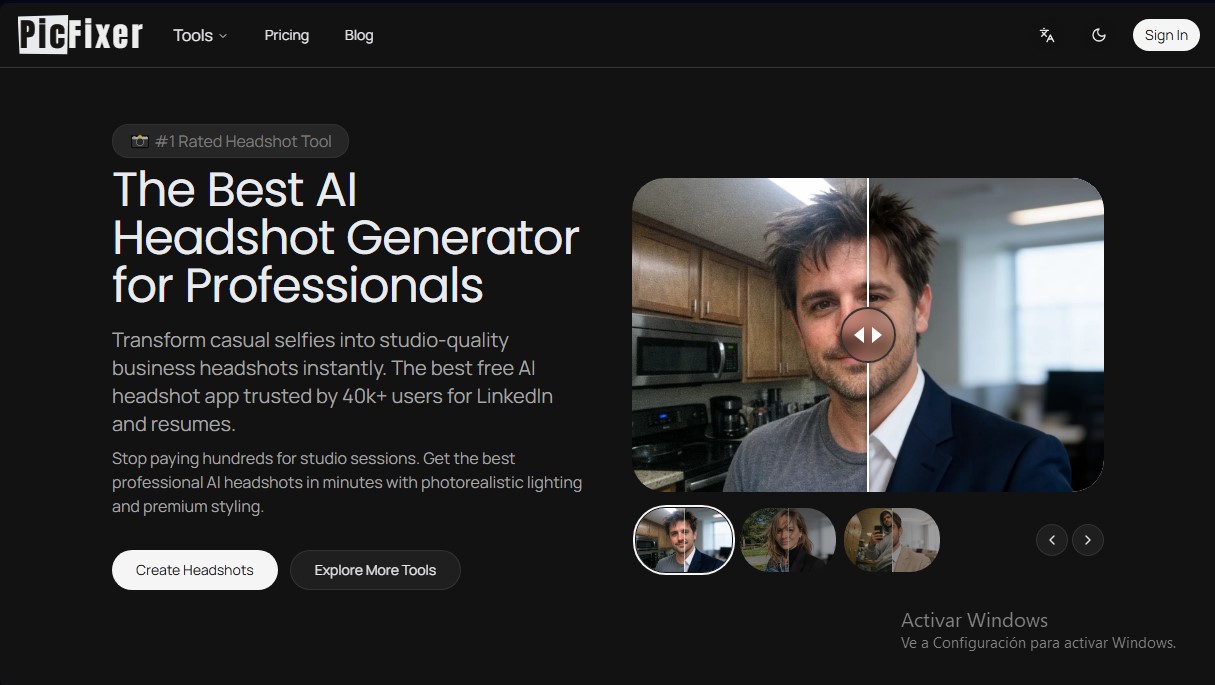
PicFixer is an advanced artificial intelligence platform designed for creating professional portraits and technical image editing with studio-quality results. Its primary function is to act as an AI headshot generator, allowing any user to instantly transform a casual selfie taken on their mobile device into a high-end corporate photograph. This tool is especially useful for professionals looking to optimize their LinkedIn profiles, candidates needing to update their resumes, realtors, and physicians who require specific photos for the ERAS system.
PicFixer's technology is based on deep learning models and image processing that analyze the user's facial structure to maintain their true identity while optimizing the environment and aesthetics. Unlike other editors, this tool uses a photorealistic lighting engine that eliminates unflattering shadows and improves skin texture without losing a natural look. The process is purely functional: the user uploads their photos (in JPG, PNG, WebP, or GIF formats), and the AI processes the image in about 15 seconds. The system supports files up to 10 MB and resolutions up to 4096 pixels, ensuring sharp results on both computer screens and printed materials.
Among its most notable capabilities are:
- Smart clothing replacement: Allows users to swap casual clothes for suits, blazers, or professional attire that perfectly fits their physique.
- Professional background generation: Replaces domestic or cluttered environments with modern offices, clean studios, or urban landscapes.
- High-resolution results: The ability to generate 4K images with a high level of detail and sharp focus.
- Complementary tools: Includes features for signature extraction to transparent PNG, e-commerce product editing, AI interior design, and automatic manga translation.
Using PicFixer provides practical benefits by eliminating the need to hire professional photographers or rent studios. By providing full commercial rights to the generated images, users can freely use them on corporate websites, business cards, and professional social networks. It is a comprehensive solution for freelancers, startup founders, and teams who require a consistent, serious, and technically high-quality image with a minimal time investment.
PicFixer features and use cases
How to use PicFixer
PicFixer FAQ
What is PicFixer, and what exactly is it used for?
PicFixer is an AI-powered professional headshot generator that transforms casual selfies into high-quality studio photos for LinkedIn or resumes.
Can I try PicFixer for free before paying?
Yes, we offer two free uses immediately after registration so you can test our image generation technology with no commitment.
How long does it take for PicFixer to generate my professional headshot?
Our AI is optimized for speed, and processing each image typically takes about fifteen seconds.
What types of image files can I upload to the platform?
We support all major current image formats, including JPG, PNG, WebP, and GIF, with a maximum file size of ten megabytes per file.
Do the photos generated by PicFixer maintain my real facial features?
Yes, the system improves lighting and attire while preserving your identity and facial structure to ensure the final result is a professional version of yourself.
Do I have commercial rights to the images created with the tool?
You own all commercial rights to the generated photos, making them perfect for LinkedIn profiles, corporate websites, or business cards.
Why do my photos downloaded from PicFixer have a watermark?
Images generated by users on the free version include a watermark, which is automatically removed when you purchase any of our subscription plans.
What kind of photos should I upload for the best results?
We recommend uploading clear selfies where your face is fully visible, avoiding sunglasses, hats, or extreme camera angles.
Is it possible to change the type of clothing that appears in my PicFixer photo?
Yes, our tool allows you to replace casual wear with professional suits, blazers, or modern business attire tailored to your specific industry.
What is the resolution of the final generated images?
Depending on your subscription plan, you can get high-resolution results ranging from 2560 pixels up to 4K format for maximum clarity.
PicFixer pricing and plans
Free Plan
Price: 0 €
Includes 2 free uses after sign-up.
Generated images include watermarks.
Basic Plan
Price: 12,00 $ per month (or 9,00 $/mo with annual billing).
Commercial use license.
200 credits per month.
Max output resolution: 2560px.
Access to all AI models.
No watermarks.
Downloads in JPG, PNG, WebP, and Original formats.
Auto 2K preset and batch quantity control.
Pro Plan
Price: 36,00 $ per month (or 27,00 $/mo with annual billing).
Commercial use license.
600 credits per month.
Max output resolution: 3840px (4K).
Generate up to 10 images simultaneously.
No watermarks.
Downloads in JPG, PNG, WebP, and Original formats.
Auto 2K and Auto 4K presets.
Custom dimensions.
Ultra Plan
Price: 80,00 $ per month (or 60,00 $/mo with annual billing).
Commercial use license.
1.500 credits per month.
Max output resolution: 4096px.
No watermarks.
Downloads in JPG, PNG, WebP, and Original formats.
Batch quantity control (up to 10 images).
Auto 2K and Auto 4K presets.
Custom dimensions.
Add-on Credit Packs (Requires active paid subscription)
Small Top-Up: 10,00 $ for 100 credits (approx. 50 images).
Medium Top-Up: 30,00 $ for 350 credits (approx. 175 images).
Large Top-Up: 80,00 $ for 1.000 credits (approx. 500 images).
PicFixer Screenshots
PicFixer user reviews
Write a review
Checking your session...
PicFixer Reviews
Loading reviews...
PicFixer alternatives

utilz Background Remover
Remove image backgrounds for free with total privacy in your browser. Create transparent or colored backgrounds without uploading files while maintaining original resolution.


Logo Foundry
Generate logos with AI and automatically create favicons, app icons, and social media assets. Includes production-ready code for your web projects.

Professional-Headshot.ai
Turn your photos into professional AI headshots. Our system optimizes attire, background, and lighting for realistic results ideal for your professional profile.

Yix AI Image Generator
Generate images and videos with multiple AI models. Create professional portraits, product photos, and artistic designs from text with FLUX, GPT, Seedream, or Nano Banana.
AI Watercolor Generator
Transform photos or text into watercolor art. Use chat to retouch textures, colors, and faces for a fully personalized artistic finish.