Professional-Headshot.ai
Share
Turn your photos into professional AI headshots. Our system optimizes attire, background, and lighting for realistic results ideal for your professional profile.
What is Professional-Headshot.ai?
Professional-Headshot.ai is an artificial intelligence tool specialized in transforming everyday photos or selfies into high-quality professional portraits. Unlike other generators that deliver massive galleries of random images, this platform utilizes an AI agent that manages the entire creative process—from style selection to the final choice of the best captures—optimizing the user's time.
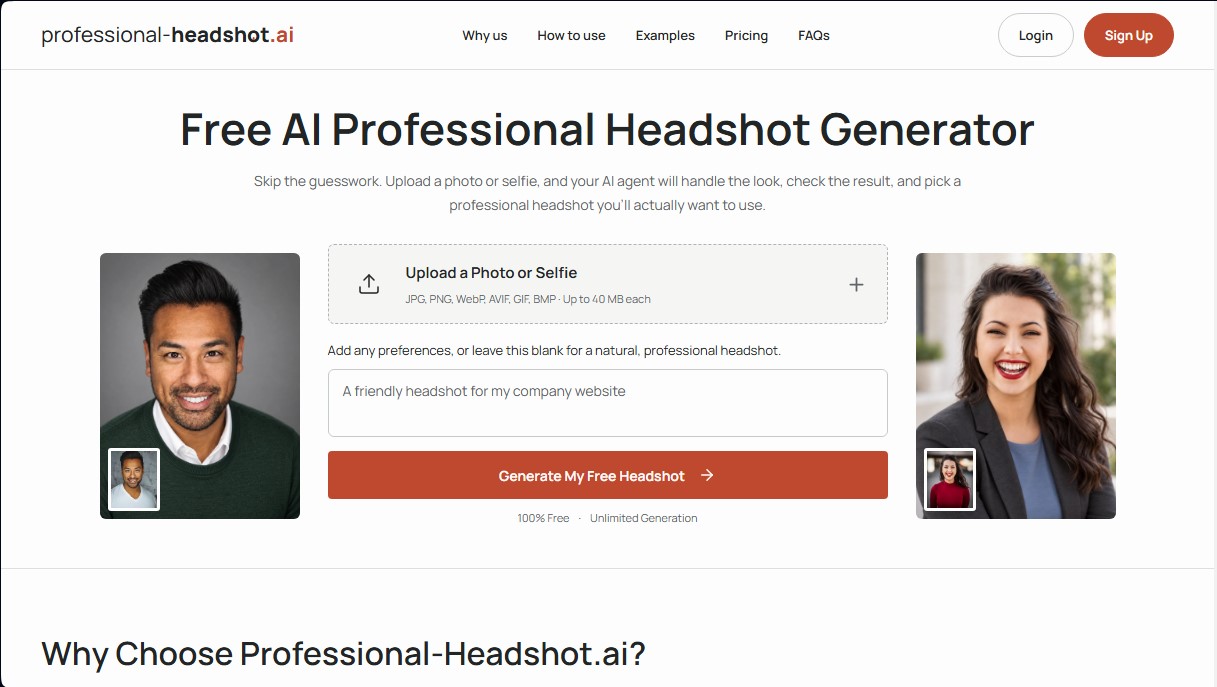
The system's operation is based on deep learning models that analyze facial features to keep the user's identity intact. The process begins by uploading one or more images from a computer or mobile device. The Professional-Headshot.ai technology then automatically handles defining the lighting, background, and the most appropriate professional attire. Although the system is autonomous, it allows users to input specific text-based preferences to customize their outfit or environment, such as requesting a knit sweater or a brightly lit office background.
One of its most standout features is its automated quality control. Before displaying any results, the AI performs technical checks to detect and correct common image generation errors, such as unnatural teeth, distorted eyes, or warped eyeglass frames. Photos that do not meet these realism standards are either repaired or discarded, ensuring that the user receives only options they can actually use in a professional setting.
Its main features and benefits include:
- Identity Preservation: The system meticulously respects details such as skin tone, facial hair, original hairstyle, and characteristic features so that the result is always recognizable.
- Smart Selection: For every scene generated, the tool offers one recommended photo and two alternatives, sparing the user from having to filter through hundreds of mediocre files.
- Editing and Refinement: It allows for adjustments to be made to an already generated image. Users can request changes to the expression or background through simple descriptions without losing the foundation of the selected portrait.
- Variety of Environments: The ability to place the user in multiple settings, ranging from understated photography studios to outdoor environments or corporate offices.
Professional-Headshot.ai is highly useful for professionals looking to enhance their personal brand on platforms like LinkedIn, update their resumes, or refresh their image on corporate websites without the need to book an in-person photo shoot. The tool guarantees user privacy by automatically deleting both uploaded photos and the generated AI professional headshots after a 30-day period. It is an efficient, technical solution for obtaining a polished corporate image quickly and easily.
Professional-Headshot.ai features and use cases
How to use Professional-Headshot.ai
Professional-Headshot.ai FAQ
Is Professional-Headshot.ai free to use?
Yes, you can generate and download a watermarked preview for free without needing to sign up on the website.
Can I use a selfie to create my headshot on Professional-Headshot.ai?
Absolutely. A single photo or a selfie where your face is clearly visible is enough for the AI agent to generate your professional image.
How long does it take to generate my professional photo?
The estimated wait time for a free preview is between one and three minutes, though this may vary depending on the service load.
Will I still be recognizable in the final result?
Yes, the system uses your original photos as a guide to maintain your facial features, skin tone, hairstyle, and even accessories like glasses.
What benefits do the paid Professional-Headshot.ai packages offer?
The Pro and Ultimate plans allow you to download images without watermarks, generate unlimited scenes, and request specific edits to the results.
Is it possible to change the background or clothing without starting from scratch?
Yes, using the editing options, you can describe the changes you want for your outfit or environment, and the tool will adjust the image while keeping your base profile intact.
What happens if the AI makes a mistake in the image?
The system performs automatic quality checks to correct issues with eyes or teeth. Additionally, with paid plans, you can request manual corrections if something isn't right.
How is the privacy of my uploaded photos handled?
Your photos are stored privately and are automatically deleted from our servers thirty days after they have been uploaded or generated.
Do I need to write detailed descriptions to get a good result?
It’s not necessary, as the tool automatically selects the most suitable clothing and background for you. However, you can add personal preferences if you are looking for something very specific.
How many photo options will I receive for each scene created?
With the advanced packages, you will receive a selection of three images per scene, which includes one AI-recommended photo and two alternatives.
Professional-Headshot.ai pricing and plans
Free ($0)
1 person.
1 professional headshot preview.
Watermarked download.
No sign-up required.
Pro ($59 - One-time payment)
1 person.
7 days of unlimited generations and edits.
Watermark-free downloads.
Access expires 7 days after payment (no subscription or auto-renewal).
Ultimate ($99 - One-time payment)
Up to 5 people.
30 days of unlimited generations and edits.
Watermark-free downloads.
Access expires 30 days after payment (no subscription or auto-renewal).
Professional-Headshot.ai Screenshots
Professional-Headshot.ai alternatives
Logo Foundry
Generate logos with AI and automatically create favicons, app icons, and social media assets. Includes production-ready code for your web projects.
Yix AI Image Generator
Generate images and videos with multiple AI models. Create professional portraits, product photos, and artistic designs from text with FLUX, GPT, Seedream, or Nano Banana.
AI Watercolor Generator
Transform photos or text into watercolor art. Use chat to retouch textures, colors, and faces for a fully personalized artistic finish.
Passport Photo Maker Ricebowl AI
Generate passport and visa photos meeting each country's official regulations. Detect potential rejection reasons and automatically adjust size and background privately.