
Passport Photo Maker Ricebowl AI
Share
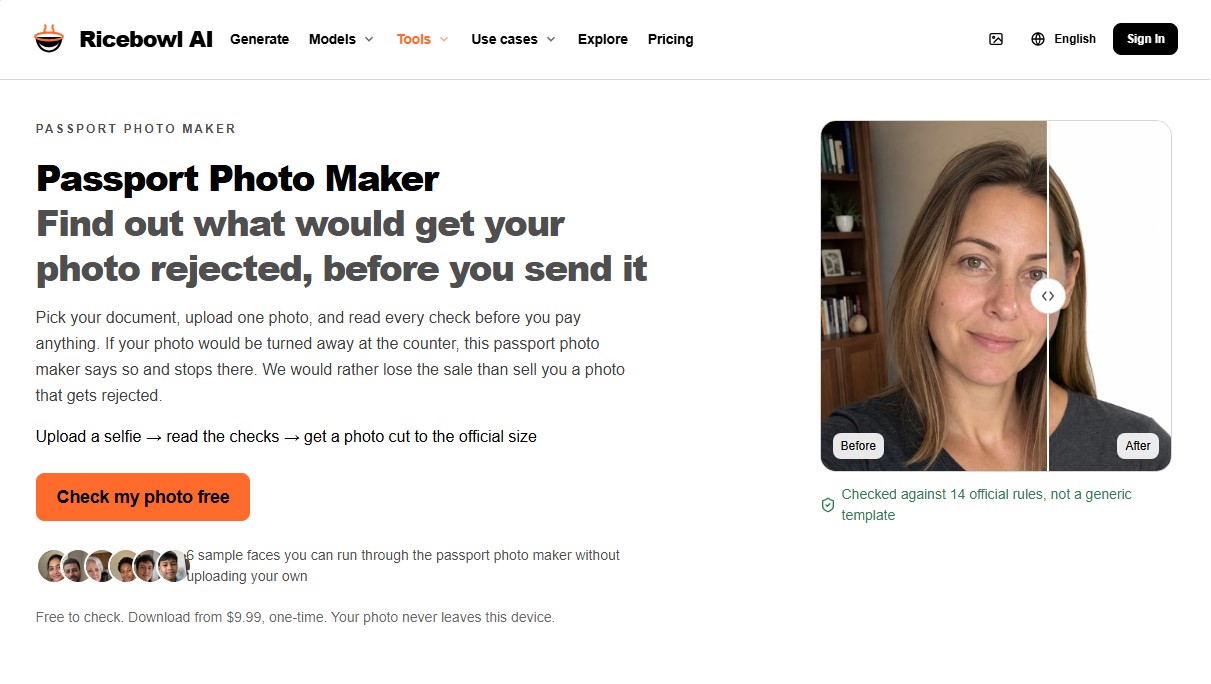
Generate passport and visa photos meeting each country's official regulations. Detect potential rejection reasons and automatically adjust size and background privately.
What is Passport Photo Maker Ricebowl AI?
Passport Photo Maker Ricebowl AI is an artificial intelligence tool specializing in the creation and verification of photos for passports, visas, and ID documents. Its primary function is to ensure that images strictly comply with the official regulations of different countries before the user submits them for an official application. This identity photo generator is designed for travelers, visa applicants, and families who need to obtain valid images from the comfort of their own homes.
The app's workflow is straightforward and structured into three functional steps. The user selects the country and document type, uploads a photo or selfie from their computer or mobile device, and the system performs an automatic analysis. The AI technology behind Passport Photo Maker Ricebowl AI uses computer vision algorithms to evaluate the image against 894 document specifications and 14 international biometric rules, such as ICAO Doc 9303 and ISO/IEC 19794-5 standards.
One of the competitive advantages of this tool is its focus on privacy and transparency. Image processing is performed locally on the user's device; the photo is not sent to external servers or stored to train AI models. Furthermore, the system allows users to view all technical check results for free before any download. Key parameters analyzed include:
- Facial expression and biometrics: Verifies that the face maintains a neutral expression, with no smiling and the mouth closed, while measuring the distance between key features.
- Framing and proportions: Automatically adjusts head height and the eye line according to the exact millimeter requirements of each authority.
- Lighting quality: Detects shadows on the face or background, red-eye from the flash, and improper exposure levels.
- Background requirements: Checks that the background color and texture match legal requirements (pure white, light gray, etc.).
The tool is particularly useful for managing baby passport photos, as it guides the user to avoid common mistakes, such as supporting hands appearing in the frame. At the end of the process, Passport Photo Maker Ricebowl AI generates a high-resolution digital file or a 4x6 inch print sheet at 300 DPI ready for physical use. For U.S. users, the system adheres to 22 CFR 51.21 regulations, limiting itself to cropping and background preparation without digitally altering facial features. It is a technical solution for those looking to take passport photos at home with the assurance of meeting official standards.
Passport Photo Maker Ricebowl AI features and use cases
How to use Passport Photo Maker Ricebowl AI
Passport Photo Maker Ricebowl AI FAQ
What is Passport Photo Maker Ricebowl AI?
It is a digital tool that verifies whether your photo meets official passport and visa regulations before you make any payment.
Is it safe to upload my image to Passport Photo Maker Ricebowl AI?
Yes, because the photo is processed directly on your device and is never sent to external servers, ensuring your total privacy.
Do I have to pay to find out if my photo will be accepted?
No, as the fourteen biometric checks are free; you only pay if you decide to download the final file once it has been confirmed as compliant.
Can I smile in the photo for Passport Photo Maker Ricebowl AI?
It is not recommended because a smile alters your facial biometric measurements, and most authorities require a neutral expression.
How many different documents does the tool recognize?
The system features over eight hundred official document specifications from multiple countries, including passports, visas, and driver's licenses.
Is wearing glasses allowed in the photo?
It depends on the document you select, but it is generally recommended to remove them to avoid glare or the frames obscuring part of your eyes.
How does the process work for baby photos?
You should lay the baby on a plain sheet and take the photo from above, ensuring that no hands are holding them and there are no shadows in the background.
Can I use the same photo for two different countries?
It is not always possible because each authority has its own rules regarding size and background color, so you must verify each document separately.
What does the Passport Photo Maker Ricebowl AI download file include?
You will receive a digital file with the exact pixel dimensions and a 4x6 inch print sheet with several copies ready to be cut out.
Is Passport Photo Maker Ricebowl AI an official government app?
No, it is an independent private service that uses regulations published by official agencies to ensure the format is correct.
Passport Photo Maker Ricebowl AI pricing and plans
Free Version
Price: 0 $
- Performs 14 automated biometric checks according to official standards (ICAO, ISO, etc.).
- Compliance verification for background, facial expression, lighting, and head position.
- Watermarked preview of the final photo.
- Local on-device processing; the photo is not uploaded to any server during the check.
- No account creation or registration required.
Photo Download (One-time payment)
Price: From 9,99 $ (pay-per-download)
- Digital file in the exact pixel dimensions required for the selected document.
- Watermark removal.
- 4×6 inch print sheet at 300 DPI with crop marks.
- Access to specifications for over 894 document types (passports, visas, driver's licenses).
- No recurring subscriptions.
Starter Monthly (Credit Subscription)
Price: 29,90 $ per month (or 19,90 $/mo with annual billing)
- 1,000 monthly credits for use across all platform models.
- Ability to generate approximately 3 to 33 videos, depending on the model.
- 1080p resolution, no watermarks, and commercial use included.
- Credits reset at the start of each monthly billing cycle.
Standard Monthly (Credit Subscription)
Price: 49,90 $ per month (or 34,90 $/mo with annual billing)
- 2,000 monthly credits for use across all platform models.
- Ability to generate approximately 6 to 66 videos, depending on the model.
- 1080p resolution, no watermarks, and commercial use included.
- Credits reset at the start of each monthly billing cycle.
Advanced Monthly (Credit Subscription)
Price: 89,90 $ per month (or 62,90 $/mo with annual billing)
- 5,000 monthly credits for use across all platform models.
- Ability to generate approximately 15 to 166 videos, depending on the model.
- 1080p resolution, no watermarks, and commercial use included.
- Credits reset at the start of each monthly billing cycle.
Basic Pack (Credit Top-up)
Price: 49,90 $ (one-time payment)
- 1,000 credits valid for 12 months.
- Access to all video and image models in 1080p.
- No watermarks and commercial usage rights.
Advanced Pack (Credit Top-up)
Price: 198 $ (one-time payment)
- 4,800 credits (includes a 20% bonus) valid for 12 months.
- Access to all video and image models in 1080p.
- No watermarks and commercial usage rights.
Passport Photo Maker Ricebowl AI Screenshots
Passport Photo Maker Ricebowl AI alternatives





NeotypeLab
NeotypeLab uses AI to plan paint schemes for Gunpla, mecha girls and Zoids, with real hobby paint codes, a spraying sequence, a shopping list and an HD preview.