
Share
Converts audio, video, and sheet music into editable MIDI using AI. Detects pitch and rhythm to streamline music production in any DAW.
What is PureMIDI?
PureMIDI is an AI-powered tool ecosystem specifically designed for audio-to-MIDI conversion and optical music recognition (OMR). Its primary function is to enable music producers, composers, and students to extract precise pitch and timing data from sound files to generate editable digital drafts. This platform facilitates the rapid transcription of musical ideas, allowing conventional recordings to be transformed into .mid files compatible with any DAW (Digital Audio Workstation) or modern notation software.
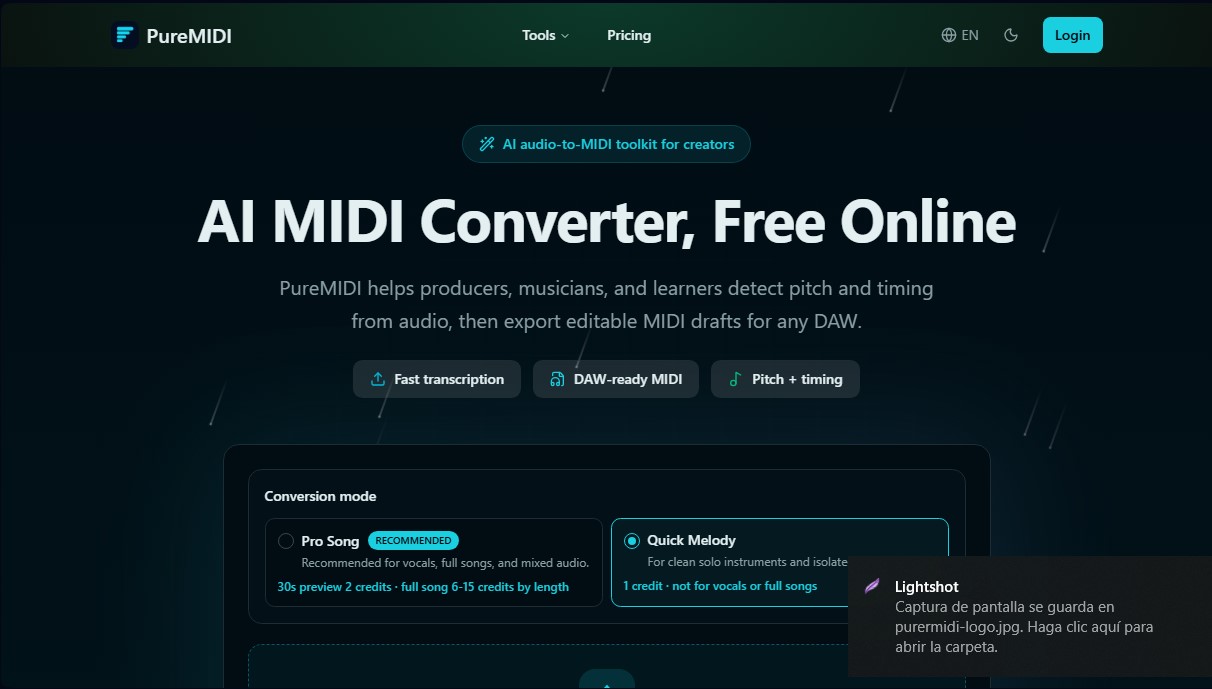
PureMIDI operates using advanced musical language processing and computer vision algorithms. For audio, the tool analyzes the frequency and rhythm of files in formats such as MP3, WAV, FLAC, OGG, or M4A, translating them into note events. For physical or digital documents, it uses AI models to recognize standard notation in PDFs or images (JPG, PNG), converting them into manageable MIDI data. The system offers two distinct technical approaches: Quick Melody, ideal for clean melodic lines and solo instruments, and Pro Song, recommended for vocals and full songs with denser arrangements.
This solution stands out for its high compatibility and practical focus on the creative workflow. By exporting standard files, it integrates seamlessly into professional programs such as Ableton Live, Logic Pro, FL Studio, Cubase, Reaper, or MuseScore. Its functional capabilities include:
- Video-to-MIDI conversion to process audio tracks directly from local files in MP4, MOV, or WebM formats.
- An integrated online MIDI editor, which allows for piano roll adjustments, note drawing, and track organization directly from a computer browser without the need for additional installations.
- AI-powered sheet music recognition to digitize scanned scores or MusicXML and MXL files.
- Cloud-based processing that allows users to manage conversions and track progress from a centralized dashboard.
The practical benefits of PureMIDI range from accelerating remixing and sound design workflows to providing pedagogical support in music education by facilitating the creation of ear-training exercises. Users can obtain melodic outlines from their own recordings to later refine them with virtual instruments. Furthermore, the platform guarantees strict data privacy, deleting uploaded files within 24 hours and ensuring that user content is not used to train artificial intelligence models. It is a tool designed to efficiently and professionally transform acoustic ideas into structured digital assets.
PureMIDI features and use cases
How to use PureMIDI
PureMIDI FAQ
What file formats can I convert to MIDI on PureMIDI?
The tool supports audio files such as MP3, WAV, M4A, and FLAC; video files like MP4 and MOV; and sheet music in PDF or image formats.
Is PureMIDI free to use?
When you create a new account, you receive two free trial credits. Afterward, you can purchase credit packs that never expire to continue using the service.
Will the exported files work with my music production software?
Yes, PureMIDI generates standard MIDI files compatible with any DAW on the market, such as Ableton Live, FL Studio, Logic Pro, Cubase, or Pro Tools.
What is the difference between Quick Melody and Pro Song modes?
Quick Melody is ideal for simple melodic lines and solo instruments, while Pro Song is optimized for vocals and full multi-track songs.
Are my personal files safe on PureMIDI?
Your files are permanently deleted within 24 hours of conversion, and the platform does not use your data to train its AI models.
Can I convert physical sheet music into an editable digital format?
Yes, you can upload photos or scans of sheet music in PDF, PNG, or JPG format for the system to recognize the notes and generate the corresponding MIDI file.
PureMIDI pricing and plans
Free Trial
Price: 0 $
• 2 free trial credits upon account creation.
• Valid for 14 days.
• No credit card required.
Starter Pack
Price: 4,99 $ (one-time payment)
• 30 credits for MIDI conversion.
• Credits never expire.
• Standard .mid file output.
• Approximately 0,166 $ per credit.
Standard Pack
Price: 9,99 $ (one-time payment)
• 100 credits for MIDI conversion.
• Credits never expire.
• Standard .mid file output.
• Approximately 0,100 $ per credit.
Pro Pack
Price: 19,99 $ (one-time payment)
• 300 credits for MIDI conversion.
• Credits never expire.
• Standard .mid file output.
• Approximately 0,067 $ per credit.
Additional information on credit usage:
• Quick Melody Mode (solo instruments): 1 credit per conversion.
• Pro Song Mode (vocals or full songs): 2 credits for a 30-second preview; between 6 and 15 credits for the full song (depending on length).
• Failed conversions do not consume credits.
PureMIDI Screenshots
PureMIDI alternatives

Songscription AI
Convert audio files and video links into sheet music, MIDI, and tabs. Transcribe multiple instruments at once and export to PDF, MusicXML, or Guitar Pro.



MP3 to MIDI
Convert audio files to editable MIDI with AI. Supports MP3, WAV, and FLAC, making it easy to extract notes and melodies for music production.