
Share
What is Read AI?
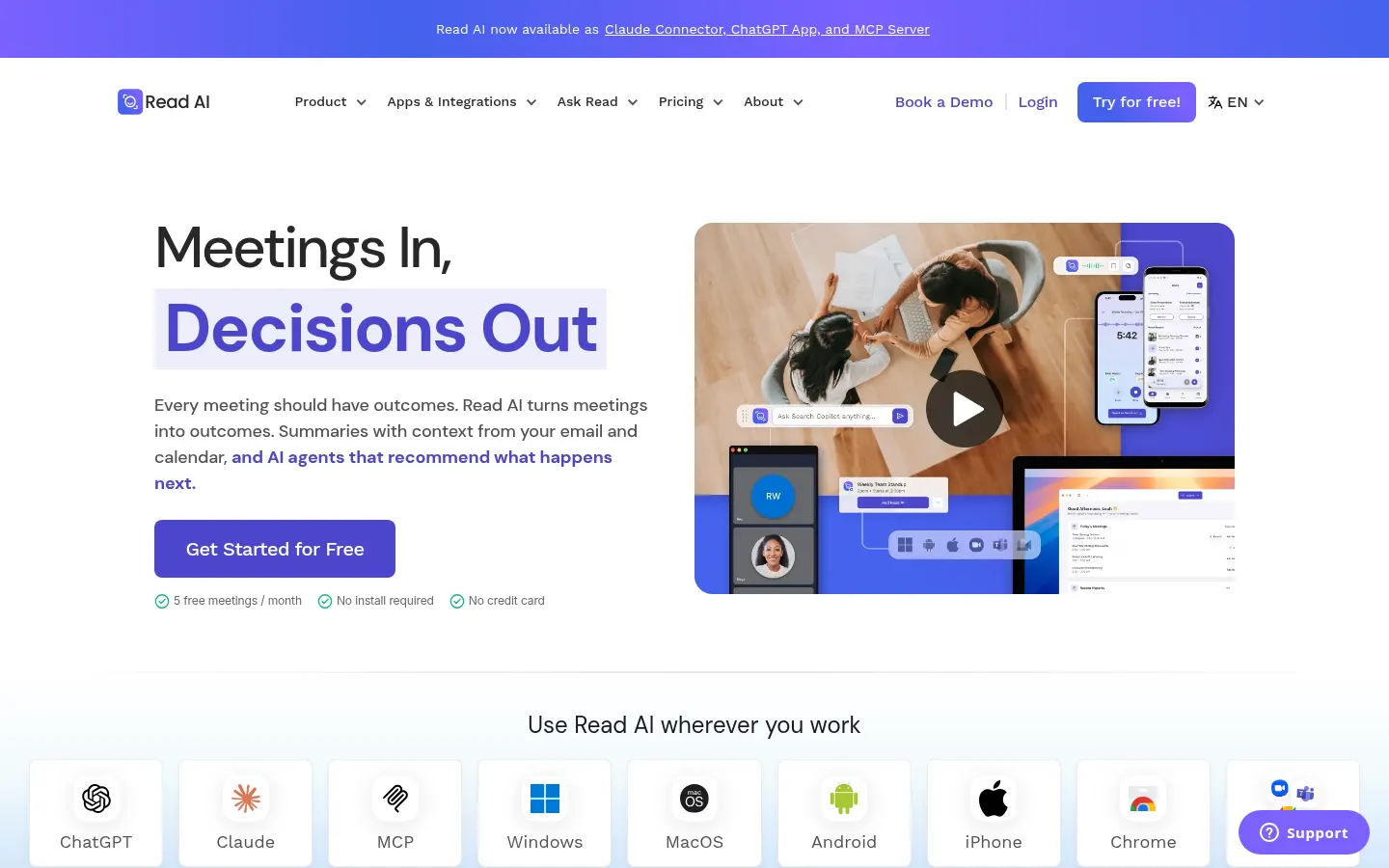
Read AI is an AI meeting assistant that joins your Zoom, Microsoft Teams or Google Meet calls, transcribes them and delivers a recap with decisions, action items and key moments. It goes beyond note-taking: it connects meetings, email, calendar and messaging so you can ask what was decided and who owns each task.
What does Read AI do in a meeting?
Before the call it sends a brief with context from your calendar, email, past meetings and CRM, so you know what was promised and what is still open. During the meeting it produces real-time notes and, when it ends, a recap with transcript, action items, highlights and, on higher tiers, audio and video playback. Every participant can see Read is there, and the agent can even cover meetings you skip.
What is Ask Read?
It is Read AI's enterprise search: you ask in plain language what was agreed with a client, which tasks are still open or what someone said on a call, and it answers with citations to the source meetings, emails and messages. Everything shared in the workspace becomes context the whole team can search.
Which tools does Read AI integrate with?
- Zoom, Microsoft Teams, Google Meet and Outlook.
- Slack, Notion, Asana, Jira and Confluence to send tasks and recaps.
- HubSpot and Salesforce to log sales calls.
- Zapier, webhooks, an API and an MCP server.
- A Claude connector and a ChatGPT app.
- Apps for Windows, macOS, Android, iPhone and a Chrome extension, including in-person meetings.
Who is Read AI for and how does it protect data?
For professionals with packed calendars, sales teams that want calls logged in the CRM without typing, managers tracking projects and organizations that need to search scattered knowledge. It is SOC 2 Type 2 certified, GDPR and HIPAA compliant and, according to the company, does not train models on your data by default. It also includes a meeting coach with engagement metrics and Ada, a digital twin that acts as a personal assistant, handles tasks and helps manage your workflow.
Read AI pros and cons
- Pro: works with Zoom, Teams and Meet without switching platforms
- Pro: searches meetings, email and messages with cited answers
- Pro: strong security and privacy certifications
- Con: a bot joining the call can make some participants uncomfortable
- Con: video playback and advanced controls require higher tiers
Read AI features and use cases
How to use Read AI
Read AI FAQ
What is Read AI?
Read AI is an AI meeting assistant that transcribes and summarizes Zoom, Teams and Meet calls and lets you search answers across meetings, email and messages.
Is Read AI free?
Yes, there is free access with 5 meetings a month and no card; unlimited meetings require a paid tier. See the pricing section of this page for details.
Does Read AI work in Spanish?
Yes. It supports 20+ languages, including Spanish, and its website is available in Spanish.
Which video call platforms does it support?
Zoom, Microsoft Teams and Google Meet, and the mobile apps also record in-person meetings.
Does Read AI have an API?
Yes. It offers an API, webhooks, a Zapier integration and an MCP server, plus a Claude connector and a ChatGPT app.
Do other participants know Read AI is in the meeting?
Yes. Read AI lets every participant know it is present by default.
Does it use my meetings to train models?
Read AI says it does not train on your data by default, and it holds SOC 2 Type 2 plus GDPR and HIPAA compliance.
What is Ask Read?
It is Read AI's search that answers questions about your meetings, email and messages with source citations.
What are the best Read AI alternatives?
On GptZone you can compare Fireflies.ai, Fathom and tl;dv, other AI meeting assistants.
Read AI pricing and plans
Reference price: 15 USD / month. Source · Verified: October 30, 2026
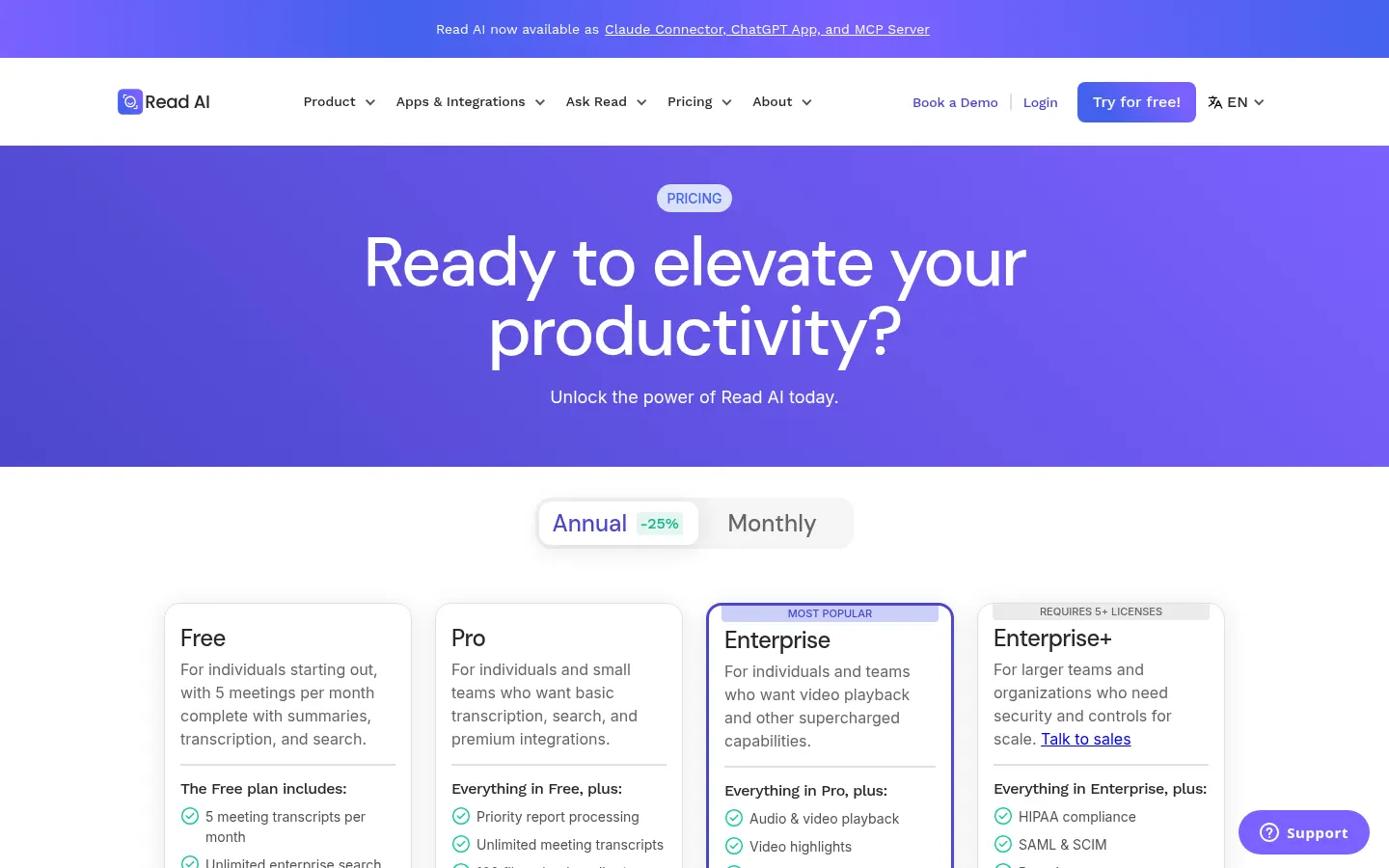
Prices in US dollars (USD) per user per month billed annually (25% less than monthly billing). Checked on: 30/10/2026.
Free: $0; 5 meetings a month with recap and transcript, meetings up to 1 hour, unlimited search and basic integrations.
Pro: $15/user/month; unlimited meetings up to 4 hours, premium integrations (Notion, Salesforce, HubSpot, Jira, Zapier) and 100 upload minutes a month.
Enterprise: $22.50/user/month; adds audio and video playback, video highlights and premium support.
Enterprise+: $29.75/user/month, 5+ licenses; HIPAA, SAML SSO, SCIM and retention policies.
Education pricing available and access included with some Zoom plans.
Read AI Screenshots
Read AI user reviews
Write a review
Checking your session...
Read AI Reviews
Loading reviews...
Read AI alternatives

The Drive AI
AI assistant that automatically organizes, renames, and summarizes team files. Answers questions about content and automates your team’s cloud document management.
Assindo iOS
AI agent that makes and answers calls, manages social media, and organizes tasks. It searches the web, books appointments, and automates your daily schedule—all serverless.