

Share
Generate high-res 360° environments from text. Create immersive backgrounds and HDRI maps for gaming and VR with seamless API integration.
What is Skybox AI?
Skybox AI, developed by Blockade Labs, is an advanced artificial intelligence tool designed for the generation of professional-quality 360° equirectangular environments. Its primary function is to transform text descriptions into immersive scenarios with resolutions starting at 8K and reaching up to 16K. This solution is geared toward game developers, 3D artists, and content creators looking to streamline the creation of dynamic backgrounds and lighting maps for their projects.
Skybox AI technology specializes in creating 32-bit HDRI images, which are essential for establishing realistic ambient lighting in graphics engines. While the system is accessible via a web interface, it stands out for its API integration, featuring official SDKs for Unity, Node.js, TypeScript, and Laravel. It also offers compatibility with Unreal Engine and specific formats for platforms like Roblox, facilitating the export of cube maps and 3D meshes.
Key features include:
- Remix Tool: Allows users to use an existing 360° image or a previous generation as a base to create new variations, providing granular control over structure and style.
- Prompt Management: Includes an Enhance Prompt system to automatically optimize descriptions, support for negative prompts, and a selection of over 30 predefined visual styles.
- Global Configuration: Developers can set strict generation parameters and custom watermarks that are applied consistently across both the web and the API.
Using Skybox AI delivers immediate practical benefits, such as eliminating the manual search for expensive HDRI assets and accelerating prototyping cycles. Instead of spending hours modeling distant geometry, users can generate a complete atmosphere in a response time of 15 to 45 seconds.
It is important to note that the tool is optimized for landscapes and environments, making it unsuitable for generating humans or animals. Additionally, while it allows exporting videos for social media in vertical or horizontal formats, it does not currently support equirectangular video export.
For third-party application implementations, the platform manages generation concurrency, ensuring that multiple users can create environments simultaneously without degrading the experience. Access is managed via an x-api-key header, providing robust scalability for projects requiring high-volume cloud processing, whether from a desktop or through mobile server integrations.
Skybox AI features and use cases
How to use Skybox AI
Skybox AI FAQ
What is Skybox AI and what is its primary use?
It is an advanced tool that generates high-resolution, 360-degree immersive environments through text descriptions for use in video games and 3D applications.
What resolution and file formats does Skybox AI offer?
The tool generates images ranging from 8K to 16K resolution and supports exporting in HDR, EXR, cubemaps, and specific files for engines like Roblox.
Can Skybox AI be integrated into game engines like Unity or Unreal Engine?
Yes, there are official integrations for Unity and community-maintained tools for Unreal Engine, as well as a comprehensive API for developers.
Can Skybox AI generate people or animals within the environments?
No, this technology specializes in landscapes and architectural environments, so it is not suitable for creating human or animal figures.
What are the benefits of the platform's Remix feature?
It allows you to use an existing image or sketch as a structural reference to generate a new environment, maintaining the composition while applying a completely different visual style.
How long does the system take to complete an image generation?
The standard turnaround time is about 45 seconds, though plans with dedicated hardware can reduce this wait time to as little as 15 seconds.
Why is a team plan recommended for app development?
Team plans allow for concurrent generation and offer overage pricing, which prevents the service from stopping once the monthly credit limit is reached.
Do global account settings affect API requests?
Yes, the strict or enhanced prompt settings established in the user profile take priority and affect all processed generations.
Skybox AI pricing and plans
Free
Price: 0 €
- 5 free generations to get started.
- Preview only (no export option).
- Basic account features.
- Standard generation speed.
Essential
Price: 24 $ per seat per month (20 $/mo billed annually).
- 100 monthly generation credits.
- 8K resolution exports.
- Generation history storage.
- Standard generation speed.
- Limited API access.
- 1 concurrent generation limit.
Standard
Price: 60 $ per seat per month (48 $/mo billed annually).
- 300 monthly generation credits.
- Includes all Essential plan features.
- Organize generations by project.
- HDRI lighting and 3D skybox meshes.
- Priority processing queue.
Business
Price: 140 $ per month (112 $/mo billed annually).
- 500 monthly generation credits.
- Full API access.
- Up to 16K resolution.
- Usage-based pricing (allows for overage charges to avoid service interruptions).
- Custom rate limits.
- Intellectual Property (IP) protection.
- Dedicated support.
Enterprise / Scale
Price: Contact Sales.
- Custom solutions for high-volume campaigns.
- Bespoke resolution or format requirements.
- White-label implementations.
- Enterprise-grade Service Level Agreements (SLAs).
- Bulk generation discounts and dedicated infrastructure allocation.
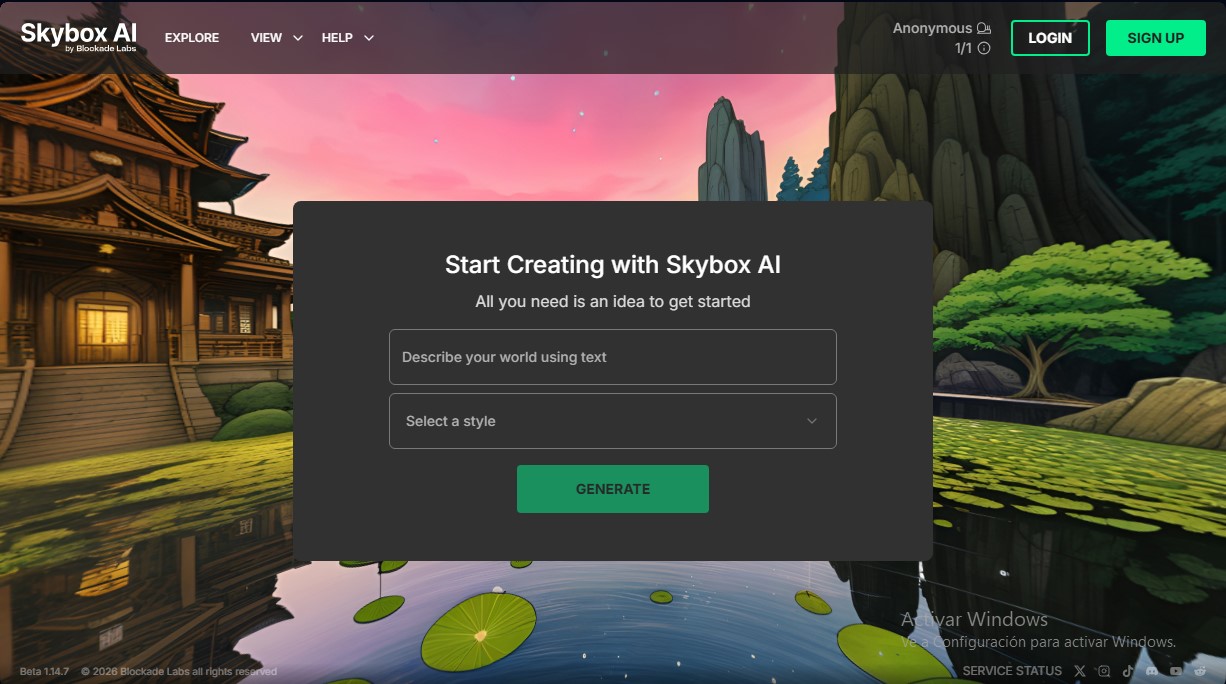
Skybox AI Screenshots
Skybox AI user reviews
Write a review
Checking your session...
Skybox AI Reviews
Loading reviews...
Skybox AI alternatives


Triverse AI
Triverse AI generates 3D models from an image or a text prompt, adds AI PBR textures and produces assets ready for games, 3D printing and XR.

ImageToSTL.org
Convert JPG and PNG images into STL files for 3D printing using AI. Generate detailed 3D models ready for instant download.

Image to 3D
Convert 2D images and sketches into textured 3D models using AI. Export in GLB, STL, or USDZ for video games, 3D printing, and augmented reality.