
SparkVid | Image to Video AI Generator
Share
Transform images into realistic videos while maintaining face and object fidelity. Control camera movement with access to various AI engines.
What is SparkVid | Image to Video AI Generator?
SparkVid is an advanced AI video generation platform designed to transform static images into high-quality dynamic clips. Its primary feature is image-to-video, allowing product photos, portraits, or illustrations to come to life while maintaining the integrity of the original subject. This tool is geared toward content creators, digital marketing professionals, and designers looking to streamline their workflow and produce visual material without the need for complex physical shoots.
The technological core of SparkVid lies in its ability to integrate the most powerful AI models on the market into a single workspace. Users can switch between engines such as Seedance 2.5, MiniMax H3, Kling, Veo, Sora, and Grok Imagine. Each of these models offers distinct approaches to motion physics, cinematic lighting, and visual detail, allowing users to compare results and select the shot that best fits their creative vision.
Key features and functional benefits include:
Precise Motion Control: Enables camera direction through specific prompts to perform pans, zooms, orbital rotations, or handheld movements.
Identity Preservation: Thanks to its recognition algorithms, faces, logos, and specific product details remain true to the source image, preventing distortions.
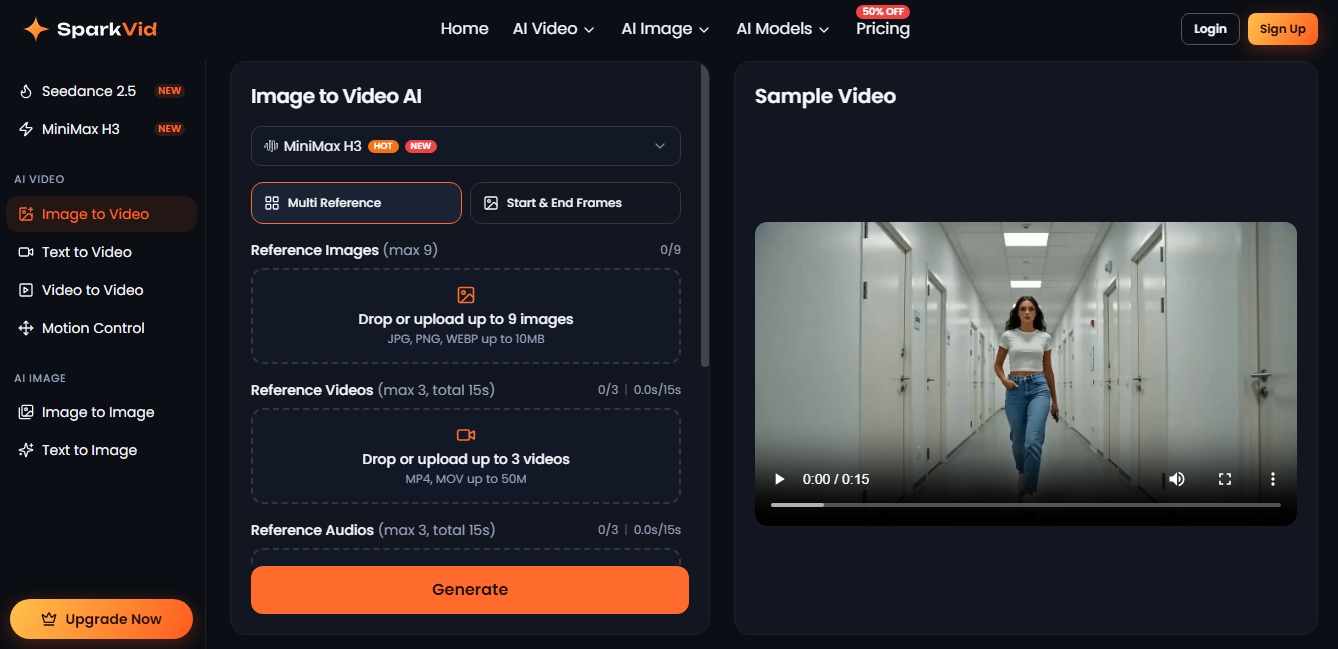
Multi-Reference System: The generator allows users to upload up to 9 images, 3 videos, and 3 audio references to guide the aesthetics, rhythm, and style of the final result.
Keyframe Management: Users can define start & end frames to ensure the animation follows an exact trajectory.
Social Media Formats: Generates clips in 16:9, 9:16, or 1:1 aspect ratios, with resolutions reaching HD and 2K, ready for publication on platforms like TikTok, Reels, or YouTube.
Operating SparkVid is intuitive and follows three steps: first, upload the base image; second, describe the desired movement in the text box; and third, select the preferred AI model to process the animation. The tool interprets the original file's lighting and composition to add coherent motion—such as the swaying of fabric or a natural smile—within minutes.
This solution is especially useful in the e-commerce sector for creating product videos from catalog photos, in developing animated storyboards for film and advertising, and in animating concept art. By centralizing generation and editing in a single environment, SparkVid optimizes the production of performance creative, allowing for the rapid and professional iteration of multiple variants of the same ad.
SparkVid | Image to Video AI Generator features and use cases
How to use SparkVid | Image to Video AI Generator
SparkVid | Image to Video AI Generator FAQ
What is SparkVid and how does its image-to-video technology work?
SparkVid is an AI-powered platform that transforms static images into realistic video clips while maintaining the fidelity of the original objects and faces.
Which AI models can I use on SparkVid?
The tool integrates the market's most advanced engines, such as Seedance, Kling, Veo, Sora, MiniMax H3, and Grok Imagine, into a single workspace.
Can I use the videos generated with SparkVid for commercial purposes?
Yes, the platform's subscription plans allow for commercial use of your creations and remove watermarks from exported files.
What image formats does SparkVid support for conversion?
You can upload JPG, PNG, and WEBP files with a maximum size of ten megabytes to start animating your content.
How can I control camera movement in my creations?
Simply write a short description indicating the desired action, such as a camera pan, a zoom-in, or specific movements of the subject in the scene.
What is the maximum output resolution for the videos?
Depending on the selected model and your subscription plan, you can export clips in qualities ranging from HD to 2K resolution.
How long does it take SparkVid to generate a video from a photo?
Most rendering processes are completed within a few minutes, allowing you to quickly create multiple versions of the same project.
Do I need to install any software to use SparkVid?
No installation is required, as the tool is entirely cloud-based and works through your standard web browser.
What types of reference files can I add to my project?
In addition to the main image, you can upload reference videos and audio so the AI can better adjust the movement and atmosphere of the scene.
Does SparkVid offer different aspect ratios for social media?
Yes, you can generate content in 16:9, 9:16, and 1:1 formats so your videos are ready to be posted on YouTube, TikTok, or Instagram.
SparkVid | Image to Video AI Generator pricing and plans
Free Version
SparkVid offers the opportunity to start animating images for free to test the tool, although specific credit limits are not detailed in the main pricing table.
Lite Plan
Price: $19.90 per month (or $9.90 per month billed annually).
200 credits per month.
Limit of up to 20 videos or 200 images per month.
Access to Seedance 2.5 and 2.0 models at 720p resolution.
Access to all models (including Kling, Veo, Sora, MiniMax H3, and Grok) and features.
Private generation and no watermarks.
Priority processing speed and customer support.
Commercial use allowed.
Pro Plan
Price: $49.90 per month (or $24.90 per month billed annually).
800 credits per month.
Limit of up to 80 videos or 800 images per month.
Full access to Seedance 2.5 and 2.0 models at 1080p resolution.
Full access to all platform models and features.
Private generation and no watermarks.
Priority processing speed and customer support.
Commercial use allowed.
Max Plan
Price: $119.90 per month (or $59.90 per month billed annually).
2,500 credits per month.
Limit of up to 250 videos or 2,500 images per month.
Full access to Seedance 2.5 and 2.0 models at 1080p resolution.
Full access to all platform models and features.
Private generation and no watermarks.
Priority processing speed and customer support.
Commercial use allowed.
SparkVid | Image to Video AI Generator Screenshots
SparkVid | Image to Video AI Generator alternatives

VideoWeb Video Generator
Generate professional AI videos from text or images. Features realistic avatars, automated scripts, and optimized formats for marketing and social media.
Motion Transfer AI Video Generator
Animate character photos using reference videos. Precisely transfer gestures, dances, and body movements from a clip to an image for realistic results.


AlreadyRan
AlreadyRan brings dozens of AI image, video and audio models into one web studio with a single credit balance and the cost shown before every generation.


Vidverse AI
Vidverse AI brings several AI video, image and voice models into one web and mobile app, so you can turn text or photos into clips, images and voiceovers.