Share
Generate AI animations and sprite sheets for video games. Create consistent assets ready to export to engines like Unity or Godot.
What is SpriteFlow?
SpriteFlow is an artificial intelligence tool designed for the automated creation of 2D sprites and animations ready for direct implementation into video games. This platform allows independent developers, artists, and studios to generate sprite sheets with guaranteed stylistic consistency, eliminating the need to manually draw every frame in traditional editing software. It is a solution focused on optimizing workflows in engines like Unity, Godot, or Unreal Engine, making it possible to transform concepts into functional assets in a matter of minutes.
SpriteFlow’s operation is based on style training and color palette locking through AI algorithms. Users can upload a reference image or describe their character’s appearance using text prompts. The technology analyzes parameters such as line weight, level of detail, and proportions to ensure that all generated frames maintain a uniform visual identity. This technical approach solves the problem of graphical inconsistency, guaranteeing that the first frame matches the rest of the sequence in style, regardless of the movement's complexity.
Its core capabilities cover a wide range of game development needs:
Essential animation generation: Automatically creates walk cycles, runs, jumps, attacks, and idle states.
Guaranteed style consistency: Allows users to lock the color palette and proportions to generate multiple character or enemy variations that fit within the same visual universe.
Multidirectional support: Facilitates the creation of 4-way and 8-way sprites, which are essential for top-down RPGs and isometric games.
Advanced technical export: Generates files in APNG, GIF, or PNG sequence formats, including JSON metadata and sprite atlases configured with suggested collision boxes.
Artistic versatility: Supports styles ranging from classic pixel art (8, 16, and 32-bit) to anime aesthetics, 2D cartoons, and hand-painted art.
The desktop workflow is straightforward: after defining the character and selecting the animation type, the system processes the sequence in less than a minute. This tool is especially useful for rapid prototyping and final asset production, allowing developers without advanced drawing skills to create custom characters. Additionally, SpriteFlow allows for generating equipment or color variations on the same animation base in just seconds, facilitating the scalable and efficient creation of NPCs and customization systems.
SpriteFlow features and use cases
How to use SpriteFlow
SpriteFlow FAQ
What is SpriteFlow and how does it help with game development?
SpriteFlow is an AI tool designed to automatically generate production-ready sprites and animations, allowing you to create character sheets in minutes without having to manually draw every frame.
How does SpriteFlow ensure style consistency across all animations?
The platform uses a palette-locking system and style training that analyzes your reference images to ensure all frames maintain the same colors, proportions, and level of detail.
Can I export files directly to game engines like Unity or Godot?
Yes, the tool allows you to export sprite sheets in PNG format along with JSON metadata, which facilitates the direct integration of animations and collision boxes into Unity, Godot, and Unreal Engine.
What types of character animations can SpriteFlow generate?
It can create walk cycles, idle states, jumps, attacks, and combat moves, supporting side-scrolling, top-down, and eight-directional isometric perspectives.
Do I need drawing skills to use this tool?
No drawing or animation skills are required, as the system generates results from text prompts or reference images, making the process much easier for programmers and indie developers.
What art styles does the SpriteFlow generator support?
The tool is compatible with various styles, including 8-bit and 16-bit retro pixel art, modern cartoons, anime aesthetics, and custom styles based on your own illustrations.
How long does it take to create a full character with its animations?
While manual drawing can take dozens of hours, this technology allows you to get a fully animated character with color variants in less than ten minutes.
Does SpriteFlow offer a free option for new users?
There is a free plan that provides access to basic features and daily credits to generate and download animations without needing to enter a credit card.
Can I create gear or color variations for the same sprite?
Yes, once the base style is defined, you can modify the character's gear, clothing, or colors and instantly regenerate all its animations while maintaining visual consistency.
How does this tool differ from pre-made asset packs?
Unlike the standard packs that everyone uses, this solution allows you to create unique, custom assets that perfectly match the visual identity of your specific project.
SpriteFlow pricing and plans
Free Plan: $0
60 credits per year (delivered upfront).
25 free daily credits.
Download feature available.
Starter Plan: $19.90 per month ($14.90/mo billed annually)
2,400 credits per year (delivered upfront).
Free daily credits included.
30-day data storage.
24-hour email support.
Professional Plan: $39.90 per month ($29.90/mo billed annually)
7,200 credits per year (delivered upfront).
Free daily credits included.
Permanent data storage.
24-hour email support.
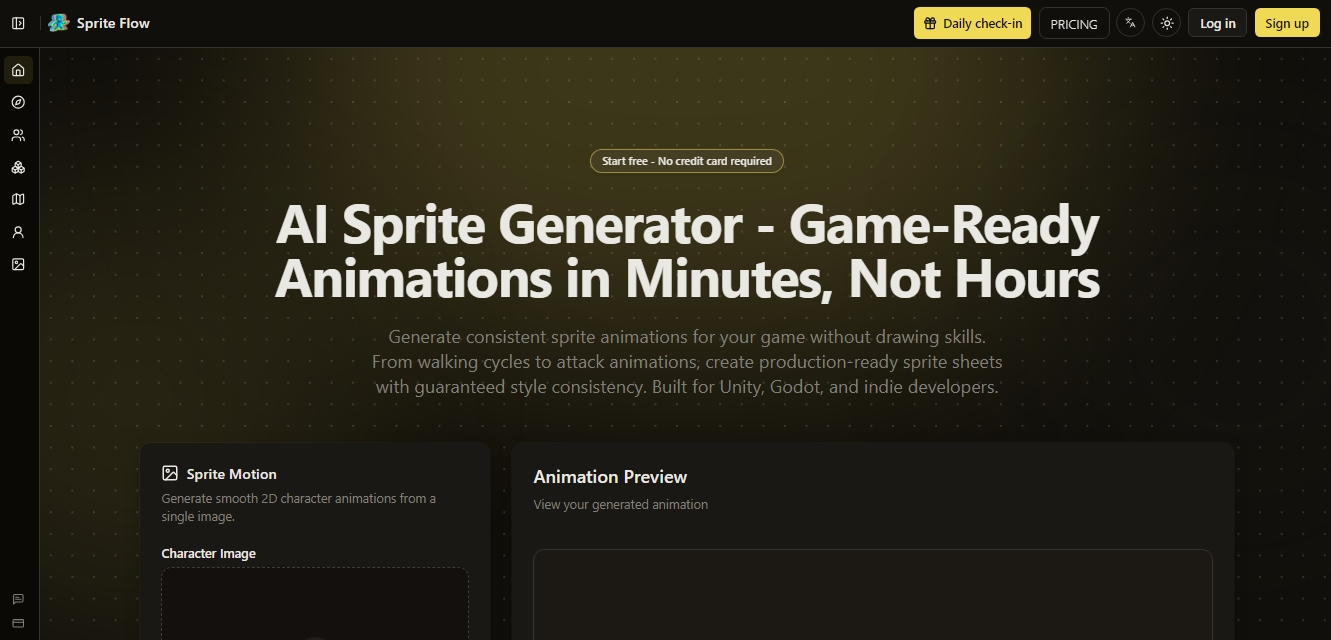
SpriteFlow Screenshots
SpriteFlow alternatives


Osmo Studio
AI animation studio for professional motion graphics and videos. Control every detail, collaborate with teams, and export with transparent backgrounds.

Comik AI-Anime Character Creator
Design anime characters using text or images. Generate multi-view design sheets to ensure visual consistency across comics, manga, and animated videos.