
Share
Turn photos and text into DMC cross-stitch patterns. Optimize colors, remove stray stitches, and export ready-to-stitch PDF charts.
What is StitchCraft?
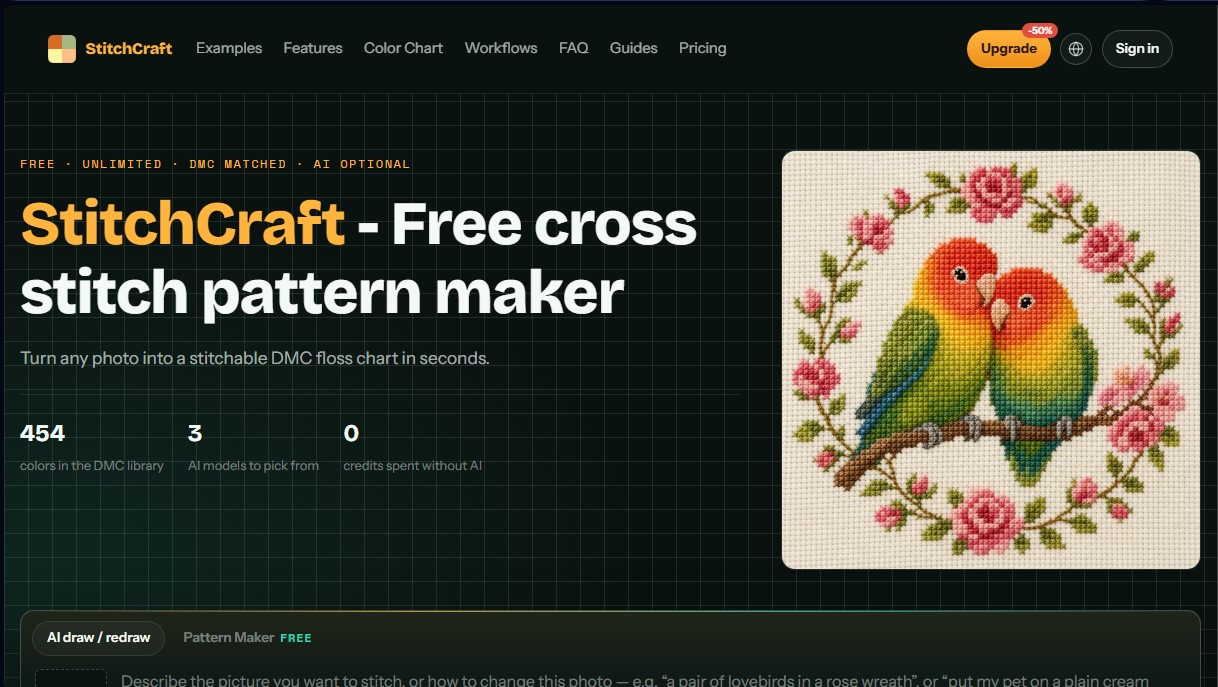
StitchCraft is a digital tool specializing in automated cross-stitch pattern creation, allowing users to transform any image or photo into a technical embroidery chart. Its primary function is to help hobbyists and professionals convert visual files into detailed charts using the DMC thread palette. The app runs directly in a computer browser or on a mobile device, eliminating the need to install additional software.
The platform integrates artificial intelligence technology to optimize chart quality. Using models such as Nano Banana 2 and GPT Image 2, StitchCraft offers an "AI Redraw" feature that simplifies complex images, smooths skin gradients, and removes distracting backgrounds. This process is essential for reducing excessive isolated stitches—known in the embroidery world as "confetti"—resulting in cleaner patterns that are easier to stitch by hand. Additionally, it allows for the generation of original designs through text prompts, creating ready-to-stitch illustrations from scratch.
The tool's core capabilities include:
- Direct Image Conversion: Instant processing of local photos with real-time grid adjustment.
- Precise Color Management: Color mapping based on the Delta-E metric in CIELAB space, ensuring the match between the digital image and the 454 DMC colors is true to human visual perception.
- "Confetti" Control: Noise reduction filters that merge isolated stitches into solid color blocks to improve the stitching experience.
- Text-to-Image Generator: Creation of custom motifs, such as floral wreaths or logos, using written descriptions.
- Materials Calculator: Automatic estimation of the number of skeins needed and final dimensions based on the type of Aida cloth (14, 16, or 18 count).
The workflow in StitchCraft is purely functional. The user uploads an image, defines the stitch width and thread budget, and adjusts smoothing sliders until the desired result is achieved. The system then generates a print-ready PDF that includes the symbol chart, color legend, and sizing instructions.
This application is ideal for those looking to customize their needlework projects without relying on pre-made commercial patterns. By offering a live preview of the chart before exporting, users can balance the level of detail with the project's difficulty. Exported files include commercial rights, allowing designers to legally sell their creations or embroidery kits. Its focus on usability and color accuracy makes this tool an advanced technical solution for digitalizing traditional crafts.
StitchCraft features and use cases
How to use StitchCraft
StitchCraft FAQ
Is StitchCraft actually free for creating cross-stitch patterns?
Yes, direct photo conversion, DMC palette adjustment, and PDF exporting are free and unlimited, with no registration or credit card required.
How do I convert my own photos into patterns using StitchCraft?
Simply upload your image, select the chart width and number of DMC colors, and adjust the smoothing setting to remove stray stitches before exporting the file.
What type of floss does the tool use to generate the charts?
The system uses all 454 official shades from the DMC cotton range, accurately calculating color distances to ensure your shopping list is precise.
Can I remove isolated stitches or the "confetti effect" in StitchCraft?
Yes, there is a smoothing control that automatically groups stray stitches into larger color blocks, making the stitching process easier and faster.
Can I sell the patterns I export from the platform?
Yes, all exported patterns include a full commercial license, allowing you to sell the PDF design, physical kits, or the finished piece.
When should I use the AI features?
AI is ideal for portraits or photos with busy backgrounds, as it simplifies gradients and drastically reduces the number of colors required for the project.
What files will I receive when I download my StitchCraft design?
You will receive a print-ready PDF document featuring the pattern symbols and color key, along with a PNG image of the full chart for use on tablets.
Do I need to install any software on my computer to use the tool?
No, StitchCraft works directly in your web browser and requires no installation or account registration for basic pattern creation features.
StitchCraft pricing and plans
Free
0.00 $/month
Unlimited photo-to-cross-stitch pattern conversion.
Unlimited pattern exports in PDF and PNG formats.
DMC color list with substitution suggestions.
Private mode (results are not shown in the public gallery).
Commercial license included.
10 welcome credits (valid for one month) to try the AI models.
No account creation required for basic pattern-making features.
Pro
20.00 $/month (or 10.00 $/month billed annually at 120.00 $/year)
1,000 monthly credits for AI rendering.
Access to all three AI models: Nano Banana 2 Lite, Nano Banana 2, and GPT Image 2.
Renders up to 4K and watermark-free downloads.
Priority generation queue.
Unlimited pattern exports in PDF and PNG.
Credits renew monthly and are valid for one month.
Ultra
60.00 $/month (or 30.00 $/month billed annually at 360.00 $/year)
3,000 monthly credits for AI rendering.
Includes all features from the Pro plan.
Highest priority generation queue.
Designed for professionals with a steady volume of orders.
Credits renew monthly and are valid for one month.
Additional Credit Information:
AI usage costs vary by model: GPT Image 2 starting at 4 credits, Nano Banana 2 Lite starting at 8 credits, and Nano Banana 2 starting at 10 credits. Exact consumption depends on the selected resolution and quality. Additional credit packs are available and remain valid for six months.
StitchCraft Screenshots
StitchCraft user reviews
Write a review
Checking your session...
StitchCraft Reviews
Loading reviews...
StitchCraft alternatives


AppLaunchFlow
Generate screenshots, ASO copy, icons, videos, and mockups for app stores. Includes localization, social graphics, and app ranking tracking.



utilz Background Remover
Remove image backgrounds for free with total privacy in your browser. Create transparent or colored backgrounds without uploading files while maintaining original resolution.
