Share
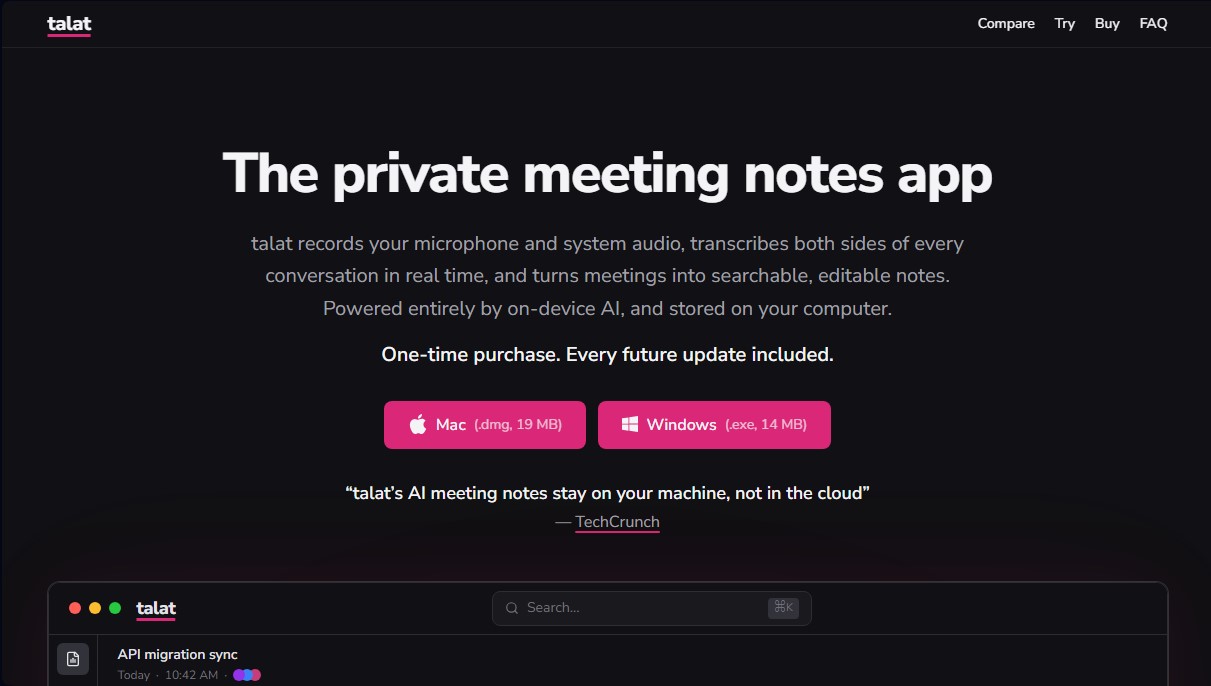
Transcribe and summarize meetings in real-time using local AI. Generate private, searchable notes saved on your computer with no cloud or subscriptions required.
What is talat?
talat is an advanced local AI solution designed for private meeting note capture and management. Unlike most transcription services, this tool processes all information directly on the user's computer, ensuring that audio and sensitive data are never uploaded to the cloud or used to train external models.
The primary function of talat is to simultaneously record both the microphone and system audio. This enables the accurate capture of both sides of a conversation on any video conferencing platform, such as Zoom, Microsoft Teams, or Google Meet, without the need to invite external bots or deal with complex integrations. The tool automatically detects when a call starts and begins real-time transcription, seamlessly identifying different speakers.
The application's technical framework leverages hardware acceleration to run Large Language Models (LLMs) locally. At the end of each session, talat's AI automatically generates structured summaries that make reviewing information easy. Its core capabilities include:
- Automatic summary generation featuring key points, decisions, and action items.
- Advanced search across your entire meeting history to locate specific text snippets.
- Editable transcripts with speaker attribution and the ability to manually reassign segments.
- Synchronized audio playback, allowing you to click any phrase to listen to that exact moment in the recording.
For power users and developers, talat offers a high level of customization. While it includes a default local model, it also allows for the integration of external providers like OpenAI, Anthropic, or Ollama using your own API keys. Additionally, it features automatic export options to knowledge management tools like Obsidian, iCloud, or Dropbox, along with support for webhooks and MCP servers, making it easy to integrate meeting data into technical workflows.
This tool is particularly useful for professionals handling confidential information, development teams, and anyone looking for an efficient and secure AI meeting tool. As a native application for macOS and Windows, it delivers optimal performance without requiring a constant internet connection, allowing for seamless offline work. talat stands out as a robust alternative for those who prioritize full control over their intellectual property and seek a note-management solution built with privacy-by-design in mind.
talat features and use cases
How to use talat
talat FAQ
Is talat actually private?
Yes. Audio processing, transcription, and summarization are handled entirely on your computer, so your data never leaves your device.
Do I need an internet connection for talat to work?
No. Both transcription and summary generation run locally, allowing you to use the app completely offline.
What kind of payment does the app require?
It is a one-time payment that includes all future updates, eliminating the need for monthly subscriptions or recurring fees.
Do I need to invite a bot or install extensions to record my meetings?
No. You don't need to invite anyone or install plugins, as the tool automatically detects audio from both your microphone and your system.
Which operating systems support talat?
The app is compatible with Windows 10 and 11, as well as Mac computers with Apple Silicon processors (M1 or later).
Where are my recordings and notes stored?
All information is saved locally on your own machine and is never synced or uploaded to external servers.
Can I try talat for free before buying it?
Yes. You can download the app and use all its features with a 10-hour free recording limit without needing to create an account.
Can I export talat summaries to other apps?
Yes. The app allows for automatic export to local folders for tools like Obsidian or Dropbox, and it also offers integration via webhooks.
Can I use my license on more than one computer?
Yes. The license is tied to the user rather than a specific device, so you can use it across your various work or personal computers.
Does talat let me choose which AI model generates the summaries?
Yes. You can use the built-in local model or optionally connect external providers like OpenAI or Anthropic using your own API key.
talat pricing and plans
Free Version
Price: Gratis.
- 10 hours of free recording time.
- Access to all tool features.
- No account or credit card required.
- Search, export, and summarize recorded meetings even after the time limit is reached.
- Limit: Once the 10 hours are used, no new recordings can be started.
Pre-release Plan (One-time purchase)
Price: 49 $ (50% off the final price).
- Lifetime license for individual use on multiple computers (personal or work).
- All future updates included.
- Unlimited real-time recording and transcription (microphone and system audio).
- Fully local processing (on-device) for maximum privacy.
- Summary generation via local LLM or external API keys (OpenAI, Anthropic, etc.).
- Automatic export to folders (Obsidian, iCloud, Dropbox) and via Webhooks.
- Integrated MCP server to connect with clients like Claude Code.
- Compatible with macOS (Apple Silicon) and Windows 10/11.
Full Price Plan (1.0 Launch)
Price: 99 $ (one-time payment).
- Includes all Pre-release plan features.
- Available starting with the official 1.0 release.
Team Plan (Volume pricing)
Price: Contact Sales (starting from 5 licenses).
- Volume discounts for multiple license purchases.
Enterprise Plan
Price: Inquire on official website.
- Managed and custom deployment.
- Build-level compliance policy enforcement.
- Customer-hosted license management.
- Contract-based technical support.
talat Screenshots
talat user reviews
Write a review
Checking your session...
talat Reviews
Loading reviews...
talat alternatives

Fireflies.ai
Fireflies.ai joins your meetings, transcribes them, writes summaries and action items, and lets you search or ask questions across every conversation.


OpenWhispr
OpenWhispr is open-source voice dictation for Mac, Windows and Linux: transcribe locally or in the cloud, type into any app and take meeting notes without a bot.