TapEdit
Share
TapEdit
AI image editor to remove backgrounds, erase objects, and upscale photos to 4K. Offers professional retouching, batch processing, and e-commerce optimization.
General Information about TapEdit
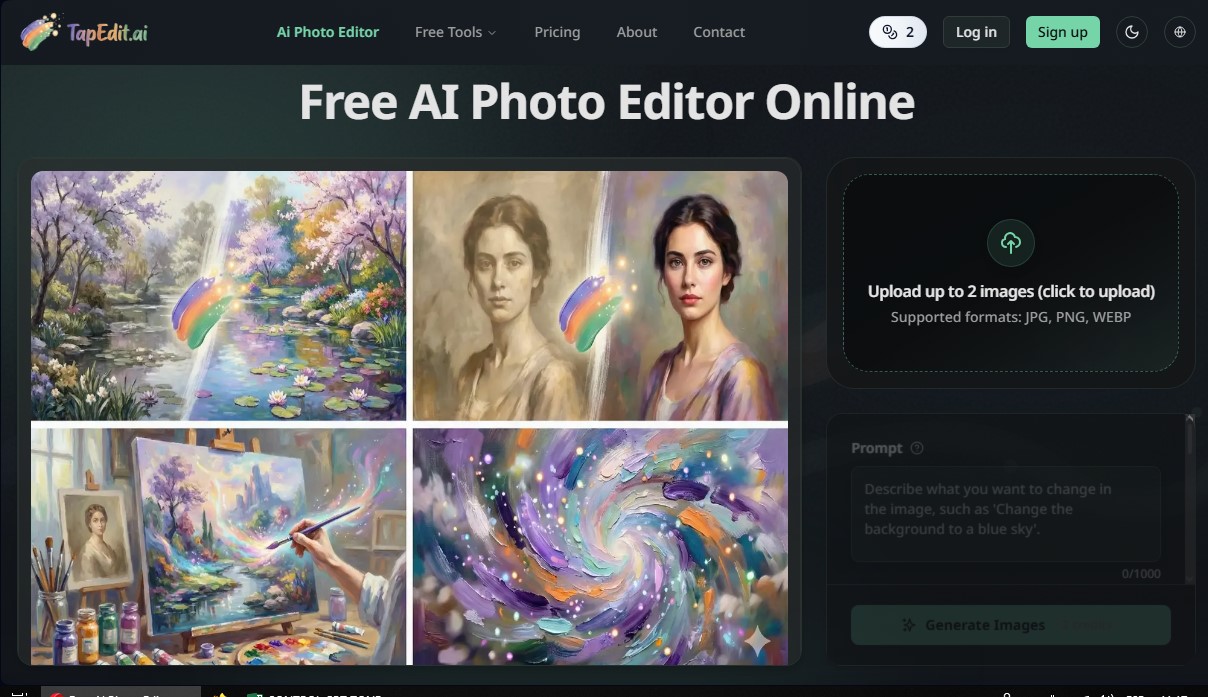
TapEdit is an AI photo editor designed to deliver professional results quickly and easily through a web browser. This artificial intelligence tool combines essential features like background removal, an object eraser, and image upscaling into a single platform optimized for digital workflows. Its primary focus is to streamline the creation of high-quality visual content for creators, marketing professionals, and e-commerce managers who need studio-level results without using complex software on their computer.
TapEdit’s technology stands out for its precision in critical tasks. The AI background remover can process complex details such as hair, fabrics, and product edges while maintaining the integrity of the original image. Meanwhile, its object and watermark eraser allows users to clean up photos by removing unwanted elements as the AI naturally and coherently reconstructs the background.
One of the application's most advanced capabilities is its generative fill and Magic Brush system. This workflow allows users to select a specific area of an image and define an action using natural language. The system automatically optimizes the user's instructions so the AI correctly interprets the intent, enabling:
- Automated product photography with ghost mannequin effects.
- Material and texture swapping via text commands.
- Contextual relighting to integrate products into realistic lifestyle scenes.
- Quality enhancement and 4K image upscaling, correcting blur and restoring textures.
For users with high-volume production needs, TapEdit includes a batch processing engine that applies edits and color adjustments to hundreds of photos simultaneously. Additionally, it integrates a professional portrait retouching suite that utilizes frequency separation techniques to achieve high-end finishes, perfect for editorial or advertising use.
The tool’s operation is intuitive and follows clear steps: select the area with the smart brush, define the task (such as improving quality or changing the background), and generate the high-resolution result. By eliminating the need for technical knowledge in prompt engineering, TapEdit positions itself as an efficient automated photo editing solution for generating visual assets ready for ads, social media, and online sales catalogs, guaranteeing physical accuracy in lighting, shadows, and perspective.
Features and Use Cases of TapEdit
How TapEdit Works
Frequently Asked Questions about TapEdit
What is TapEdit and what is it used for?
TapEdit is a professional AI-powered photo editor that lets you automatically enhance images, remove backgrounds, and erase unwanted objects.
Is TapEdit a free photo editor?
Yes, the tool offers basic free features and daily credits for standard edits at no cost.
Can I remove the background from my images with this tool?
Absolutely. TapEdit features a high-precision background remover that preserves complex details like hair or clothing textures.
Do I need to register to use the editor?
You can perform basic edits anonymously, but you need to sign in to access higher resolutions and earn more daily credits.
How does the payment system work on TapEdit?
The platform doesn't use monthly subscriptions. Instead, it uses a one-time credit pack system that can be purchased with Telegram Stars or cryptocurrency.
What output resolution do the AI tools offer?
Depending on your plan and available credits, you can export your processed images in HD, 2K, or 4K quality.
Is it possible to erase objects or watermarks from a photo?
Yes, using the object eraser tool, you can remove any element or text, and the AI will naturally reconstruct the background.
What file formats does the platform support?
TapEdit supports the most commonly used image formats today: JPG, PNG, and WEBP.
Do I need prompt engineering skills to use the AI?
No, it's not necessary. The tool automatically optimizes your simple instructions so the AI perfectly understands what you want to edit.
Can I process multiple photos at once?
Yes, TapEdit includes a batch processing engine designed for professionals who need to quickly edit hundreds of product images or portraits.
TapEdit Pricing
Free Version
Daily free credits for standard edits.
Access to basic tools: background remover, object eraser, and image enhancer.
Supports anonymous use with daily credit limits.
Restrictions: Advanced features, multi-prompts, PNG export, and HD, 2K, or 4K quality require registration or paid credits.
50 Credit Pack - $2.99
One-time payment of $2.99 (or 150 Telegram Stars).
Access to professional editing tools and generative features.
Export results in HD, 2K, and 4K resolutions.
Generative fill, material swap, and relighting tools.
500 Credit Pack - $12.99
One-time payment of $12.99 (or 650 Telegram Stars).
Includes all basic plan features with 57% savings.
Access to professional workflows such as batch processing.
High-quality commercial portrait retouching suite.
2,000 Credit Pack - $39.99
One-time payment of $39.99 (or 2,000 Telegram Stars).
Includes all advanced features with 67% savings.
Designed for content creators and high-volume industrial workflows.
Batch processing engine to apply AI edits to hundreds of photos simultaneously.
TapEdit Screenshots