
Share
Convert text, PDFs, or links into explainer videos with motion graphics and voiceovers. Automatically create professional visual content with no editing skills required.
What is TapVid?
TapVid is an advanced AI-powered audiovisual content creation platform designed to transform concepts, documents, or scripts into high-quality motion graphics videos. Its primary purpose is to simplify the production of professional explainer videos, enabling any user to generate structured visual content without requiring technical video editing or graphic design skills. The tool allows you to work directly from your computer using various sources, such as simple text prompts, PDF files, or links to web articles.
TapVid’s functionality is powered by an AI engine that integrates diffusion models and 3D animation technologies to bring ideas to life. Upon inputting source material, the system analyzes the context and automatically generates a visual narrative that includes synchronized voiceovers, captions, and dynamic graphic elements. This text-to-video technology stands out for its stylistic versatility, offering everything from photorealistic finishes and cinematic animations to pixel art aesthetics or kinetic typography, ensuring the final result never looks like a generic template.
Key capabilities and practical benefits include:
- PDF and URL to Video Conversion: Instantly transform technical documentation, blog posts, or long scripts into dynamic visual summaries.
- Motion Graphics Generator: Easily create animated diagrams and charts to explain complex data or industrial processes.
- Smart Editing and One-Shot: Users can generate a complete video in a single step or make precise adjustments to the output to refine the message.
- Product Demos and Tutorials: Ideal for SaaS companies that need to showcase their software through clear and direct explainer videos.
- Professional Export: Generated clips support resolutions up to 1080p, are watermark-free on premium plans, and adapt to standard formats like 9:16 for mobile devices or 16:9 for widescreen.
This tool is particularly useful for marketing managers, content creators, educators, and product teams looking to optimize their workflows. By using TapVid, production times can be slashed from weeks to minutes, eliminating the need for external agencies to create training videos, product launches, or social media content. Its practical approach ensures users maintain control over tone and style, achieving effective and professional visual communication through the strategic use of generative artificial intelligence.
TapVid features and use cases
How to use TapVid
TapVid FAQ
What is TapVid and what is this tool used for?
TapVid is an AI platform that transforms text, ideas, links, or PDF documents into explainer videos featuring motion graphics and voiceovers.
Is there a special offer for first-time TapVid users?
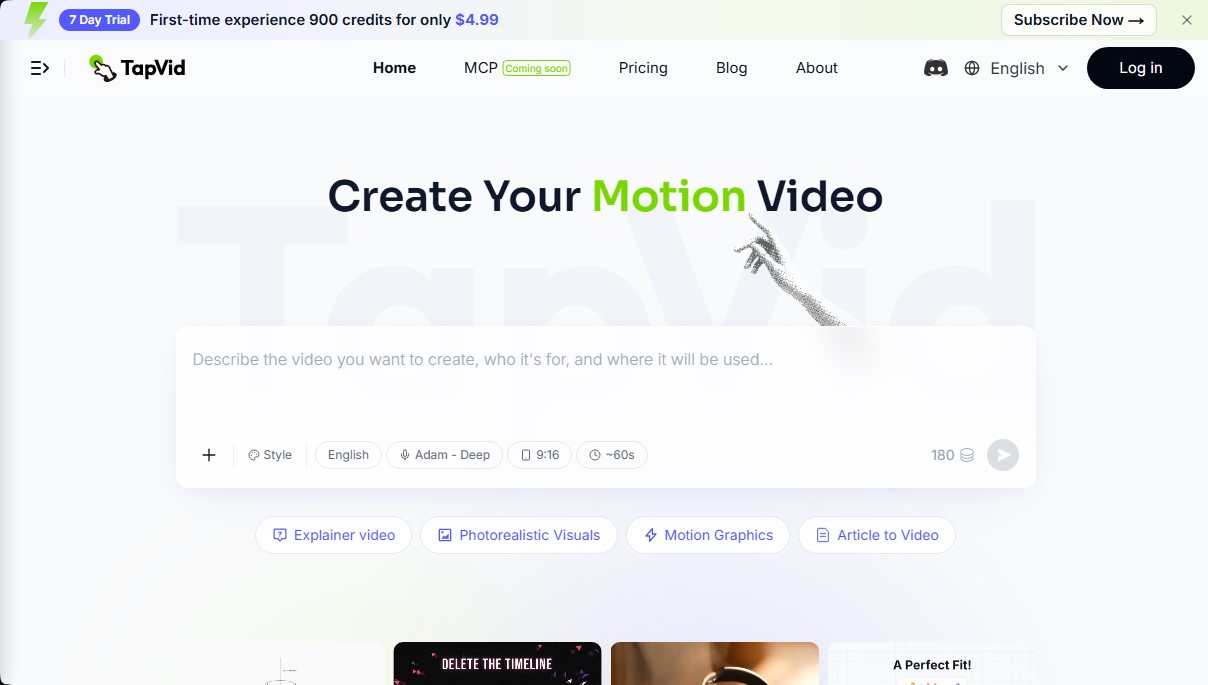
Yes, new users can access a seven-day trial that includes 900 credits for $4.99.
Do I need video editing skills to use TapVid?
No, the tool automatically generates the visuals, voiceover, and video structure, so users don't need any editing or design experience.
Can I convert a PDF file or a web article into a video?
Yes, the system allows you to import PDF documents or article links to extract information and automatically create an animated video.
Do videos exported with TapVid include a watermark?
Subscription plans allow you to export projects in 1080p high definition without any watermarks.
How are the credits needed to generate a video calculated?
Credit consumption depends on the total length of the content, calculated at approximately three credits per second of generated video.
What is the maximum length for videos created on the platform?
Depending on your chosen subscription plan, you can generate clips of up to three minutes or longer productions of up to five minutes on the top-tier plan.
What languages and voice styles does TapVid offer?
The tool features various style options and professional voices in multiple languages, including deep, clear voices to enhance the quality of the explanation.
Can I edit the final result if I want to change something?
Yes, the platform offers a smart editing feature to make adjustments to the generated content before the final export.
Does TapVid offer priority support for professional users?
Advanced plans like Max and Ultra include priority support and faster rendering queues to streamline team workflows.
TapVid pricing and plans
Free Version: TapVid allows you to get started for free to test its basic AI explainer video creation features before committing to a subscription.
Basic Plan: $4.99 (7-day trial for new users), then $19/mo.
900 credits per month (equivalent to about 6 videos of 45-60 seconds).
1080p resolution exports.
No watermarks.
Clips up to 3 minutes long.
Option to purchase credit add-ons.
Pro Plan: $39/mo.
2,000 credits per month (approximately 20 videos).
Priority rendering to reduce wait times.
Early access to new platform features.
Includes all Basic plan features.
Max Plan: $99/mo.
6,000 credits per month (approximately 42 videos).
Priority technical support.
Faster rendering queue.
Includes all Pro plan features.
Ultra Plan: $199/mo.
14,000 credits per month (over 100 videos).
Create movies up to 5 minutes long.
Clips up to 5 minutes long.
Expedited expert support.
Includes all Max plan features.
TapVid Screenshots
TapVid alternatives

VideoWeb Video Generator
Generate professional AI videos from text or images. Features realistic avatars, automated scripts, and optimized formats for marketing and social media.
Framia | Short Drama Maker
Turn scripts and ideas into short dramas for TikTok and Reels. Generate characters, scenes, and dialogue with AI—no filming, cameras, or professional actors required.

ToonBee AI
Generate animated videos from scripts with consistent characters across scenes. Includes AI voiceovers and music. Ideal for marketing, education, and social media.

Fash Studio
Transform garment photos into realistic images and videos with AI models. Create professional fashion catalogs and ads without the need for photo shoots.