
Share
Design professional AI logos from text or images. Vectorize files, animate icons, and export in SVG, PNG, and JPEG formats.
What is The Logo Creator AI?
The Logo Creator AI is a specialized visual identity design platform that uses generative artificial intelligence to transform abstract concepts into professional logos. Unlike static template-based editors, this tool interprets text prompts and visual references to create unique proposals from scratch, allowing founders, marketing teams, and independent creators to achieve high-quality results in a matter of minutes.
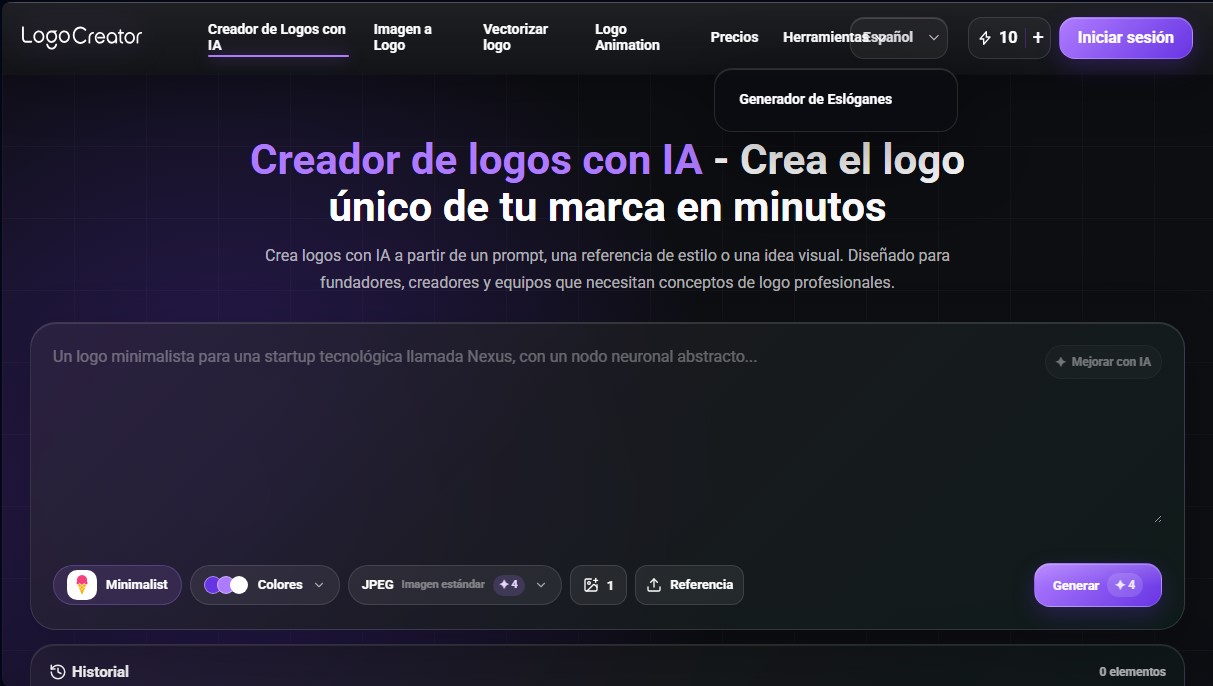
The app's functionality is powered by natural language processing and computer vision models. Users can start the process through the Text-to-Logo feature by describing their idea in plain language. The platform includes an AI-enhance option for the initial prompt, optimizing the description so the generative engine better understands the required visual hierarchy and symbolic elements. Additionally, it allows users to select from various predefined styles, such as minimalist, 3D rendering, 8-bit aesthetics, or luxury badges, ensuring the look aligns with the brand's values.
One of the most notable capabilities of The Logo Creator AI is its technical versatility, offered through complementary tools integrated into its workflow:
- Image-to-Logo: Allows users to upload hand-drawn sketches, product photos, or reference images for the AI to simplify and convert into a clean, professional brand design.
- Vector Logo Converter: Facilitates the transition from raster files to editable SVG format, ensuring the logo is scalable without loss of resolution for use in signage or digital media.
- AI Logo Animation: Transforms a static design into an MP4 video file, ideal for content intros, social media, and corporate presentations.
The tool is optimized for operational efficiency, offering export options in standard formats such as JPEG, transparent PNG, and SVG. This allows for immediate integration into websites, mobile apps, and stationery. To streamline the workflow, the system maintains a generation history for seven days, allowing users to review previous variations, make color adjustments, or refine the visual direction without needing to restart the creative process.
In the professional sphere, The Logo Creator AI acts as a design assistant for startups that need to validate their identity quickly, as well as for agencies that need to generate moodboards and initial concepts for clients. By removing the technical barriers of complex design software, it democratizes access to a coherent and visually appealing brand identity, enabling any user, regardless of prior experience, to bring a corporate vision to life with technical precision and speed.
The Logo Creator AI features and use cases
How to use The Logo Creator AI
The Logo Creator AI FAQ
What exactly is The Logo Creator AI?
It’s an AI-powered tool that generates professional logo concepts based on text descriptions, predefined styles, or reference images.
Do I need design skills to use The Logo Creator AI?
No prior experience is necessary. The platform is designed so that anyone can create a complete visual identity using simple prompts.
What file formats can I download?
You can export your designs as JPEGs for standard use, transparent PNGs for web use, and vector SVG files for professional printing.
Can I turn my own sketch into a finished logo?
Yes, the image-to-logo feature allows you to upload a drawing or visual reference, which the AI then refines and transforms into a professional brand mark.
How does The Logo Creator AI’s credit system work?
The platform uses a pay-as-you-go model. You can purchase credit packs that never expire, so there’s no need for a mandatory monthly subscription.
Can I animate the logos I create?
Yes, the tool includes a specific feature to turn any static logo into an MP4 animation, perfect for presentations or social media.
How long are my designs saved in my history?
Your creations and variations are automatically saved for seven days, allowing you to edit or re-download them without losing your progress.
Can I use the logos I create for my business?
Absolutely. The tool is specifically designed for founders and businesses to build their visual identity. You can use your designs on websites, social media, and packaging.
The Logo Creator AI pricing and plans
Free
0 $
10 credits per day.
Approximately 5 AI image generations.
Includes standard JPG and PNG downloads.
Instant access to all basic AI tools.
Standard (Most Popular)
4,99 $ (one-time payment, no auto-renewal)
100 credits that never expire.
Approximately 30 AI image generations.
Includes standard JPG and PNG downloads.
Accelerated processing speed.
Instant access to all basic AI tools.
Pro (Best Value)
9,99 $ (one-time payment, no auto-renewal)
300 credits that never expire.
Approximately 80 AI image generations.
Includes standard JPG and PNG downloads.
Accelerated processing speed.
Instant access to all basic AI tools.
The Logo Creator AI Screenshots
The Logo Creator AI alternatives

Osmo Studio
AI animation studio for professional motion graphics and videos. Control every detail, collaborate with teams, and export with transparent backgrounds.

ColorCraft
Create Amazon KDP books. Generate coloring pages, stories, puzzles, and print-ready full covers, plus promotional mockups in a single workflow.

NeotypeLab
NeotypeLab uses AI to plan paint schemes for Gunpla, mecha girls and Zoids, with real hobby paint codes, a spraying sequence, a shopping list and an HD preview.
