

ThumbnailCreator.com
Share
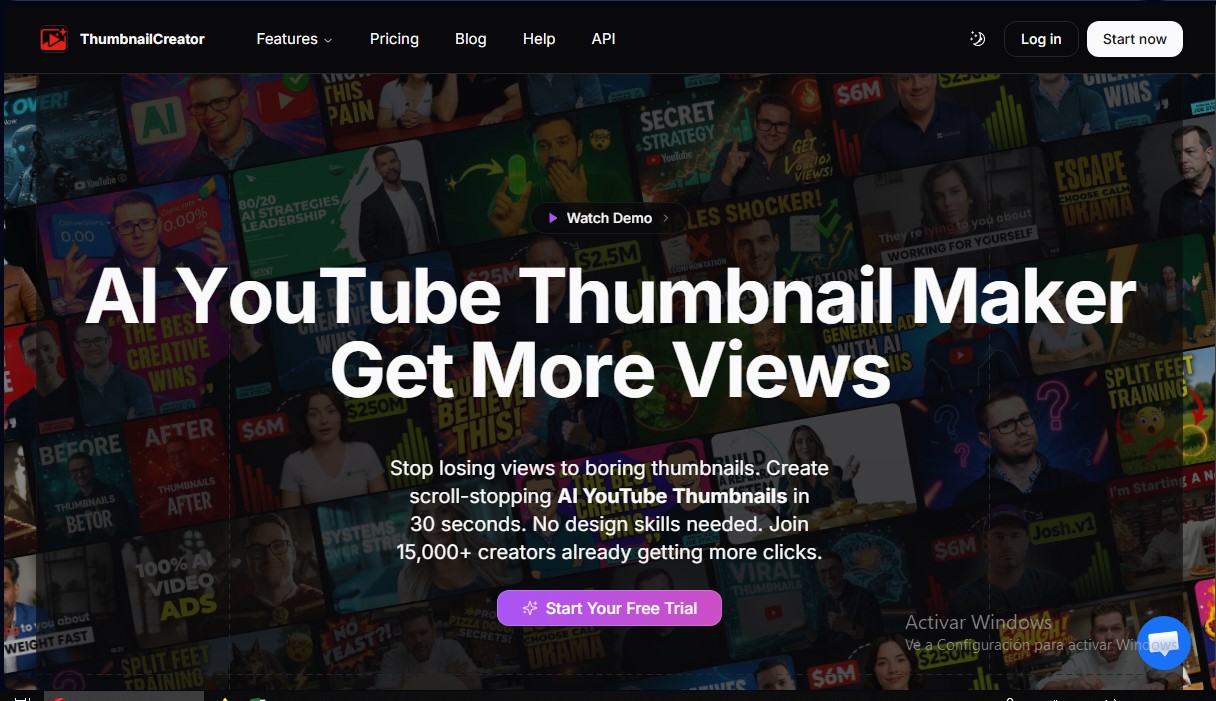
Generate AI YouTube thumbnails in seconds without design skills. Create high-impact images, swap faces, and drive more clicks to your videos.
What is ThumbnailCreator.com?
ThumbnailCreator.com is a specialized platform for designing AI-driven YouTube thumbnails. Its primary goal is to provide creators with a fast solution for generating scroll-stopping images, optimizing CTR (Click-Through Rate) without requiring advanced graphic design skills. The system stands out for its ability to produce professional results in just 30 seconds, eliminating the need for complex software on a computer.
The technology behind ThumbnailCreator.com is based on the analysis of over 3 million high-performing thumbnails. Thanks to this deep learning approach, the AI understands which visual elements, contrasts, and compositions attract the most clicks. Users can enter a video URL or a text description, and the tool will automatically generate various iterations tailored to the content and the target audience.
Key features and technical capabilities:
- AI Thumbnail Generator: Automatic creation of visual concepts from YouTube links or text descriptions.
- Face Swap and Facial Training: Allows creators to upload real photos to integrate them into the thumbnail with consistent lighting, positioning, and expressions.
- Advanced Object and Background Editing: The ability to intelligently swap elements, remove backgrounds, or add specific objects.
- Expression Morphology: Adjusting facial features to change emotions (joy, surprise, fear) based on the video's tone.
- Style Cloning and Templates: Maintaining visual consistency across a channel by replicating previous aesthetics or using popular designs.
- Thumbnail Analyzer: An integrated tool to evaluate the image's potential effectiveness before publishing.
This tool is aimed at a wide range of users, from individual content creators and gamers to marketing agencies, podcasters, and corporate channel managers. By automating tasks that traditionally require hours of manual work, it allows users to manage their time more efficiently from any mobile or desktop device.
The workflow is straightforward: after pasting the video link, the AI analyzes the context and offers multiple customizable options. The editor allows you to add highly readable text, make fine adjustments, and export the image in the exact resolution required by YouTube. ThumbnailCreator.com positions itself as a high-performance alternative to traditional design, achieving an average 73% increase in click-through rates through the use of visual optimization algorithms.
ThumbnailCreator.com features and use cases
How to use ThumbnailCreator.com
ThumbnailCreator.com FAQ
What is ThumbnailCreator.com and how can it help my YouTube channel?
It’s an AI-powered tool that generates high-impact thumbnails in seconds to boost your click-through rate and attract more subscribers without needing any design skills.
How can I generate a thumbnail using a video link?
Just paste your YouTube video URL, and our technology will automatically analyze the content to create several variations optimized for your audience.
Can I include my own face in ThumbnailCreator designs?
Yes, you can upload your own photos so the AI can learn your features, allowing you to insert your face into thumbnails with different expressions, lighting, and poses.
How long does it actually take to create an image with this tool?
The process is extremely fast and usually takes about thirty seconds, which is a significant time saver compared to the two or three hours required for manual design.
What sets ThumbnailCreator.com apart from other options like Canva or Photoshop?
Unlike generic templates or complex software, our AI creates unique images trained on millions of successful thumbnails, knowing exactly which elements drive the most views.
Is there a free trial for new users?
We offer a seven-day free trial that includes ten credits so you can experiment with all the platform's features before deciding on a paid plan.
How do credits work within the platform?
The system is very straightforward: one credit equals the generation of one AI thumbnail on any of our available plans.
Can I cancel my subscription if I'm not satisfied?
You can cancel your subscription at any time with a single click from your account settings, and we offer a seven-day money-back guarantee on all paid plans.
What other editing features does ThumbnailCreator offer?
In addition to automatic generation, you can perform face swaps, replace objects, edit text, and use the AI optimizer to perfect every detail before downloading.
Can I download thumbnails in the correct resolution for YouTube?
All images are exported at the optimal resolution recommended by YouTube, and you also have the option to upload them directly to your channel from our interface.
ThumbnailCreator.com pricing and plans
Free Trial
Price: Free for 7 days.
10-credit limit for thumbnail generation.
Credit card required (no charges until the eighth day).
Starter
Price: 29 $ per month (or 24 $/mo billed annually).
50 credits per month (1 credit equals 1 AI thumbnail).
AI-powered thumbnail generation.
Basic facial features.
Basic variation generator.
Thumbnail extractor for any YouTube video.
Basic thumbnail optimization.
Creator
Price: 49 $ per month (or 41 $/mo billed annually).
100 credits per month.
Advanced face training (train and save faces).
Image face-swapping.
Advanced variation generator.
Unlimited YouTube thumbnail extractions.
Facial expression morphing.
Access to trending thumbnails.
AI-driven thumbnail optimization.
Teams
Price: 99 $ per month (or 83 $/mo billed annually).
250 credits per month.
Multi-face training.
Full channel makeover.
Unlimited face swaps.
Batch variation generation.
API access and unlimited extractions.
Advanced expression morphing.
Priority access to trends.
Enterprise-grade optimization.
Team collaboration with unlimited members.
24/7 dedicated priority support.
ThumbnailCreator.com Screenshots
ThumbnailCreator.com alternatives
utilz Background Remover
Remove image backgrounds for free with total privacy in your browser. Create transparent or colored backgrounds without uploading files while maintaining original resolution.




AlreadyRan
AlreadyRan brings dozens of AI image, video and audio models into one web studio with a single credit balance and the cost shown before every generation.