

Share
Generate 3D models from text or images using various AI engines. Compare results side-by-side and export files for 3D printing, video games, and digital design.
What is Trify3D?
Trify3D is an advanced AI-powered 3D model generation platform distinguished by its multi-model architecture. Unlike conventional tools that rely on a single algorithm, this AI-based 3D studio enables the simultaneous execution of several of the industry's most powerful engines—such as Tripo3D, Meshy, and Rodin—within a single interface. Its primary goal is to allow users to compare results from different engines in parallel using a single credit pool, thereby optimizing the final quality of assets before their definitive export.
The system operates through three functional modes designed to cover the entire creation cycle. The Text to 3D feature transforms natural language descriptions into complex geometry with integrated PBR textures. Using the Image to 3D tool, users can upload photos or sketches for the AI to perform a multi-view reconstruction, capturing precise details from the original object. Finally, the AI Texturing module generates professional material maps (albedo, normal, roughness, and metallic) for any existing mesh, providing total control over the model's style and realism.
From a technical standpoint, Trify3D integrates automated auto-retopology and UV unwrapping processes, ensuring that models are functional and lightweight. Its core capabilities include:
- Real-time asset generation: Results ready for preview in under sixty seconds.
- Versatile export: Support for industry-standard formats such as GLB, glTF, OBJ, and STL.
- Engine comparison: Direct evaluation of topology and texturing across different AI providers from a single account.
- Browser-based workflow: Complete execution directly from a computer browser, requiring no heavy software installations.
This tool is ideal for game development professionals in need of props and characters optimized for Unity, Unreal Engine, or Roblox. It is also a robust solution for 3D printing, as it generates STL files ready for slicing software. By removing the technical barriers of manual modeling, Trify3D positions itself as an essential resource for designers, concept artists, and rapid prototyping enthusiasts seeking high-fidelity results with minimal technical effort. Users retain full commercial ownership of their creations, facilitating seamless and legal integration into commercial and creative projects.
Trify3D features and use cases
How to use Trify3D
Trify3D FAQ
What exactly is Trify3D, and how does it work?
Trify3D is a multi-model AI platform that allows you to create 3D objects from text or images by using several generation engines simultaneously.
Can I convert a photo into a 3D model using Trify3D?
Yes. Just upload an image or sketch, and the tool will automatically generate a detailed mesh with professional-grade textures in less than a minute.
Why does Trify3D allow me to compare different AI engines?
The platform integrates engines like Tripo3D, Meshy, and Rodin, allowing you to compare results side-by-side and choose the best version before spending your credits.
What file formats can I use to download my creations?
You can export your models in industry-standard formats like GLB, glTF, OBJ, and STL for direct use in software such as Blender, Unity, or Unreal Engine.
Do I have commercial rights to the models generated on Trify3D?
Yes. You retain full ownership of every model you generate and can use, sell, or distribute them commercially without any restrictions.
Can I 3D print the files created on the platform?
Absolutely. You can export your designs in STL format, which is the industry standard compatible with most common 3D printing slicers.
Do I need to install any special software to use Trify3D?
No installation is required. The tool runs entirely in your web browser, allowing you to generate and export assets without downloading any software.
How does the Trify3D credit system work?
You have a single credit pool that can be used across any engine on the platform, giving you the flexibility to manage your budget across the various tools.
What does the launch offer include?
Our special launch promotion offers a 20% discount on all available plans for a limited time.
Are the textures generated by Trify3D professional quality?
Yes. The platform generates full PBR texture maps—including albedo, normal, roughness, and metallic—to ensure a realistic finish in any rendering engine.
Trify3D pricing and plans
Free Version
Price: 0 $
50 free credits for new accounts.
No credit card required to get started.
Starter
Price: 19.90 $ per month (or 15.83 $ per month billed annually).
1,000 monthly generation credits.
Access to all AI generation and texturing modes.
Export in GLB, glTF, OBJ, and STL formats.
Adjustable speed and quality modes.
Includes PBR texture maps.
Pro
Price: 29.90 $ per month (or 24 $ per month billed annually).
3,500 monthly generation credits.
Access to all AI generation and texturing modes.
Export in GLB, glTF, OBJ, and STL formats.
High mesh quality and PBR maps.
Priority generation queue.
Priority technical support.
Max
Price: 149.90 $ per month (or 120 $ per month billed annually).
18,000 monthly generation credits.
Access to all AI generation and texturing modes.
All available export formats.
Ultra mesh quality and high-definition (HD) PBR maps.
Priority generation queue.
Dedicated technical support.
One-time credits (no subscription)
Small: 24.90 $ for 1,000 credits.
Medium: 39.90 $ for 3,500 credits.
Large: 179.00 $ for 18,000 credits.
Credit Restrictions:
Credit usage varies depending on the AI engine used: Tripo3D (1.0x), Meshy (1.3x), and Rodin (1.5x). Credits are consumed from a common pool shared across all engines.
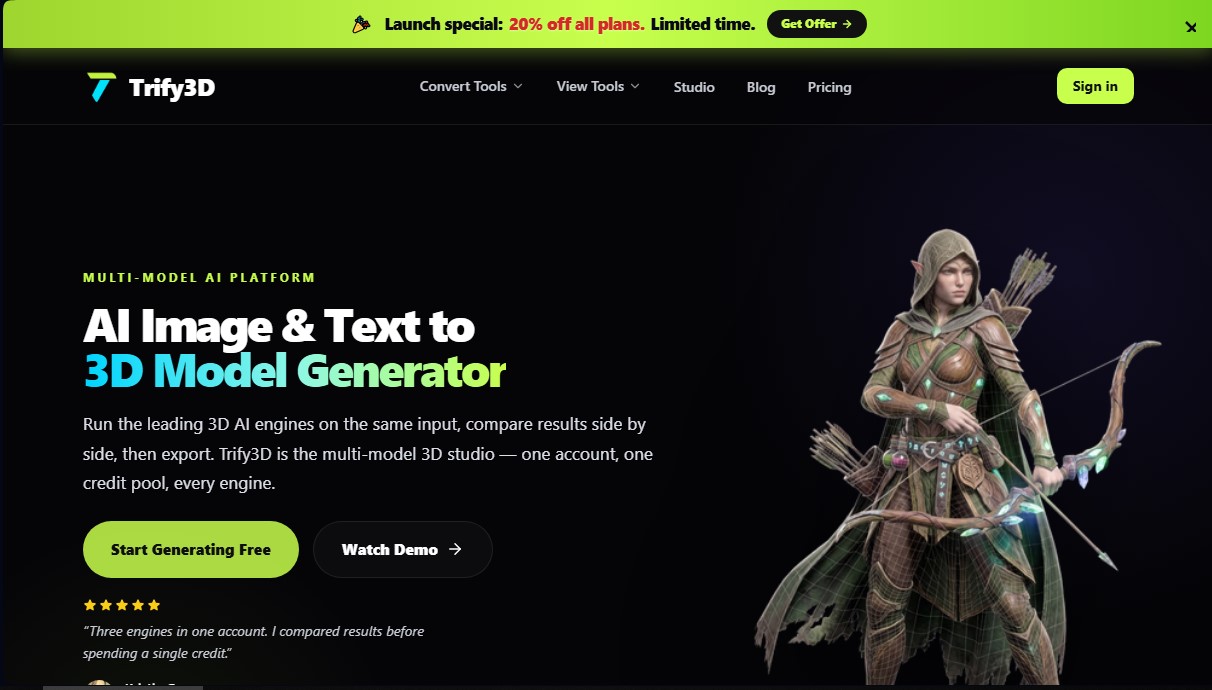
Trify3D Screenshots
Trify3D user reviews
Write a review
Checking your session...
Trify3D Reviews
Loading reviews...
Trify3D alternatives



Triverse AI
Triverse AI generates 3D models from an image or a text prompt, adds AI PBR textures and produces assets ready for games, 3D printing and XR.

ImageToSTL.org
Convert JPG and PNG images into STL files for 3D printing using AI. Generate detailed 3D models ready for instant download.

Image to 3D
Convert 2D images and sketches into textured 3D models using AI. Export in GLB, STL, or USDZ for video games, 3D printing, and augmented reality.