

Share
Edit images with AI—no sign-up or watermarks. Remove backgrounds, erase objects, and restore old photos via text. Includes free daily credits.
What is Try AI Editor?
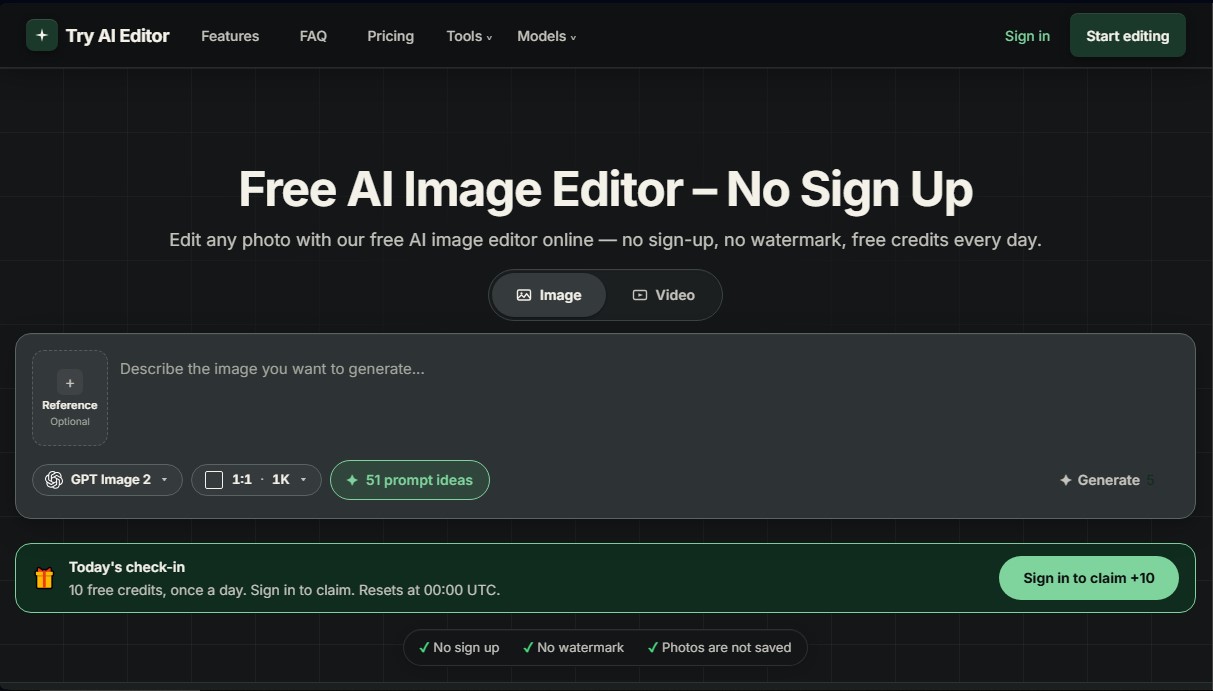
Try AI Editor is an AI image editor designed for advanced photo retouching using simple text prompts. Unlike traditional design tools that require manual layers or masks, this platform allows you to modify files based on natural language descriptions. Its primary mission is to democratize high-quality editing, enabling any user—regardless of prior technical knowledge—to transform photos from their desktop, tablet, or mobile device.
The technology behind Try AI Editor is built on cutting-edge diffusion and image processing models, including options like GPT Image 2, Nano Banana, and Seedream. These engines can interpret a scene's context, recognizing objects, textures, and lighting to execute coherent changes. The workflow is straightforward and functional: the user uploads an image (in JPG, PNG, or WebP formats up to 10MB), types a phrase describing the desired change, and the system automatically generates the result.
Key capabilities and practical benefits include:
- Background Removal and Replacement: Effortlessly isolate products or people and generate new environments, such as studio walls or landscapes—ideal for commercial catalogs.
- Object Removal: Uses AI to erase unwanted elements like wires, signs, or people, naturally reconstructing the background.
- Old Photo Restoration: Specialized in repairing damage, scratches, and color loss in historical portraits, improving clarity without altering the original essence.
- Style Transfer and Reimagining: Transforms photos into illustrations, watercolors, or cinematic scenes, while also allowing for changes in clothing or atmosphere through specific prompts.
- Image Upscaling: Enhances the resolution and sharpness of low-quality or small files.
From an operational standpoint, this online AI photo editor stands out for its accessibility. No registration or account creation is required, streamlining the process for quick edits. Furthermore, downloads are provided in PNG format without watermarks, making them easy to integrate into professional projects. The tool is privacy-friendly, as it does not store user images in permanent libraries.
Try AI Editor offers daily free credits that reset every day, allowing users to test different models based on the task's complexity—from the balanced Nano Banana 2 to the detailed Seedream 5 Pro for high-definition results. By including commercial use rights, it is an efficient solution for content creators, marketplace sellers, and home users looking for a practical, powerful, and technically frictionless AI tool.
Try AI Editor features and use cases
How to use Try AI Editor
Try AI Editor FAQ
What is Try AI Editor and how does it work?
Try AI Editor is an online tool that uses artificial intelligence to edit photos through simple text prompts, requiring no prior experience.
Do I need to register to use this tool?
No, you don't need to create an account or provide an email address to start editing your photos immediately.
Do downloaded images have watermarks?
Edited images are downloaded completely clean, without any Try AI Editor watermarks on the final result.
How many free credits does Try AI Editor offer daily?
You receive ten free credits every day, which reset at midnight UTC, to use for your edits.
What kind of changes can I make to my photos?
You can remove backgrounds, erase unwanted objects, transform the artistic style, restore old photos, or enhance resolution with a simple phrase.
Are my photos safe when using this editor?
Your files are not saved or archived; they are only processed temporarily through an external service to complete the requested edit.
Can I use Try AI Editor results for commercial purposes?
Yes, all edits you make are your property, and you can use them for your business without the need for attribution or licensing fees.
Which devices can I use Try AI Editor on?
You can access the tool from any smartphone, tablet, or computer with an internet connection without having to install any apps.
Try AI Editor pricing and plans
Free Plan
Price: Free
10 free credits every day (reset at 00:00 UTC).
No registration or account creation required.
No watermarks on downloaded images.
Access to object removal, background swap, and restoration tools.
1,000 Credit Plan
Price: $10/month (or $7.50/month with $90 annual billing)
1,000 monthly credits (equivalent to approximately 200 standard edits).
Credits refresh every month; unused credits do not roll over.
Plan credits are used after daily free credits are exhausted.
Cancel anytime and keep your credits until the end of the billing period.
2,500 Credit Plan
Price: $20/month (or $15/month with $180 annual billing)
2,500 monthly credits (equivalent to approximately 500 standard edits).
Credits refresh every month; unused credits do not roll over.
Plan credits are used after daily free credits are exhausted.
Cancel anytime and keep your credits until the end of the billing period.
5,000 Credit Plan
Price: $40/month (or $30/month with $360 annual billing)
5,000 monthly credits (equivalent to approximately 1,000 standard edits).
Credits refresh every month; unused credits do not roll over.
Plan credits are used after daily free credits are exhausted.
Cancel anytime and keep your credits until the end of the billing period.
Credit Packs (One-time packs)
Price: See official website for details
One-time credit top-ups available as an alternative to monthly subscriptions.
Try AI Editor Screenshots
Try AI Editor user reviews
Write a review
Checking your session...
Try AI Editor Reviews
Loading reviews...
Try AI Editor alternatives

utilz Background Remover
Remove image backgrounds for free with total privacy in your browser. Create transparent or colored backgrounds without uploading files while maintaining original resolution.

ColorCraft
Create Amazon KDP books. Generate coloring pages, stories, puzzles, and print-ready full covers, plus promotional mockups in a single workflow.



