

Share
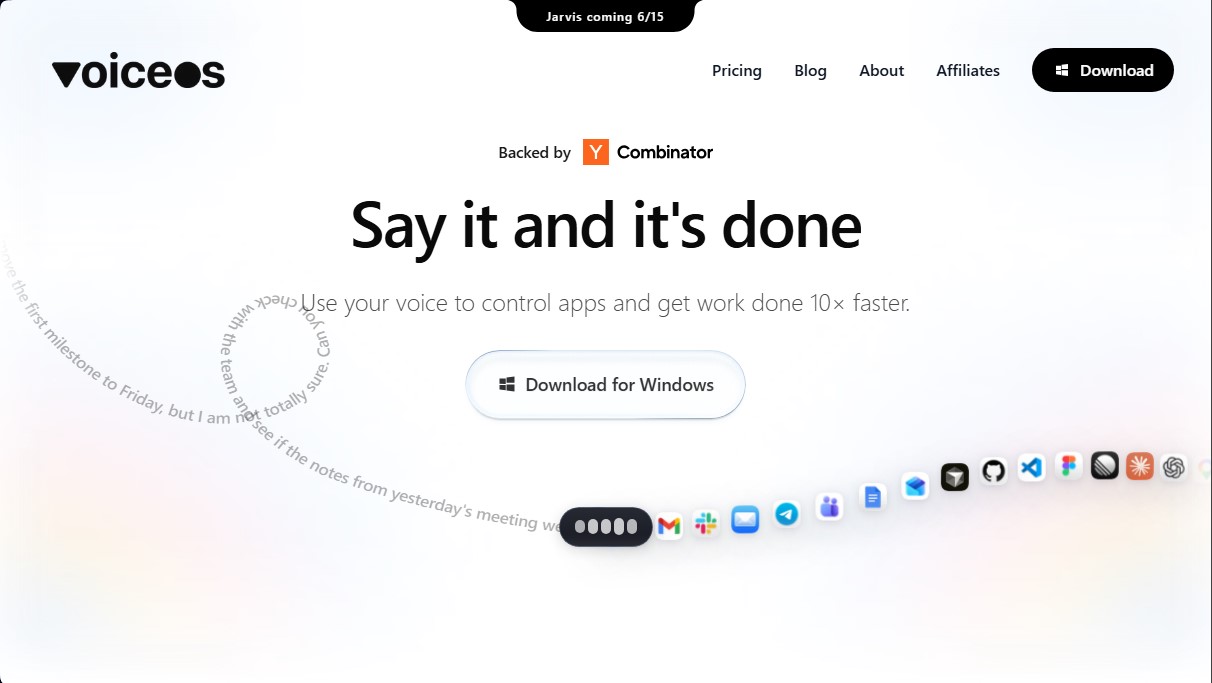
Control apps and automate tasks with voice commands. Manage emails and calendars across various tools to optimize your daily workflow.
What is VoiceOS?
VoiceOS is an advanced productivity platform designed to control applications and execute complex workflows through voice commands. Backed by Y Combinator, this tool allows professionals, developers, and operations managers to optimize their computer performance by eliminating repetitive manual tasks. Its core value proposition is based on the premise that voice is considerably faster than a keyboard for managing today's digital ecosystem.
The tool's functionality is primarily divided into two technological branches. The first is Agent Mode, an execution system that transforms spoken instructions into direct actions across multiple integrated applications. Instead of performing multi-step processes—such as opening an email, finding a thread, and drafting a reply—users can give a single command like "reply to Sam's email and book a meeting for tomorrow." The AI handles navigating between tabs and executing the action without the user having to manually switch contexts.
The second key capability is its Dictation Mode. Unlike conventional dictation systems that transcribe literally, VoiceOS uses artificial intelligence to interpret the user's intent. The system writes what the user means to say, not just what they utter, eliminating filler words and applying intelligent auto-formatting so the resulting text is perfectly structured. This is especially useful for drafting emails in Gmail, sending messages in Slack, or documenting processes in Notion.
VoiceOS integration capabilities cover the most widely used tools in professional and development environments, including:
- Communication and management: Gmail, Slack, Messages, and Google Calendar.
- Productivity and design: Notion, Figma, Linear, and Google Docs.
- Software development: Cursor and other coding tools.
Regarding privacy, the tool applies a policy of total user control. Audio data is not stored on external servers by default, and there is an option to save transcriptions exclusively on the local device. Additionally, the platform guarantees that dictation is not used to train global AI models, ensuring that sensitive information from companies and creators remains protected.
VoiceOS is geared toward users looking to maximize efficiency and reduce the burnout caused by intensive mouse and keyboard use. By centralizing operations through voice, it saves an average of eight hours per week, facilitating a much smoother and more natural workflow in any professional digital environment. It is a robust solution for those who need a voice AI tool that combines intelligent transcription with automated task execution.
VoiceOS features and use cases
How to use VoiceOS
VoiceOS FAQ
What is VoiceOS and how can it help me be more productive?
VoiceOS is a system that lets you control your apps using your voice, allowing you to complete tasks up to ten times faster than using a keyboard.
How does VoiceOS's Agent Mode work with my current apps?
Agent Mode translates your voice commands into automated actions within apps like Slack, Notion, or Gmail, eliminating the need for multi-step manual processes.
Is my privacy secure when using VoiceOS?
Your data belongs to you, and your audio is never stored on servers or used to train AI models unless you choose to share it voluntarily.
What sets VoiceOS’s Dictation Mode apart from other transcription tools?
Dictation Mode does more than just transcribe your words literally; it interprets your intent and writes it with a perfect, professional structure.
Can I use VoiceOS for free?
Yes, there is a permanent free plan that includes 100 weekly uses and access to Dictation and Query modes without requiring a credit card.
Which apps are compatible with VoiceOS?
The tool integrates with a wide variety of professional apps, including Google Calendar, Figma, Slack, Gmail, Notion, and Linear, among others.
What advantages does the VoiceOS Pro subscription offer for power users?
The Pro plan offers unlimited use of all features, priority support, and team-specific tools for a monthly fee billed annually.
When will the new Jarvis feature be available on VoiceOS?
The Jarvis feature is scheduled to launch on June 15, according to official platform information.
Is it possible to prevent VoiceOS from saving my transcriptions locally?
Yes, within the advanced settings, you have full control to decide whether to save transcriptions to your device or maintain maximum privacy.
What security standards does VoiceOS meet for enterprise use?
For organizations requiring a higher level of protection, the Enterprise plan offers zero data retention and SOC 2 and ISO 27001 security certifications.
VoiceOS pricing and plans
Free Plan: $0 per month
Ideal for trying out the tool—no credit card required.
100 uses per week limit.
Dictation Mode.
Ask Mode.
Custom vocabulary.
Works across all applications.
Pro Plan: $10 per month (billed annually)
Designed for power users and professionals.
Unlimited use.
Includes all Free plan features.
Priority support.
Team features.
Enterprise Plan: Custom pricing (billed annually)
Tailored solutions for teams and large organizations.
Includes all Pro plan features.
Zero data retention.
SOC 2 Type II and ISO 27001 certifications.
SSO / SAML access.
VoiceOS Screenshots
VoiceOS alternatives

localscreenshot
localscreenshot is a screenshot API and MCP server for AI agents, returning clean captures of any web page on phone or desktop from 227 countries.


Nuclr Commander
Workspace for running multiple AI agents in parallel with a file manager. Supports local or external models and remote mobile monitoring.