
Share
Automatically rename and organize files by analyzing their content with AI. Supports 100+ formats and batch processing. Runs locally and privately.
What is Zush AI File Renamer & Organizer?
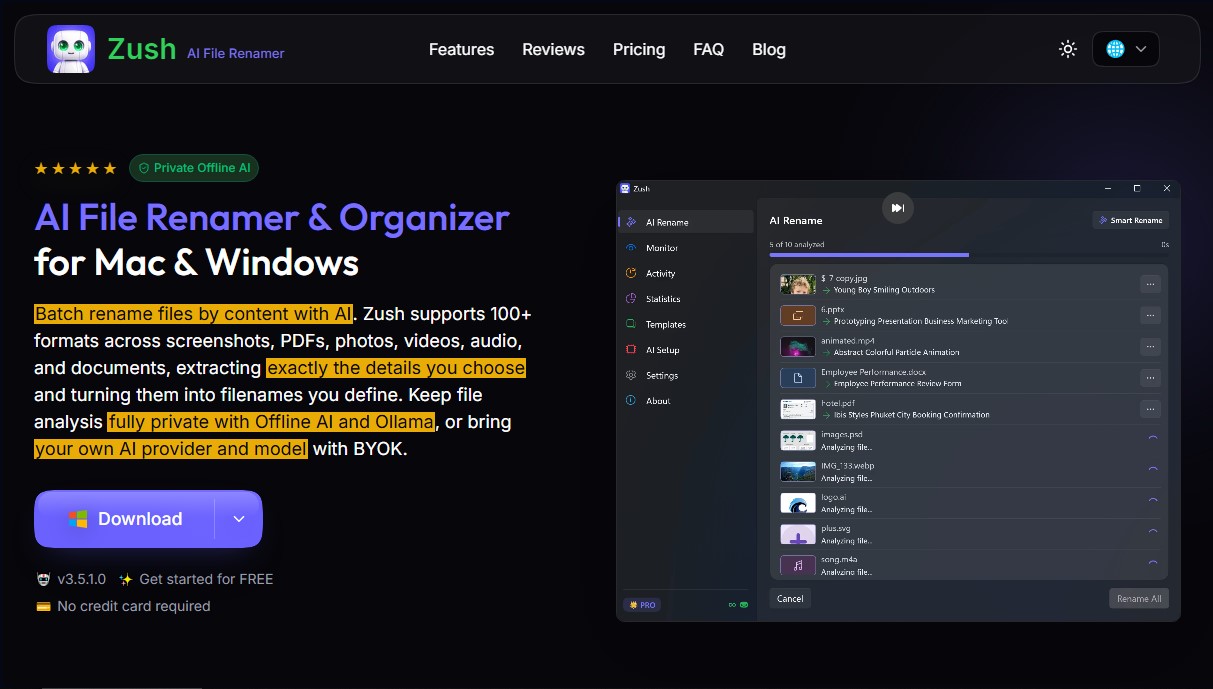
Zush AI File Renamer & Organizer is an advanced solution designed for smart file management on Windows and macOS. Unlike traditional renamers based on rigid patterns or numerical sequences, this tool uses artificial intelligence to analyze the actual content of each file and automatically generate descriptive, consistent, and highly organized names. It is compatible with over 100 formats, including PDF documents, RAW images, videos, audio files, and design projects like Figma, Sketch, or Photoshop.
The application's functionality is powered by the integration of language models and computer vision. Users can choose between different processing modes based on their privacy and performance needs. A standout feature is its local and private AI capability through integration with Ollama, allowing file analysis to be performed entirely on the user's computer without data ever leaving the device. It also offers a BYOK (Bring Your Own Key) option to connect directly with OpenAI, Claude, Gemini, or Groq models, providing total control over the processing engine used.
Its core capabilities and practical benefits include:
- Smart Batch Renaming: The ability to process mixed folders by analyzing the visual context of photos or the text in documents to propose logical names.
- Custom AI Blocks: Allows for the configuration of specific data extraction—such as client names, invoice numbers, or detected brands—to integrate them as variables in the final filename.
- Folder Monitoring: The tool can monitor specific directories in real-time and automatically rename any new file detected.
- Metadata and Tag Management: Beyond renaming, it adds system tags and smart metadata that drastically improve file searching using natural language.
- Change History and Reversion: Maintains a detailed log of all actions, allowing users to undo any change with a single click to restore original names.
- Reusable Templates: Features over 145 building blocks to create specific workflows for photographers, lawyers, accountants, or video editors.
Zush AI File Renamer & Organizer is especially useful for professionals who handle large volumes of digital information. By automating AI file organization, it eliminates the manual workload of repetitive tasks, ensuring that content is easily searchable and maintains a professional structure at all times. Its interface allows users to preview all changes before applying them, ensuring the final result perfectly matches their needs.
Zush AI File Renamer & Organizer features and use cases
How to use Zush AI File Renamer & Organizer
Zush AI File Renamer & Organizer FAQ
What is Zush AI File Renamer & Organizer?
Zush is an advanced tool for Mac and Windows that uses artificial intelligence to analyze your files' content and rename them automatically and descriptively.
Can I use Zush completely privately and offline?
Yes, PRO version users can enable local AI mode via Ollama to process files directly on their machine, ensuring that data never leaves the device.
What file types can Zush AI File Renamer & Organizer process?
The tool is compatible with over a hundred different formats, including PDF documents, RAW images, Office files, videos, audio, and design projects like Photoshop or Figma.
Is it possible to undo a rename if I don't like the result?
Yes, the application includes a full activity history that allows you to revert any changes and restore the original file names with a single click.
Does Zush allow me to automate the organization of new downloads?
Yes, thanks to the folder monitoring feature, the program watches your chosen directories and automatically renames new files as they appear based on your templates.
What customization options does Zush offer for file names?
You can create your own rules using more than 140 data blocks, such as dates, specific metadata, or custom AI blocks that extract specific details from the content.
Is there a free version of Zush AI File Renamer & Organizer?
Yes, you can download the tool and perform up to 50 AI-powered renames for free to test all its features without needing to register or provide a credit card.
Can I use my own AI keys in the application?
Yes, the PRO version allows you to connect your own API keys from providers like OpenAI, Claude, or Gemini to manage an unlimited volume of files in the cloud.
Zush AI File Renamer & Organizer pricing and plans
Free Version
Price: Free.
• 50 AI renames shared across Zush Cloud AI, BYOK, LM Studio, and Ollama; no credit card required. Templates, Naming Blocks, Custom AI Blocks, custom AI prompts, and folder Monitoring are included free.
• No registration or credit card required.
• Access to custom AI blocks to extract specific details.
• Over 145 naming blocks (dates, metadata, etc.).
• Support for more than 104 file formats.
• Folder monitoring and reusable templates.
• Change history and one-click undo.
• 14-day money-back guarantee.
Zush PRO Monthly
Price: 10 $ per month.
• Unlimited AI renames (removes the free version limit).
• "Bring Your Own Key" (BYOK) mode: connect your own API keys from OpenAI, Claude, Gemini, or Groq.
• Local Private AI mode: offline file analysis via Ollama—data never leaves your device.
• Cancel anytime.
• 14-day money-back guarantee.
Zush PRO One-Time
Price: 48 $ (one-time payment).
• Lifetime access to all PRO features.
• Unlimited AI renames.
• Includes all future tool updates.
• Support for your own API keys (BYOK).
• Local and private AI mode (offline) via Ollama.
• 14-day money-back guarantee.
Zush AI File Renamer & Organizer Screenshots
Zush AI File Renamer & Organizer user reviews
Write a review
Checking your session...
Zush AI File Renamer & Organizer Reviews
Loading reviews...
Zush AI File Renamer & Organizer alternatives


Datalab.to
Convert PDFs and complex documents to Markdown, JSON, or HTML with high precision. Extract data, segment files, and process tables, formulas, and diagrams.


Bank Statement Converter
Convert PDF bank statements and images to Excel or CSV. Securely edit transactions and validate balances against the original without sharing login credentials.

kSuite Pro
Swiss-hosted collaborative suite with sovereign AI. Offers encrypted email, cloud storage, and tools for writing, transcribing, and team management with privacy.