
Share
Convert documents, images, audio, and websites into clean Markdown. Extract structured content to power AI models, knowledge bases, and note management.
What is Markovo?
Markovo is an advanced document processing solution designed to transform various file types and digital sources into clean Markdown. Its primary function is to facilitate data preparation for Large Language Models (LLMs), note-taking tools, and research systems, removing visual and structural noise from original files to provide a lightweight format that is highly readable for both machines and users.
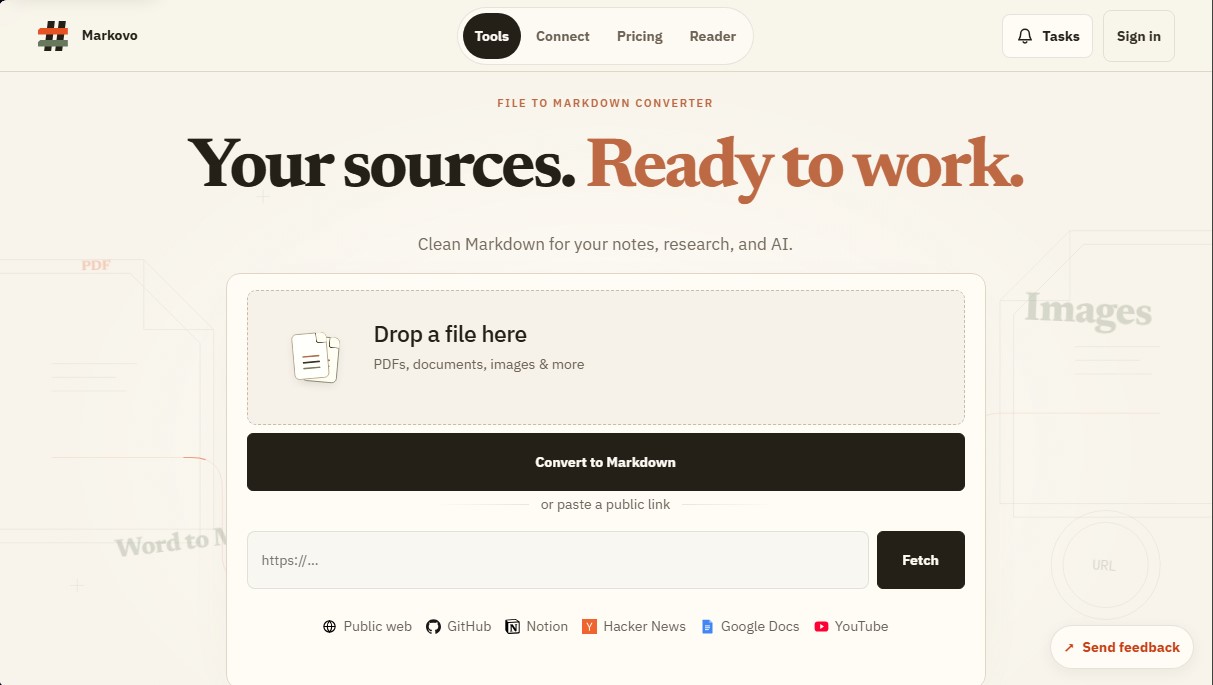
The tool stands out for its versatility in data input. It can process everything from PDF files, Word documents, Excel spreadsheets, and PowerPoint presentations to formats like EPUB or CSV files. Additionally, Markovo integrates optical character recognition (OCR) capabilities using its proprietary OvisOCR2 technology, allowing it to extract text from images and scans with high precision while maintaining the original context without unnecessary elements.
Beyond static documents, the system is capable of performing audio and video transcription to convert them directly into Markdown text. It also offers integration with public web sources and productivity platforms, allowing users to import content directly from URLs, GitHub repositories, Notion pages, Google Docs, and YouTube transcripts.
From a technical standpoint, Markovo seamlessly integrates into professional and development workflows through various interfaces:
- Web Interface: For manual uploads and quick file or link conversions via drag-and-drop.
- API and CLI: Tools designed for developers looking to automate large-scale content extraction within their own applications.
- MCP Support (Model Context Protocol): Enables AI agents to connect directly to the tool to read and process information autonomously.
Regarding security and privacy, the platform guarantees that data is encrypted in transit and deleted from its servers according to a strict schedule. A critical aspect for businesses and professionals is that processed files are never used for training AI models, ensuring total confidentiality for sensitive information.
Markovo is especially useful for users who need to provide better context for AI, researchers managing large volumes of documentation, and developers requiring a structured data source. By reducing the manual labor of text cleaning, the tool allows users to move directly from the information source to analysis or the execution of complex tasks efficiently.
Markovo features and use cases
How to use Markovo
Markovo FAQ
What types of files can I convert with Markovo?
The tool allows you to transform PDFs, Word documents, images, audio, video, and web links into clean, structured Markdown.
Does Markovo offer a free plan for new users?
Yes, there is a free plan that includes twenty-five monthly credits to process documents and files without needing to register a credit card.
How are credits calculated for a conversion in Markovo?
The cost depends on the file type, consuming 0.1 credits per digital page and 0.5 credits per scanned page or minute of audio.
What security measures does the platform use to protect my data?
Files are encrypted in transit, deleted on a scheduled basis, and never used to train artificial intelligence models.
Is it possible to integrate Markovo with AI agents?
Yes, the tool is compatible with the MCP protocol, and it also offers API and command-line access to facilitate technical integration.
What happens if a conversion fails or is canceled by the system?
In the event of an error, timeout, or system cancellation, the operation costs zero credits, and any held balance is released.
Can I process multiple documents at once?
Starter and Pro plan users have access to batch processing and can run up to two conversion tasks simultaneously.
Does Markovo allow importing content directly from public links?
The platform allows you to import and convert content from sites like YouTube, GitHub, Google Docs, Notion, and Hacker News simply by entering the URL.
Markovo pricing and plans
Free Plan ($0/month)
- 25 credits per month (approx. 250 standard pages or 50 OCR pages).
- 25-page limit per file.
- Up to 5 files per day.
- Standard processing queue.
- File retention for session duration only.
- Access via Web, API, CLI, and MCP.
Starter Plan ($3.99/month or $39.90/year)
- 200 credits per month.
- 200-page limit per file.
- Multi-file batch processing.
- Up to 2 simultaneous tasks.
- Fast processing queue.
- 7-day file retention.
- Access via Web, API, CLI, and MCP.
Pro Plan ($7.99/month or $79.90/year)
- 500 credits per month.
- 500-page limit per file.
- Multi-file batch processing.
- Up to 2 simultaneous tasks.
- Priority processing queue.
- 30-day file retention.
- Access via Web, API, CLI, and MCP.
Credit Packs (One-time payment)
- 100 credits: $3.99.
- 300 credits: $9.99.
- 800 credits: $23.99.
- Credits from these packs are valid for 365 days.
Credit Usage Information:
- Digital page or slide: 0.1 credits.
- OCR page (scans or photos): 0.5 credits.
- Audio and video: 0.5 credits per minute (0.3 minimum per task).
- Public URL import: starting at 0.3 credits.
Markovo Screenshots
Markovo alternatives

The Drive AI
AI assistant that automatically organizes, renames, and summarizes team files. Answers questions about content and automates your team’s cloud document management.

Slides Translator
Translate presentations and PDFs while preserving original layouts, images, and formatting. Review each slide and download the final result as a PDF.