Share
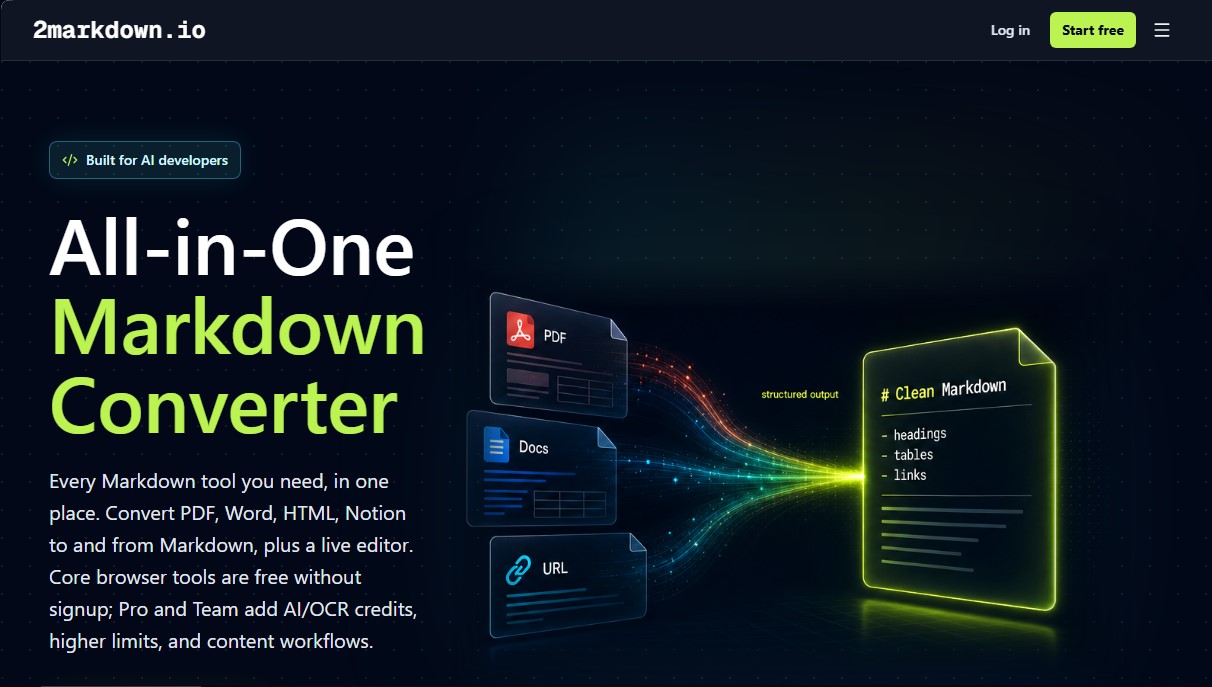
OCR-powered document and website to Markdown converter. Transform PDF, Word, or Notion files and edit text live to feed language models and workflows.
What is 2markdown?
2markdown is a technical platform specializing in the conversion and editing of Markdown files, specifically designed to meet the needs of artificial intelligence developers and knowledge managers. Its primary function is to transform complex documents and web content into structured text, facilitating its integration into digital workflows. It is an essential tool for those who need to process large volumes of information from diverse sources such as PDF, Word, HTML, or Notion, converting them into a lightweight and highly compatible format.
The application uses a browser-first approach, allowing most operations to be performed directly on the user's computer, which ensures data privacy by not storing information on external servers by default. For processing complex files or images, 2markdown employs AI-powered optical character recognition (OCR) technology, ensuring accurate text extraction even from scanned documents. This conversion process is fundamental for preparing data intended for training large language models (LLMs) and building RAG (Retrieval-Augmented Generation) architectures.
Among its most notable capabilities are:
- File and data conversion: Transforms DOCX, PDF, Excel, and JSON files into Markdown while maintaining the integrity of tables and content hierarchies.
- Multi-platform content capture: Enables the extraction of information from URLs, YouTube transcripts, Twitter/X threads, LinkedIn posts, and Reddit or TikTok content, converting them into clean, editable text.
- Live viewer and editor: Features a Markdown Viewer that allows users to preview, edit, and render documents in real-time with support for GitHub Flavored Markdown and LaTeX equations.
- Integration with productivity tools: Facilitates data export and import from Notion, Google Docs, Confluence, and Slack.
From a practical standpoint, 2markdown optimizes token consumption on platforms like ChatGPT or Claude, as Markdown is the preferred format for these models to interpret the structure of the provided context. This results in more accurate responses and more efficient knowledge processing. Likewise, it is a key utility for Obsidian users who want to migrate their notes or for developers who need to automate technical documentation without dealing with manual formatting.
The tool eliminates friction in data preparation, allowing content to be easily chunked and indexed in vector databases. By offering a unified interface for converters, editors, and table tools, 2markdown establishes itself as a comprehensive solution for managing text assets in the modern artificial intelligence ecosystem.
2markdown features and use cases
How to use 2markdown
2markdown FAQ
What is 2markdown and what is it used for?
It is an online platform that provides tools to easily convert files, links, and content from various platforms into Markdown format and vice versa.
Are 2markdown's tools free to use?
Yes, the basic browser-based features are free and do not require registration, though paid plans are available for accessing advanced AI capabilities.
Yes, the basic browser-based features are free and do not require registration, though paid plans are available for accessing advanced AI capabilities.
No. Most conversions are performed locally in your browser, meaning your files never leave your device, ensuring total data privacy.
Can I preview my documents before downloading them on 2markdown?
Yes, the tool features a real-time viewer that lets you edit, preview, and format your content before exporting it to other formats.
What file types can I convert to Markdown using this tool?
You can convert PDFs, Word documents, HTML, Excel spreadsheets, CSV files, and even content directly from Notion or Google Docs.
How does 2markdown help improve my interactions with AI tools?
By converting your documents into clean Markdown, you make it easier for language models to process information more efficiently, structurally, and cost-effectively.
What is the main difference between 2markdown and Pandoc?
Unlike Pandoc, which requires installation and technical command-line knowledge, this platform works instantly in any browser without any setup.
Can I convert Twitter threads or YouTube videos with 2markdown?
Yes, Pro and Team subscriptions allow you to transform content from platforms like YouTube, Twitter, LinkedIn, Reddit, and TikTok into editable Markdown documents.
Which Markdown versions does the platform support?
The tool is compatible with CommonMark and GitHub Flavored Markdown by default, and includes support for LaTeX equations, tables, and task lists.
Do I need to install any software to use 2markdown?
There is no need to install anything on your computer, as all the tools work directly within your preferred web browser.
2markdown pricing and plans
Basic
Free
In-browser Markdown tools with fair usage.
Markdown viewer and editor.
25 AI/OCR credits per month.
Limited (beta) access to content links.
Limited (beta) access to Notion and Google Docs workflows.
Pro
$9 per month (or $5 per month billed annually)
Everything in the Basic plan, ad-free.
1,000 AI/OCR credits per month.
500 content link conversions per month (YouTube, WeChat, Bilibili, Twitter/X, podcasts, TikTok, Xiaohongshu, Reddit, and LinkedIn).
Markdown workflows for Notion and Google Docs.
Standard email support.
Team
$15 per user per month (or $10 per user per month billed annually)
Everything in the Pro plan.
2,000 AI/OCR credits per user per month.
2,000 content link conversions per user per month.
Shared usage pool for the entire team.
Team seat management.
Priority email support.
2markdown Screenshots
2markdown user reviews
Write a review
Checking your session...
2markdown Reviews
Loading reviews...
2markdown alternatives
The Drive AI
AI assistant that automatically organizes, renames, and summarizes team files. Answers questions about content and automates your team’s cloud document management.

Slides Translator
Translate presentations and PDFs while preserving original layouts, images, and formatting. Review each slide and download the final result as a PDF.