AcaDraw
Share
Generate professional scientific illustrations and diagrams from text using AI. Create figures for academic papers and presentations with editable export.
What is AcaDraw?
AcaDraw is an advanced artificial intelligence platform specialized in creating high-quality scientific drawings and illustrations for academic and research fields. Its primary function is to transform natural language descriptions into technical figures ready for publication in prestigious journals. This tool is specifically designed for researchers, scientists, educators, and students who need to generate prototype diagrams, presentation figures, or professional graphical abstracts without requiring graphic design or programming knowledge.
AcaDraw’s operation is based on state-of-the-art AI models—specifically GPT-image-2.5-Flare, optimized for technical precision and scientific rigor, and GPT-image-2.5-Sunburst, ideal for conceptual exploration and expressive visual palettes. Users simply enter text detailing the element they wish to visualize—such as a cellular structure, a chemical mechanism, or an anatomical region—and the system generates a high-fidelity image in seconds. Additionally, it allows for interactive refinement through a chat interface, facilitating the adjustment of specific details via an intelligent conversational flow.
Key functional capabilities and features include:
- 4K Image Generation: Produces illustrations with superior native resolution and crisp details, suitable for digital media or large-format printing.
- Editable SVG Export: The system converts AI-generated images into fully editable vector formats, compatible with professional software such as Adobe Illustrator or Affinity Designer.
- Integration with draw.io and Excalidraw: Allows for the creation of flowcharts and technical diagrams that can be opened and modified directly within these diagramming tools.
- Intelligent Recognition and Conversion: Its analysis engine identifies shapes, paths, and text to ensure a precise transition from image to manageable vectors.
- Specialized Academic Gallery: Includes styles and templates for various disciplines such as neuroscience, cardiology, oncology, pharmacology, and botany.
- Format Compatibility: Supports exports in PNG, JPG, SVG, and PDF, adapting to any editorial requirement.
Using AcaDraw optimizes workflow in the laboratory and academic environments. By automating the creation of medical illustrations and biological diagrams, professionals drastically reduce the time spent on manual drawing. The tool offers multiple aspect ratios (16:9, 4:3, 1:1, among others), making it versatile for designing everything from scientific posters to presentation slides for your computer. Thanks to its focus on technical precision, it ensures that representations of reaction mechanisms or anatomical structures meet the rigorous standards necessary for global scientific communication.
AcaDraw features and use cases
How to use AcaDraw
AcaDraw FAQ
What is AcaDraw and what is it used for?
It is an artificial intelligence platform designed to create high-quality scientific drawings, diagrams, and figures from natural language descriptions.
Does AcaDraw offer a free plan for new users?
Yes, when you sign up, you receive eight free credits that renew every month, allowing you to test the basic generation features at no cost.
What formats can I use to export my scientific creations?
Depending on your chosen plan, you can export your work in PNG, JPG, and PDF formats, as well as fully editable SVG files for use in vector software.
How can I edit an AcaDraw file in a PowerPoint presentation?
Simply drag the SVG file onto the slide, right-click to convert it into a shape, and then ungroup the elements to modify them individually.
Can I use the generated images for academic or commercial publications?
Users on the Plus and Max plans are granted a specific license for commercial use and publication in scientific journals without watermarks.
Which AI models does the tool use?
The platform utilizes the GPT-image-2.5-Flare models for editorial-grade technical precision and GPT-image-2.5-Sunburst for conceptual exploration.
What aspect ratios does the platform support for images?
The system supports multiple formats, including 1:1, 16:9, 4:3, and 21:9, making it adaptable for posters, presentations, slides, or social media.
What is AcaDraw's refund policy if I am not satisfied?
We offer a 14-day money-back guarantee if the product does not meet your expectations after you contact our support team.
AcaDraw pricing and plans
Free Plan – 0 $
- 8 free AI credits per month (renews monthly).
- AI scientific illustration generation (5 credits per use).
- Image generation and export limited to 1K resolution.
- AI diagram creation (3 credits per generation, 1 per edit).
- Smart SVG conversion (1 credit per text, 3 per full conversion).
- Export available in PNG format only.
- Community support.
- Restricted to personal educational use.
Plus Plan – 14,9 $ per month (or 178,8 $ billed annually)
- 800 AI credits per month.
- Native resolution image generation and export up to 4K.
- Export in PNG, JPG, SVG, and PDF formats.
- Watermark-free exports.
- 30-day generation history.
- Priority email support.
- License for scientific journal publication and commercial use.
- Includes the same diagram and conversion features as the Free plan, deducted from monthly credits.
Max Plan – 29,9 $ per month (or 279 $ billed annually)
- 1,800 AI credits per month.
- Native resolution image generation and export up to 4K.
- Export in PNG, JPG, SVG, and PDF formats.
- Watermark-free exports.
- 90-day generation history.
- Priority email support.
- License for scientific journal publication and commercial use.
- Includes full access to diagramming and smart conversion tools.
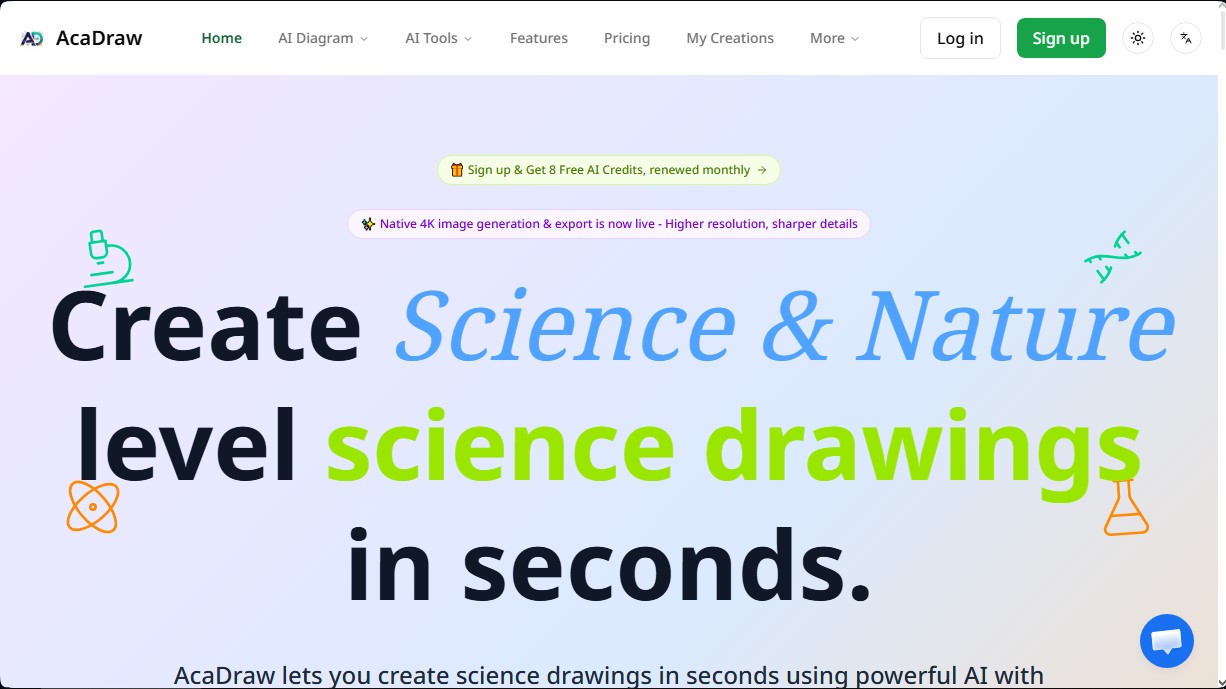
AcaDraw Screenshots
AcaDraw alternatives

Comik AI-Anime Character Creator
Design anime characters using text or images. Generate multi-view design sheets to ensure visual consistency across comics, manga, and animated videos.
AppGrowthKit
Generate AI screenshots and icons for the App Store and Google Play. Features 3D mockups, localization in 42 languages, and ASO audits to boost mobile rankings.

Burning Bridges AI
Create custom videos by inserting your photos into preset scenes. Swap the lead and audience while keeping the original choreography and audio.

KiwiMotion AI
Generate videos, images, voices, and avatars with AI. Features motion control, voice cloning, background removal, and professional file upscaling.