

Share
Generative AI platform to create and edit images, videos, and audio using text prompts. Streamline professional content production and optimize your workflows.
What is Adobe?
Adobe Firefly is an advanced generative AI platform designed specifically for the creative and multimedia sectors. This tool allows users to transform conceptual ideas into visual, audio, and video assets through text prompts or reference images. Unlike other generic models, Firefly integrates natively into professional workflows, enabling designers, video editors, and content creators to optimize their production processes from their desktop or any device compatible with the Adobe ecosystem.
The primary function of this AI tool is text-to-image generation, which allows for the creation of complex visual compositions with a high level of detail and aesthetic consistency. Additionally, it stands out for its smart image editing capabilities, including generative fill features that automatically and realistically add, remove, or modify parts of a photo. Adobe’s technology also extends to video generation and creating clips from descriptions, streamlining both the pre-production and post-production phases of multimedia projects.
Its most relevant functional capabilities include:
- Advanced Image Generation: Creating high-quality visual content using detailed prompts and optimized AI models.
- Generative Editing: Modifying specific elements within an image, allowing for precise adjustments without the need for laborious manual processes.
- Text-to-Video: Converting text-based ideas into video scenes and transforming static images into dynamic clips.
- Audio and Synthesized Voices: Creating sound resources and custom voices for audiovisual projects.
- Firefly Boards: Collaborative tools designed to organize visual collections and develop creative concepts as a team.
- Integration with Adobe Creative Cloud: Direct access to AI features within industry-standard applications such as Photoshop, Illustrator, and Adobe Express.
The inner workings of Adobe Firefly are based on deep learning models trained to interpret natural language and translate it into graphic or multimedia elements. The system operates on a generative credits mechanism, where each creation or editing action consumes processing units based on the complexity of the task. This technical approach provides scalability tailored to every user profile, from occasional use to high-volume asset production.
This platform is especially useful for professionals who require AI design tools that guarantee production-ready results. Since it is linked to the Adobe environment, generated assets can be refined using professional-grade precision tools, maintaining the technical consistency required in fields like advertising, graphic design, and social media content creation. Its practical focus helps drastically reduce turnaround times, allowing users to focus on creative direction while the AI manages the technical execution of visual and auditory elements.
Adobe features and use cases
How to use Adobe
Adobe FAQ
What is Adobe Firefly and what is it used for?
Adobe Firefly is a generative artificial intelligence platform designed to create and edit images, videos, and audio using text descriptions.
Can I use Adobe Firefly for free?
Yes, Adobe offers a free version that provides access to basic content generation features with a limited number of monthly credits.
What image editing features does Adobe Firefly offer?
It allows you to generate new images from scratch, use generative fill to modify specific parts of a photo, and apply smart effects directly.
How do Adobe generative credits work?
Credits are units consumed every time you use AI to generate or edit content; they renew monthly based on your specific plan.
Can Adobe Firefly be integrated with other design applications?
The tool integrates seamlessly with Creative Cloud programs like Photoshop and Illustrator, allowing you to apply AI features within professional workflows.
What are the benefits of the Adobe Firefly Pro plan?
This plan offers a higher number of generative credits, access to premium features, longer video creation capabilities, and advanced collaborative tools.
Does Adobe Firefly allow you to generate audio files?
Yes, the platform includes tools for creating audio and custom synthetic voices that can be used in various multimedia projects.
What is the text-to-video feature in Adobe Firefly?
It is a tool that allows you to transform conceptual ideas or written descriptions into video clips, or convert static images into motion content.
How much do Adobe’s paid plans cost?
Plans vary depending on user needs, with options ranging from approximately $9.99 to $199.99 per month.
What are Firefly Boards within the tool?
They are collaborative workspaces designed to organize visual collections and efficiently develop design ideas as a team.
Adobe pricing and plans
Free Plan
Cost: Free.
- Basic AI content generation via the web or Creative Cloud.
- Limited monthly generative credits.
Firefly Standard
Cost: Approximately US$9.99/mo.
- 2,000 generative credits per month.
- Access to image and vector generation.
- Short-form video creation.
Firefly Pro
Cost: Approximately US$19.99 to US$29.99/mo.
- 7,000 generative credits per month.
- Access to premium features.
- Longer video generation durations.
- Access to Firefly Boards for visual collections and team design.
Firefly Premium
Cost: Approximately US$199.99/mo.
- 50,000 generative credits per month.
- Unlimited access to the advanced video model.
- Tools for large-scale production.
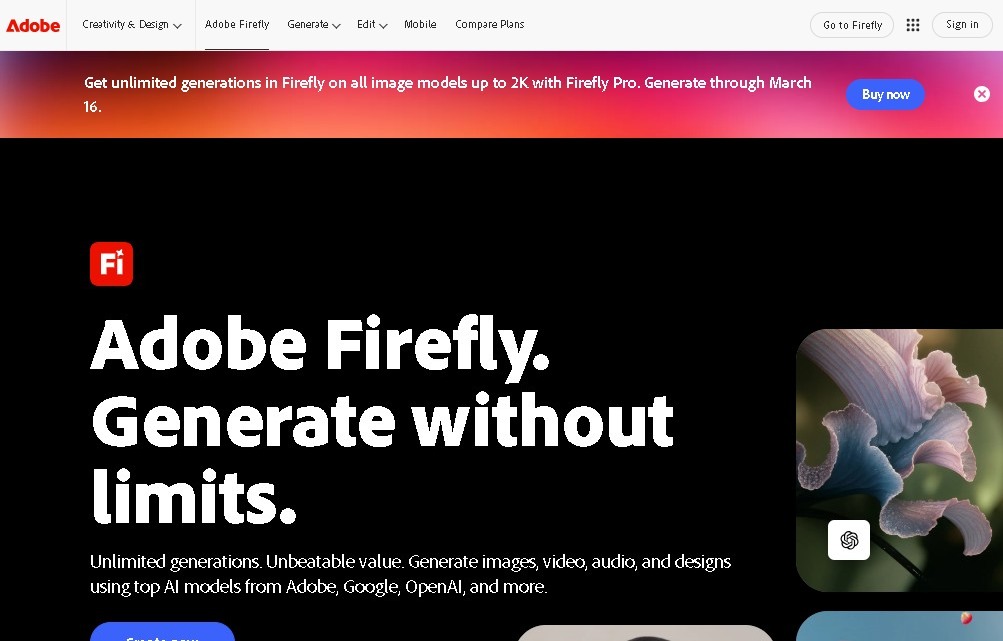
Adobe Screenshots
Adobe alternatives


NeotypeLab
NeotypeLab uses AI to plan paint schemes for Gunpla, mecha girls and Zoids, with real hobby paint codes, a spraying sequence, a shopping list and an HD preview.



ImageToSTL.org
Convert JPG and PNG images into STL files for 3D printing using AI. Generate detailed 3D models ready for instant download.
Image to 3D
Convert 2D images and sketches into textured 3D models using AI. Export in GLB, STL, or USDZ for video games, 3D printing, and augmented reality.