

Share
An environment for running persistent AI agents in your own cloud. Manage multiple models with shared memory, security rules, and task monitoring.
What is agenthost.space?
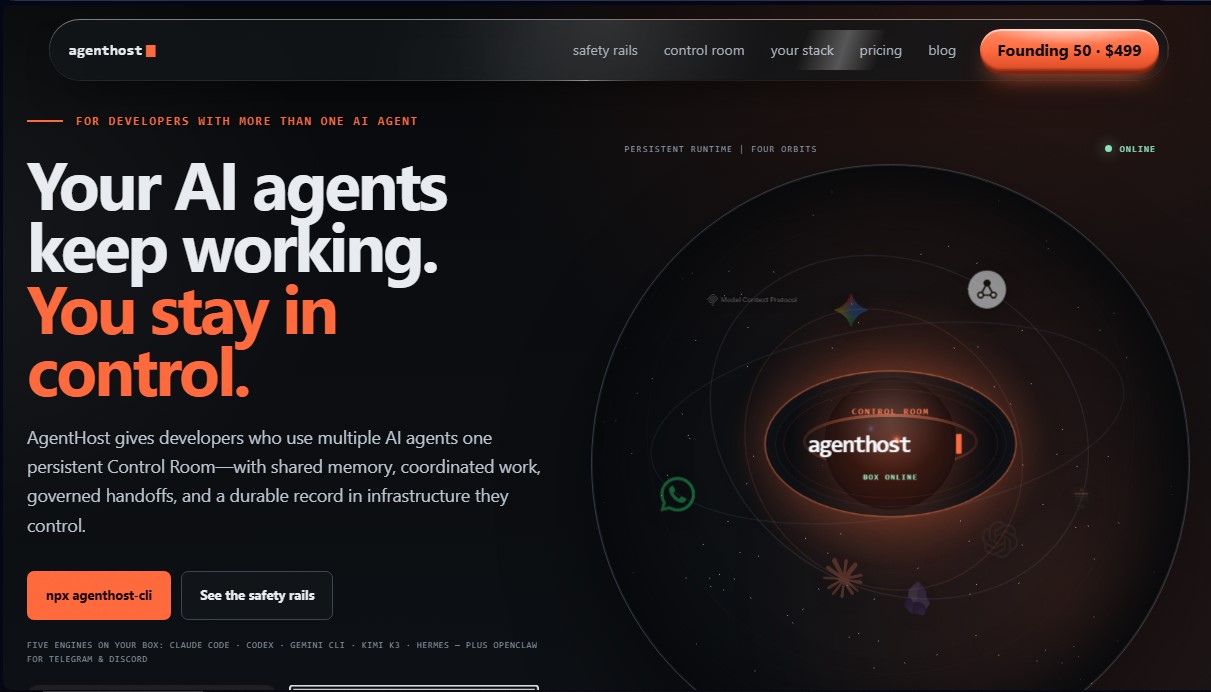
agenthost.space is a persistent execution infrastructure designed specifically for developers managing multiple AI agents simultaneously. Unlike conventional interfaces tied to volatile sessions that lose context upon closing, this tool provides a centralized control environment (Control Room) where agents maintain their memory, work state, and tools continuously. Its fundamental purpose is to allow users to deploy a "sovereign box" within their own cloud infrastructure, ensuring that processes are not interrupted when turning off the computer or closing a browser tab.
The tool operates via a command-line interface (npx agenthost-cli) that facilitates the migration of existing agents, preserving their skills, MCP (Model Context Protocol) server configurations, and plugins. agenthost.space natively integrates advanced engines such as Claude Code, Codex, Gemini CLI, and Hermes, as well as OpenClaw for managing communications on Telegram and Discord. The technology is based on a 24/7 persistent runtime that runs directly in the developer's cloud account, ensuring that credentials, API keys, and work history remain private and under the user's total control.
Key capabilities include the safety rails system, designed for the governance of autonomous agents. This system allows for:
- Mandatory human approval: Establishes control gates for critical actions such as code deployment, file deletion, or sending messages.
- Spending and token limits: Configuration of maximum budget ceilings and compute usage for each workflow to avoid unforeseen costs.
- Cross-engine review: Allows one agent (such as Codex) to audit the work performed by another (such as Claude) before marking a task as complete.
- Shared memory (Brain): A persistent storage system in Markdown format that allows all agents to access a unified history and project plans.
- Push notifications: The system sends alerts to your mobile device when a task requires manual intervention or has completed a work cycle.
The practical benefit of agenthost.space lies in transforming ephemeral chat tools into a robust, governed engineering system. It is ideal for implementing complex workflow automation, such as repository security audits, writing changelogs, or monitoring metrics, without constant intervention. As a self-hosted solution, the developer maintains sovereignty over their data, allowing autonomous agents to work securely in the background with a complete and durable audit trail.
agenthost.space features and use cases
How to use agenthost.space
agenthost.space FAQ
What exactly is agenthost.space, and what benefits does it offer developers?
It’s a platform that provides a persistent execution environment for multiple AI agents, enabling them to maintain memory and task states continuously within your own cloud infrastructure.
Do AgentHost agents really keep working if I shut down my computer?
Yes, the system runs 24/7 in your cloud, allowing scheduled tasks and review processes to continue even when you're offline.
How does AgentHost ensure the security of my keys and sensitive data?
Your credentials and API keys never pass through the tool's external servers; they are sent directly to your own cloud provider's encrypted storage, keeping you in full control.
What kind of security controls can I set up on agenthost.space?
You can configure guardrails that include spending limits per workflow, time restrictions, token caps, and mandatory human approval for critical actions.
Which AI agents are currently integrated into the AgentHost ecosystem?
The standard stack includes tools like Claude Code, Codex, Gemini CLI, Hermes Agent, and OpenClaw for integration with messaging channels like Telegram and Discord.
What is the shared memory or "Brain" feature?
It’s a persistent memory system stored in Markdown format that allows all your agents to share task history, plans, and knowledge across different sessions.
How is agenthost.space billed, and are there any additional costs?
The software is free to use in its self-hosted version, though you are responsible for paying your cloud and AI model providers separately based on your usage.
Do I need to install any external apps to manage agent memory?
No, the memory feature is built-in. However, the system is compatible with note-taking apps like Obsidian or Notion if you prefer to view your data there.
How do I get started with AgentHost in my own development environment?
You can start installing and configuring your agent team by running the npx command from your terminal to deploy the infrastructure to your cloud account.
What happens if I decide to stop using the tool and want to delete my data?
You can easily remove the application, data volumes, and secrets from your cloud account by running the destroy command from the command line interface (CLI).
agenthost.space pricing and plans
Self-serve
Price: 0 € (AgentHost fee). Cloud infrastructure and AI model provider costs are billed separately.
Migration of existing agents (skills, memory, MCP, and plugins).
Persistent agent team, "Brain" and "Loops" features.
Access to the Control Room, task dashboard, budgets, and audit trail.
Documentation and community support.
Governance constraints: limit of 6 runs, 45-minute duration, 150,000 tokens, and 5 $ spend per workflow.
Founding Operator
Price: 29 $/month (AgentHost fee). Cloud and model costs are separate.
Live migration to your own cloud infrastructure.
Control Room setup for mobile devices.
"Starter stack" installation and custom "Loops" configuration.
Priority support and direct line of contact.
Lock in the founding rate for as long as the subscription remains active.
Founding 50 · Lifetime
Price: 499 $ (one-time payment with code TOMORROWSHERE). Cloud and model costs are separate.
White-glove setup of your persistent and governed agent team.
Lifetime AgentHost product updates.
Access to an exclusive private channel for founding members.
agenthost.space Screenshots
agenthost.space user reviews
Write a review
Checking your session...
agenthost.space Reviews
Loading reviews...
agenthost.space alternatives



TriggerFlow
Automate Windows apps without APIs using computer vision and AI. Manage PC fleets, monitor processes, and provide centralized remote control.

Relevance AI
Relevance AI lets companies design AI agents that take on work in sales, customer support, marketing, HR and operations, wired into the tools they already use.

