

Share
Turn videos into visual effects with AI rotoscoping, PBR map generation, and 3D lighting. Create professional assets for post-production workflows.
What is Beeble.ai?
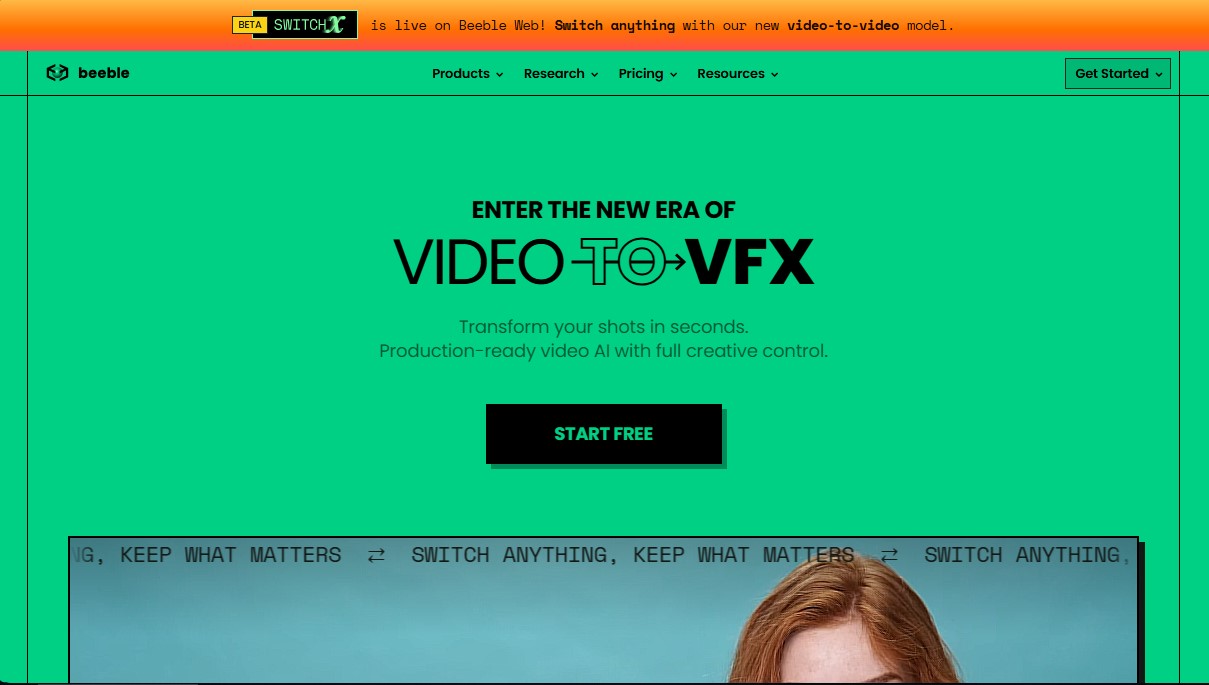
Beeble.ai is an advanced AI platform for video and visual effects (VFX) designed to transform conventional footage into high-quality, post-production-ready digital assets. This tool allows creators and VFX studios to convert any shot into a 2.5D element with camera tracking, automatic rotoscoping, and relighting capabilities, optimizing compositing workflows without the need for reshoots.
The application's technological core is based on SwitchLight 3, a next-generation AI model that decomposes original footage into multiple PBR (Physically Based Rendering) maps. Through this process, the tool automatically generates Normal, BaseColor, Metallic, Depth, Roughness, and Specular passes, along with a precise Alpha channel for perfect subject cutouts. This approach allows recorded material to interact naturally with virtual environments and digital lights, facilitating a next-generation compositing workflow.
Among its functional capabilities, Beeble.ai offers:
- AI Rotoscoping: Automatically generates clean, artifact-free mattes, saving hours of manual labor in subject selection.
- Beeble Editor: A real-time 3D relighting environment where physical light models can be applied. It allows for light falloff adjustments and video-based lighting so the subject reacts consistently to dynamic backgrounds.
- DCC Integration: Generated passes can be exported and imported directly into professional software like Blender or other digital content creation packages, eliminating complex node or shader setups.
- VFX Asset Generation: Transforms source video into an asset with depth and volume that can be integrated into any virtual scene with total creative control.
The tool adapts to different professional profiles through two modes of use. Beeble Cloud is the browser-accessible version, utilizing cloud rendering to process 2K resolution videos quickly and easily from any computer. Meanwhile, Beeble Studio is a desktop application designed for high-performance workflows. This local version leverages the power of the user's NVIDIA GPU to process videos in 4K resolution, allowing for unlimited work with EXR sequences and ensuring data privacy by not uploading material to the web.
Beeble.ai positions itself as an essential solution for VFX artists, independent filmmakers, and virtual production studios looking for AI post-production tools that not only automate tasks but also offer precise technical control over lighting and the integration of real-world elements into digital worlds.
Beeble.ai features and use cases
How to use Beeble.ai
Beeble.ai FAQ
What is Beeble.ai and what are its core features?
It is an AI platform that converts video into VFX assets by generating PBR passes, automatic rotoscoping, and camera tracking in just seconds.
What is the difference between the cloud version and Beeble Studio?
The Cloud version runs in your browser with processing on external servers, while Beeble Studio is a local application for Windows and Linux that uses your own graphics card for unlimited rendering.
Can I use Beeble.ai for free?
Yes, the Starter plan is free and provides thirty monthly credits to process videos up to five seconds long in 2K resolution for non-commercial purposes.
What types of files and render passes does the tool generate?
Beeble generates high-quality, production-ready maps including base color, normals, depth, metallic, roughness, specular, and precise rotoscoping masks.
Is it possible to change the lighting of a scene recorded with Beeble.ai?
Yes, the tool includes a real-time relighting editor that uses physical light models to modify the lighting of your shots without the need for reshoots.
What are the minimum requirements to install the desktop version?
You need a Windows or Linux PC with an Intel or AMD processor from 2020 or later and an NVIDIA graphics card with at least twelve gigabytes of video memory.
Does the platform allow commercial use of the generated projects?
Commercial use is permitted for subscribers of the Cloud Creator and Professional plans, as well as for users with Indie and Standard licenses for the desktop version.
How are Beeble.ai results integrated into other 3D software?
The tool offers plugins to import passes directly into programs like Blender and other professional workflows without the need to manually configure nodes or materials.
Beeble.ai pricing and plans
Starter (Cloud)
Price: Free.
- 30 credits per month.
- 2K resolution.
- 5-second video limit.
- Access to basic Video-to-VFX features and Beeble Editor.
- Non-commercial use.
Creator (Cloud)
Price: $19 per month ($16 per month billed annually).
- 540 credits per month.
- 2K resolution.
- 30-second video limit.
- Batch upload.
- Access to Beeble Editor and commercial use.
- Priority support.
Professional (Cloud)
Price: $75 per month ($60 per month billed annually).
- 2,400 credits per month.
- 2K resolution.
- 60-second video limit.
- Batch and image sequence uploads.
- Access to Beeble Editor and commercial use.
- Priority support.
Indie (Beeble Studio - Local)
Price: $60 per month ($42 per month billed annually).
- Unlimited local rendering using your own GPU.
- 4K resolution.
- 1-hour video limit.
- Render queue and EXR sequence export.
- Access to Beeble Editor.
- Limited commercial use (for organizations with less than $200,000 in annual revenue).
Standard (Beeble Studio - Local)
Price: $400 per month ($250 per month billed annually).
- Unlimited local rendering using your own GPU.
- 4K resolution.
- 1-hour video limit.
- Render queue and EXR sequence export.
- Early access to new features.
- Full commercial use for studios and production companies.
Beeble.ai Screenshots
Beeble.ai alternatives

Victoria Secret Runway
Create fashion show videos by integrating your face into real scenes. Just upload a photo to replace professional models and walk the runway.

VidLux Image to Video AI
Generate cinematic videos and animations from images or text. Control camera movement and use multiple AI models all in one place.
SparkVid | Image to Video AI Generator
Transform images into realistic videos while maintaining face and object fidelity. Control camera movement with access to various AI engines.
Choicer Voicer
AI tool for voice cloning, video translation, and voiceovers. Design unique sounds and dub games, animations, or social media content.
Background Remover Video
Automatically remove backgrounds from any video without a green screen. Export in 4K with transparent or solid colors while preserving original audio.