

Share
Generate cinematic videos and animations from images or text. Control camera movement and use multiple AI models all in one place.
What is VidLux Image to Video AI?
VidLux Image to Video AI is an advanced platform designed to transform static images into dynamic content using generative artificial intelligence. This tool allows users to easily add natural movement and cinematic effects to photos, illustrations, or digital designs from their computer. Its primary function is to serve as a unified workspace that integrates multiple cutting-edge models, facilitating the creation of high-quality videos without requiring technical expertise in traditional video editing.
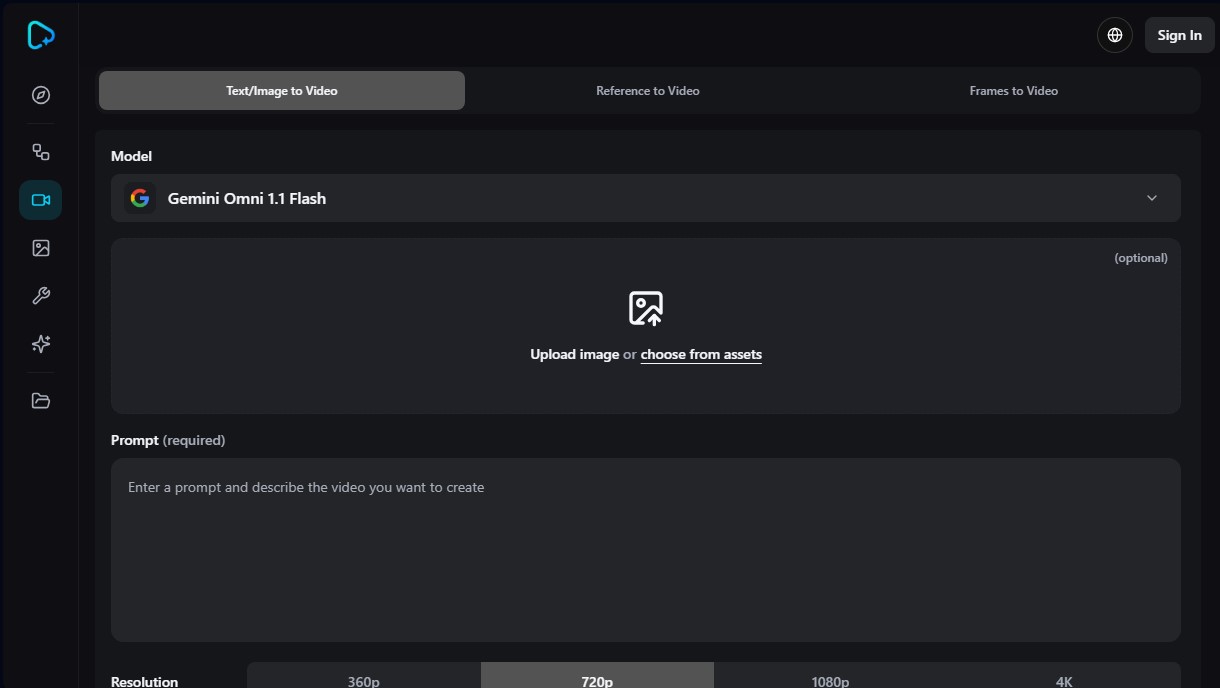
The application's architecture stands out for its technical versatility. Unlike other closed solutions, VidLux allows you to choose from several industry-leading processing engines, such as Veo 3.1, Kling 3.0, Seedance 2.0, and Wan 2.6. Each model offers specific advantages: from the visual realism and rich details of Veo to the precise character control and expressive camera movements of Kling. Additionally, it utilizes technologies like Gemini Omni 1.1 Flash to optimize prompt interpretation, ensuring the resulting animation is consistent with the provided text description.
Its most relevant functional capabilities include:
- Start and End Frame Control: Allows you to upload an initial and a final image to define the exact movement trajectory, ensuring controlled transitions and fluid visual transformations.
- Prompt-based Animation: The system interprets text instructions to apply camera movements (zoom, tracking, panning) or specific actions to subjects while maintaining the consistency of the original style.
- Resolution and Format Adjustments: Supports exports in various qualities, including 4K resolution, with customizable aspect ratio and clip duration options.
- Video Reference and Frames to Video: The ability to use existing clips or image sequences as a guide to generate new visual pieces with aesthetic coherence.
This ecosystem is highly useful for marketing professionals, content creators, and designers looking to streamline their workflow. In the e-commerce sector, it facilitates product animation for social media ads. Concept artists can bring portraits or landscapes to life while maintaining the subject's identity, while in the pre-production phase, it is ideal for generating animated storyboards and previewing scenes before actual production.
The generation process is straightforward and functional. The user simply needs to upload an image (or choose a resource from their library), select the AI model that best fits their goal, and write a descriptive prompt. After configuring duration and format parameters, VidLux Image to Video AI processes the information to deliver a video ready for download and professional use.
VidLux Image to Video AI features and use cases
How to use VidLux Image to Video AI
VidLux Image to Video AI FAQ
What is VidLux Image to Video AI, and what is it used for?
It is an artificial intelligence tool designed to transform static images, illustrations, or product photos into videos with natural movement and cinematic quality.
Which animation models can I use in VidLux?
The platform allows you to choose from several advanced models, such as Veo 3.1, Kling 3.0, Seedance 2.0, and Wan 2.6, to tailor the motion style to your specific needs.
Can I control the start and end frames of my video in VidLux Image to Video AI?
Yes, the tool includes a feature to upload both a starting and an ending image, allowing you to precisely define how the animation transition begins and ends.
What resolutions can I use to generate content?
You can configure your creations in various output qualities, with options ranging from 360p to 4K resolution for professional-grade results.
Will my generated videos have a watermark?
Downloads made through any of the paid subscription plans—such as the Standard, Pro, or Ultra tiers—are completely watermark-free.
How can I contact VidLux technical support if I have an issue?
For any inquiries regarding payments, tool functionality, or general support, you can send an email to [email protected].
What other types of content can I create with this tool?
In addition to animating images, VidLux offers features for text-to-video, video references, frame-to-video conversion, and text-to-image generation.
How many videos can I generate per month with the Standard plan?
The Standard plan allows for up to eighty video generations per month and includes access to all image and video models available in the workspace.
VidLux Image to Video AI pricing and plans
Free Version
Try the tool for free with no upfront cost (check the official website for specific credit limits).
Standard Plan: $29 per month ($23 per month billed annually)
800 credits per month.
Limit of up to 80 videos or 400 images per month.
Access to all image and video models.
4 concurrent tasks.
Fast generation speed.
No watermarks.
Privacy controls and copyright protection.
Standard support.
Pro Plan: $49 per month ($34 per month billed annually)
2,200 credits per month.
Limit of up to 220 videos or 1,100 images per month.
Access to all image and video models.
6 concurrent tasks.
Fast generation speed.
No watermarks.
Privacy controls and copyright protection.
Standard support.
Ultra Plan: $129 per month ($77 per month billed annually)
6,000 credits per month.
Limit of up to 600 videos or 3,000 images per month.
Access to all image and video models.
8 concurrent tasks.
Fast generation speed.
No watermarks.
Privacy controls and copyright protection.
Standard support.
Starter Credits Pack: $69 (one-time payment)
2,800 credits.
Up to 280 videos or 1,400 images.
Access to all image and video models.
4 concurrent tasks.
Fast generation and no watermarks.
Includes privacy controls and standard support.
Pro Credits Pack: $99 (one-time payment)
4,500 credits.
Up to 450 videos or 2,250 images.
Access to all image and video models.
4 concurrent tasks.
Fast generation and no watermarks.
Includes privacy controls and standard support.
Advanced Credits Pack: $199 (one-time payment)
10,000 credits.
Up to 1,000 videos or 5,000 images.
Access to all image and video models.
4 concurrent tasks.
Fast generation and no watermarks.
Includes privacy controls and standard support.
VidLux Image to Video AI Screenshots
VidLux Image to Video AI alternatives

BurningBridgesAI.app
Turn a photo into Drake’s viral dance. AI automatically recreates the choreography and gestures so you can star in the trend without recording a thing.

VideoWeb Video Generator
Generate professional AI videos from text or images. Features realistic avatars, automated scripts, and optimized formats for marketing and social media.
Motion Transfer AI Video Generator
Animate character photos using reference videos. Precisely transfer gestures, dances, and body movements from a clip to an image for realistic results.


AlreadyRan
AlreadyRan brings dozens of AI image, video and audio models into one web studio with a single credit balance and the cost shown before every generation.
