Share
AI video editor that automatically removes silences and outtakes. Create animated captions, punchy titles, and B-roll to streamline your post-production workflow.
What is BlitzClip?
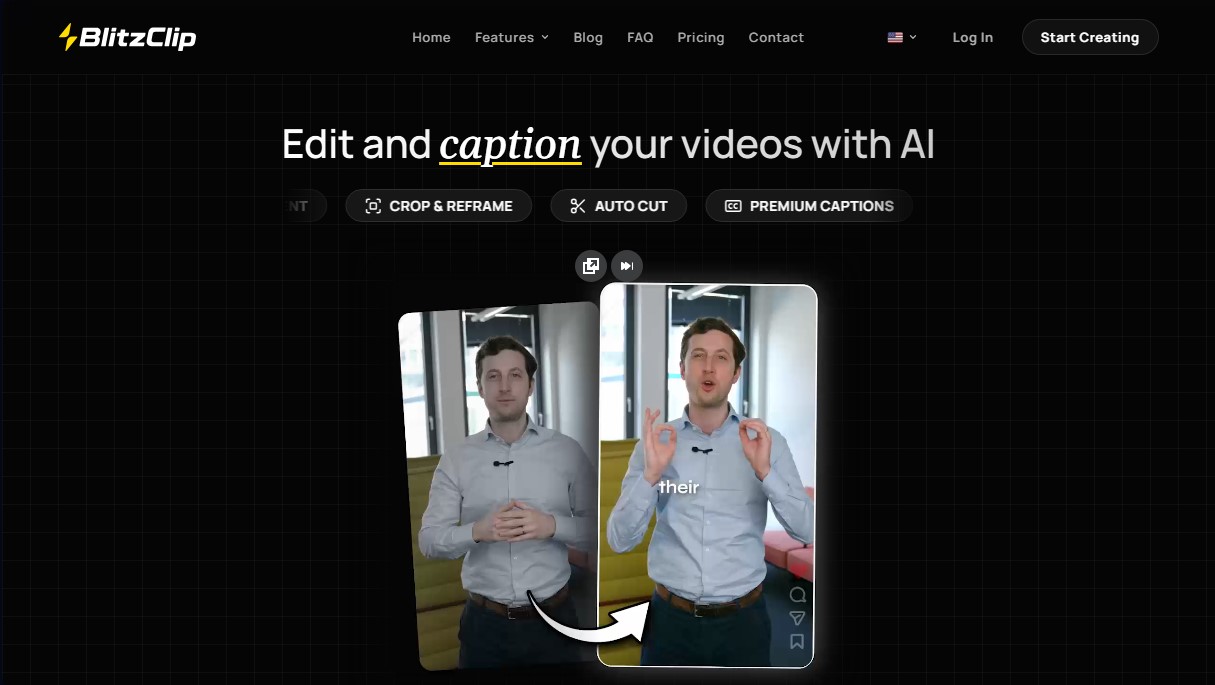
BlitzClip is an advanced AI-powered video editor specifically designed to streamline short-form content post-production. This tool acts as a comprehensive editing assistant that automates cutting, captioning, and visual enhancement, allowing users to efficiently transform raw footage into professional pieces. Its architecture is geared toward both individual creators and agencies managing a high volume of clients who need to optimize turnaround times without compromising technical precision.
At its core, BlitzClip uses Natural Language Processing algorithms to analyze audio and execute the Auto Cut feature, which automatically removes silences, filler words, and outtakes. Once the video is processed in the background, the system generates animated captions and hook titles based on the context of the speech. The platform allows for deep customization through an intuitive editor where users can fine-tune the timing of each word, change visual styles, or modify the structure of the AI-generated cuts.
Key functional capabilities include:
- Automatic B-Roll Generation: The tool selects and inserts relevant supporting clips from external libraries to make the visual content more dynamic.
- Custom Dictionaries: Allows you to define technical terms, brand names, or specific jargon to ensure transcription accuracy from the very first try.
- Team Management and Collaboration: Includes features to invite collaborators, manage permissions, and work on joint projects within a single workspace.
- Batch Workflows: Facilitates the simultaneous uploading and exporting of multiple files, making it ideal for high-volume content creation.
- Brand Customization: Supports uploading custom fonts and creating presets to maintain visual consistency across all projects.
To ensure maximum flexibility, BlitzClip offers Auto-Reframing (Crop & Reframe) tools, ensuring content is optimized for various platforms and devices, such as mobile or desktop. Users can export their projects in .mp4 format with high-quality resolutions. Additionally, for companies with specific integration needs, the platform offers an on-demand API to connect its editing capabilities with other software automations, establishing itself as a versatile solution for modern video editing productivity.
BlitzClip features and use cases
How to use BlitzClip
BlitzClip FAQ
What exactly is BlitzClip, and what is it used for?
BlitzClip is an AI-powered video editor that automatically removes silences and bad takes while adding animated captions and catchy hook titles.
Can I use BlitzClip for free?
Yes, you can create up to three free projects per month with a basic account to test all of the tool's core features.
What file formats can I upload to the platform?
The tool supports .mp4 and .mov file uploads, while exports are always generated in .mp4 format.
Can I make manual adjustments after the AI edits my video?
Absolutely. BlitzClip includes a full editor where you can fine-tune the timing of every word, modify cuts, and customize the caption styles.
Does BlitzClip allow the use of custom fonts?
Yes, professional plans allow you to upload your own fonts so that your captions and titles always align with your brand's visual identity.
How does the automatic B-roll selection work?
The AI analyzes your video's content and automatically adds relevant stock clips pulled from the Pexels library.
What happens if I'm not satisfied with the result after making a purchase?
If the product doesn't meet your expectations, you can request a full refund by contacting our support team within the first fourteen days of your subscription.
Is there an option for team collaboration within the tool?
Yes, BlitzClip allows you to invite other members to your workspace and manage their permissions to collaborate on content editing.
Can I process multiple videos at the same time?
Batch workflows allow you to upload and export multiple videos simultaneously to streamline large-scale content production.
BlitzClip pricing and plans
Free Version: 0 €
3 free projects per month.
Creator Plan: 20 € per month per member (or 12 € per month with 144 € annual billing).
20 videos per month per member.
AI captions.
AI auto-cut.
Auto hook titles.
500 MB limit per video.
8-minute maximum duration per video.
Up to 1080p export at 30 FPS.
Save custom presets.
Professional Plan: 45 € per month per member (or 27 € per month with 324 € annual billing).
50 videos per month per member.
AI captions.
AI auto-cut.
Auto hook titles.
AI auto B-roll.
1 GB limit per video.
10-minute maximum duration per video.
Up to 1080p export at 60 FPS.
Save custom presets.
Custom font uploads.
Custom dictionaries.
Business Plan: 85 € per month per member (or 51 € per month with 612 € annual billing).
120 videos per month per member.
AI captions.
AI auto-cut.
Auto hook titles.
AI auto B-roll.
2 GB limit per video.
30-minute maximum duration per video.
Up to 4K export at 60 FPS.
Save custom presets.
Custom font uploads.
Custom dictionaries.
BlitzClip Screenshots
BlitzClip alternatives

Osmo Studio
AI animation studio for professional motion graphics and videos. Control every detail, collaborate with teams, and export with transparent backgrounds.

AI Video Text Remover
Use AI to remove subtitles, logos, and watermarks from your videos. Automatically reconstruct backgrounds for a clean, blur-free result.