
Share
Create short social media videos from Reddit threads or songs. Includes AI voices, captions, and auto-posting to TikTok, Instagram, and YouTube.
What is Brainrotify?
Brainrotify is an advanced automated content creation platform specifically designed to generate short-form videos optimized for social media networks like TikTok, YouTube Shorts, and Instagram Reels. Its primary function is to transform ideas, Reddit threads, scripts, or audio tracks into viral clips with a "brainrot" aesthetic, characterized by dynamic backgrounds, AI narration, and integrated auto-captions that drive user retention.
The tool operates through two main engines: one for video and one for audio. The video engine allows for the creation of pieces from scratch using text threads, scripts, or PDF links. Users can choose from various specialized modes, such as Reddit stories, iMessage conversations, 3D animations, character scenes, or the popular Minecraft gameplay format with voiceovers. Meanwhile, the audio engine stands out for its AI Lyric Swap feature, which enables users to replace song lyrics while maintaining the original melody, rhythm, and timing through AI-guided alignment technology.
Its functional capabilities and practical benefits include:
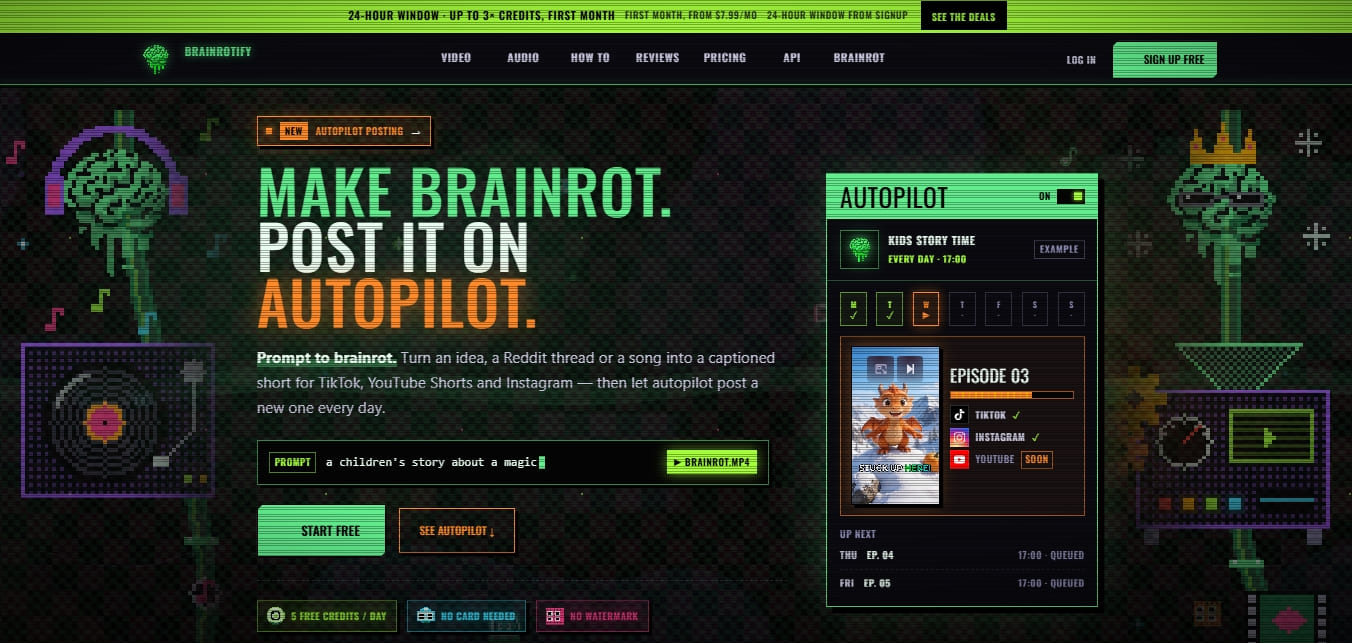
Autopilot: An automation system that lets you schedule a series of content for the tool to create and publish daily to connected TikTok and Instagram channels without manual intervention.
RVC Voice Library: Access to realistic synthetic voices and voice cloning technology to personalize video narration.
Batch Generation: The ability to render multiple videos simultaneously, optimizing content creators' workflows.
Claude Integration: Uses advanced language models to intelligently plan niches and content strategies via prompts.
AI Audio Editor: Tools to extend, edit, and generate full songs or specific snippets.
The creation process consists of four straightforward stages: selecting the mode (video or audio), inputting the source (script, link, or lyrics), configuring the voice and visual style, and exporting the final file in MP4 or MP3 format. As a cloud-based AI tool, rendering takes place on its servers, allowing you to work from any computer or mobile device without consuming local resources.
For professional users and businesses, Brainrotify offers a Developer API to integrate its rendering engine into external workflows. This facilitates mass content generation through authenticated requests, delivering finished clips ready for distribution. It is a comprehensive solution for those looking to maximize their digital presence through short-form video automation and trend-based content creation.
Brainrotify features and use cases
How to use Brainrotify
Brainrotify FAQ
What is Brainrotify and what is it used for?
It is an AI tool designed to create viral short-form videos for TikTok, Reels, and YouTube Shorts from ideas, Reddit threads, or songs.
How much does it cost to generate a video with Brainrotify?
Most standard videos and lyric swaps consume two credits for every render performed.
What is included in the tool’s free plan?
New users receive five daily credits up to a maximum total of fifteen credits, with no credit card registration required.
Do videos downloaded from Brainrotify have watermarks?
No, all exports are watermark-free, even for users on the platform's free version.
What is Brainrotify’s Autopilot feature?
It is a Business plan option that allows you to fully automate the daily creation and posting of episodes on TikTok and Instagram without manual intervention.
How does the lyric swap work in Brainrotify?
You need to upload an original audio file and write new lyrics so the AI can generate a sung version that maintains the melody and rhythm of the original source.
Which social media platforms can the content be posted to?
Videos are optimized for TikTok, Instagram Reels, and YouTube Shorts, with direct account connection available on higher-tier plans.
Is there a Brainrotify API for developers?
Yes, the tool offers a documented API to generate videos and audio automatically through authenticated requests.
Is it possible to customize the voices in Brainrotify?
Users can choose from various narrators or use the RVC voice library available in subscription plans for their projects.
What is the difference between the Pro and Creator plans?
The Pro plan offers fifty monthly credits and two connected channels, while the Creator plan increases to one hundred and fifty credits and allows for managing up to five channels.
Brainrotify pricing and plans
Free
5 daily credits up to a total maximum of 15 credits (one-time grant).
Access to video modes: Brainrot, Story, Reddit, iMessage, Post Reveal, and Quiz.
No watermarks on exports.
No credit card required.
Pro: $7.99 per month
100 credits for the first month (limited-time offer), then 50 monthly credits.
Conversation videos with multi-character dialogue.
90-second and 2-minute video lengths.
Access to RVC voice library.
Batch video generation.
Connect and post to 2 channels.
No watermark.
Creator: $19.99 per month
450 credits for the first month (limited-time offer), then 150 monthly credits.
Cast of up to 6 characters per video.
Connect and post to 5 channels.
Includes all creation tools and video modes from the Pro plan.
No watermark.
Business: $39.99 per month
1,200 credits for the first month (limited-time offer), then 400 monthly credits.
Autopilot feature: automatically create and post episodes daily.
Cast of up to 10 characters per video.
Connect and post to 15 channels.
Custom character uploads.
No watermark.
Developer API: starting at $16 per month
10 free trial credits when creating your first API key.
Access to endpoints for automated video and audio generation.
Billing and rate limits independent from creator plans.
Brainrotify Screenshots
Brainrotify alternatives
Motion Transfer AI Video Generator
Animate character photos using reference videos. Precisely transfer gestures, dances, and body movements from a clip to an image for realistic results.

AI Microdrama Generator by Picsart
Create vertical micro-drama series with consistent characters. Plan seasons, generate scripts, and produce AI-powered short episodes with cliffhangers.


Burning Bridges AI
Create custom videos by inserting your photos into preset scenes. Swap the lead and audience while keeping the original choreography and audio.
AI Migos Video
Turn two photos into a Hotel Lobby-style music video. Automatically generate a rap performance with your faces, original choreography, and music in seconds.