Share
Summarize Microsoft Teams meetings and calls without visible bots. Generate AI minutes, tasks, and decisions. Also compatible with Zoom and Google Meet.
What is CallScrib?
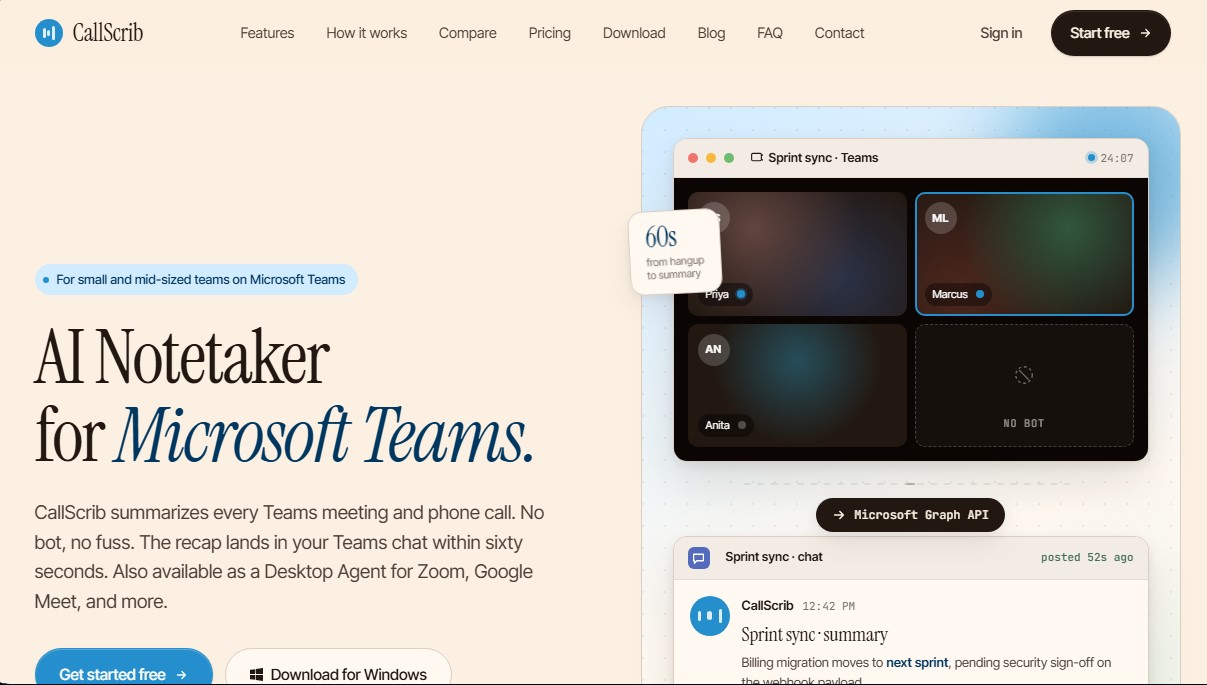
CallScrib is an AI meeting assistant designed to optimize conversation tracking on Microsoft Teams and other communication platforms. Unlike other note-taking systems, this tool stands out by being completely invisible to participants, as it does not use bots that join the session or interrupt the display. Instead, it utilizes the Microsoft Graph API to process transcripts once the call has ended, ensuring clean and professional integration into the corporate workflow.
CallScrib's primary function is to automatically generate structured summaries in less than 60 seconds after hanging up. These reports are not simple literal transcripts; they intelligently extract decision points, pending tasks, and agreed-upon next steps. One of its most distinguishing capabilities is its compatibility not only with video conferences but also with PSTN phone calls made through Teams, making it a comprehensive solution for sales and customer service departments.
Regarding its technology, the system utilizes Mistral AI models for natural language processing. The software allows users to configure summary outputs in more than 20 languages, including Spanish, English, French, and German, adapting to each user's specific working language. Additionally, it offers two deployment methods: direct cloud integration for Teams-centric organizations, and a desktop agent for Windows and macOS that allows for capturing meetings on platforms such as Zoom or Google Meet.
Key capabilities and functional benefits include:
- Privacy and Security: Fully GDPR compliant and utilizes a zero-retention API, ensuring that conversation data is never used to train AI models.
- Workflow Delivery: Summaries are published directly into the Teams meeting chat, avoiding the need for external platforms or cluttered inboxes.
- Speaker Identification: The ability to distinguish between different participants' contributions for accurate task assignment.
- Indexed Archive: Enables semantic searches across conversation history to quickly locate specific agreements.
This business productivity tool is geared toward project managers, sales teams, and executives looking for a reliable record of their interactions without the need for manual note-taking. Initial configuration can be completed at the administrator level in just a few minutes, allowing the entire organization to benefit from the transparent and efficient automation of meeting minutes.
CallScrib features and use cases
How to use CallScrib
CallScrib FAQ
Does a bot join my meetings when I use CallScrib?
No. CallScrib is invisible to participants because it uses the Microsoft Graph API to read transcripts after the call ends, eliminating the need to admit an external bot.
Does CallScrib work with traditional phone calls too?
Yes. This tool is one of the few Teams apps that automatically summarizes both scheduled video meetings and PSTN (traditional) phone calls.
How long does it take for the summary to appear after a meeting?
A structured summary featuring decisions and action items appears in its own Teams chat less than sixty seconds after the conversation ends.
What languages are CallScrib summaries available in?
You can configure the tool to generate summaries in over twenty different languages, including English, Spanish, French, German, Japanese, and Mandarin.
What is the difference between the cloud version and the CallScrib Desktop Agent?
The cloud version is designed for Teams-centric organizations, while the Desktop Agent allows you to summarize meetings on other platforms like Zoom or Google Meet without requiring admin approval.
Is my data secure with CallScrib?
Yes. We are GDPR-compliant and use a zero-retention API, which ensures that your transcripts are never used to train artificial intelligence models.
Is there a free version to try CallScrib?
Yes. We offer a permanent free plan that allows you to summarize up to seven meetings per month without needing to enter any credit card information.
What kind of information is included in CallScrib summaries?
Summaries generated by Mistral AI provide a structured breakdown of decisions made, action items, and clear next steps.
CallScrib pricing and plans
Free
0 € forever.
7 AI meetings per month.
Compatible with Teams meetings and phone calls.
Summary, transcription, and action items.
90-day transcription archive.
Delivered to Teams chat in under 60 seconds.
Pro
5 $ per user per month.
Everything in the Free plan.
Unlimited meetings and phone calls.
Speaker identification.
Assign action items to specific owners.
Search across all conversations.
Q&A feature for any past meeting.
Custom summary templates.
Business
10 $ per user per month.
Everything in the Pro plan.
Shared team workspace.
Automatic CRM sync (HubSpot and Salesforce).
Custom branding on summaries.
Bulk data export and archiving.
Dedicated onboarding session.
Enterprise
Starting at 14 $ per user per month (for 25+ users).
Everything in the Business plan.
SSO and SCIM authentication.
Audit logs.
Support for large-scale deployments.
CallScrib Screenshots
CallScrib user reviews
Write a review
Checking your session...
CallScrib Reviews
Loading reviews...
CallScrib alternatives




Fireflies.ai
Fireflies.ai joins your meetings, transcribes them, writes summaries and action items, and lets you search or ask questions across every conversation.