

Share
AI coding agent that automates bug fixes, testing, and migrations from the terminal. It integrates with GitHub to resolve issues and refactor code.
What is Claude Code?
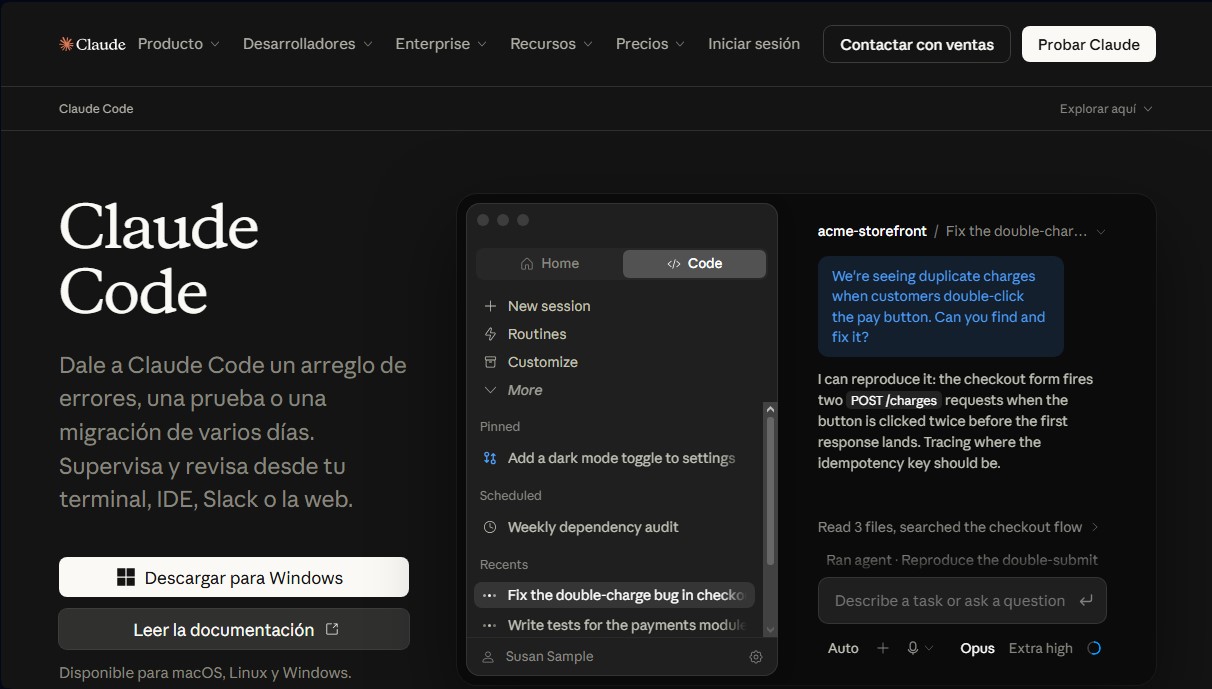
Claude Code is an artificial intelligence tool designed specifically for software development. It is presented as a programming agent capable of executing complex tasks autonomously or under supervision directly from the terminal, IDE, or web. Unlike conventional chatbots, this solution from Anthropic acts as an active collaborator that can plan, write code, run tests, and manage multi-day migrations.
The operation of Claude Code is based on an agentic programming approach. The tool uses advanced models like Claude 3.5 Sonnet or Opus 5.5 to understand the full context of a repository. Through its agentic search capability, the system maps and explains codebases in seconds, identifying dependencies and structures without the developer having to manually select context files.
This AI tool is compatible with macOS, Linux, and Windows, and integrates seamlessly into the standard workflow through various interfaces:
- Terminal (CLI): Direct execution alongside command-line tools, databases, and monitoring systems.
- IDE Extensions: Native support for VS Code, Cursor, and JetBrains environments.
- Collaborative Platforms: Integration with Slack, GitHub, and GitLab for issue management and version control.
- Multi-platform Access: Available via web version and mobile apps (iOS and Android) for coding on the go.
Among its core capabilities, the function to convert issues into Pull Requests stands out. The agent can read an issue, analyze the affected code, perform the necessary fix, run the relevant tests, and automatically open the change proposal. Additionally, it is a robust solution for refactoring and code migrations that require tracking imports across the entire repository.
Regarding security, Claude Code stands out because it runs locally on the user's computer. It communicates with the model APIs without the need for an intermediate backend server or a remote code index, and it always requests explicit permissions before modifying files or executing system commands.
Practical benefits for engineering teams include:
- Rapid Onboarding: Immediate explanation of the architecture and logic of new projects for new team members.
- Routine Task Automation: Bug fixing, issue triaging, and unit test creation.
- Fast Mode: Speed optimization for tasks requiring near-instant responses through the use of high-performance models.
- Multi-project Support: Ability to group sessions and oversee multiple agents simultaneously.
This tool is ideal for both individual developers looking to increase their productivity and Enterprise environments that require centralized administrative controls, advanced security, and deployments on their own infrastructure.
Claude Code features and use cases
How to use Claude Code
Claude Code FAQ
What exactly is Claude Code, and what is it used for?
It is an agentic programming tool designed to automate complex tasks such as bug fixes, test writing, and code migrations directly from your terminal or IDE.
Which operating systems can I run Claude Code on?
The tool is fully compatible with and can be installed on macOS, Linux, and Windows operating systems.
Which subscription plans include access to Claude Code?
Access is included for users on Pro or Max plans, and it is also available for Team and Enterprise subscriptions.
Is it safe to use Claude Code with my local files?
Yes, the tool runs locally in your terminal and always requests your explicit permission before making any modifications to files or executing commands.
Can I integrate Claude Code into my favorite code editor?
Yes, native extensions are available for VS Code and JetBrains IDEs, and it is also compatible with other development tools like Cursor or Devin Desktop.
How does Claude Code help with project issue management?
It integrates directly with platforms like GitHub or GitLab to read issues, write the code needed to resolve them, run tests, and automatically open pull requests.
What features does Claude Code offer to help with onboarding to a new project?
The tool can map and explain entire codebases in seconds, helping developers understand the repository's structure, dependencies, and architecture.
What is the fast mode available in Claude Code?
It is a high-speed configuration for the Opus 5.5 model that delivers results up to 2.5 times faster in exchange for a higher cost per token.
Can Claude Code be used through Slack?
Yes, in addition to the terminal and IDE, you can initiate programming tasks and collaborate with the tool directly through the Slack platform.
Does Claude Code require a remote server to index my code?
No, the tool communicates directly with the model APIs and processes information locally without the need for intermediate servers or remote code indexes.
Claude Code pricing and plans
Free ($0/mo)
Chat on web, desktop, and mobile versions.
Web search, file creation, and code execution.
Memory across conversations and Artifacts creation.
Connection with external apps and tools.
Pro ($17/mo billed annually or $20/mo)
Includes access to Claude Code for short sessions on small codebases.
Everything in the Free plan with higher usage limits.
Ability to delegate and schedule tasks.
Access to Claude Design, Slides, Docs, and Science.
Use of Projects and a wider variety of Claude models.
Chrome and Microsoft 365 integration.
Max ($100 to $200/mo)
$100/mo option: Includes 5x more usage than the Pro plan, recommended for large codebases.
$200/mo option: Includes 20x more usage than the Pro plan for power users.
Higher output limits across all tasks.
Priority access during high-traffic periods.
Early access to advanced Claude features.
Team ($20/seat per month billed annually or $25/mo)
Includes access to Claude Code and Claude Cowork.
Premium Seat option ($100-$125/mo) with 5x more usage than a standard seat.
Org-wide enterprise search.
Centralized administration and billing with SSO support.
Admin controls for remote and local connectors.
Content is not used to train models by default.
Enterprise ($20/seat per month billed annually + API usage costs)
Everything in the Team plan.
Spend limit controls for users and organizations.
Identity management (SCIM) and role-based access with granular permissions.
Audit logs and custom data retention controls.
Advanced security with IP allowlisting and Claude Security (beta).
HIPAA compliance option available.
API / Claude Console (Usage-based)
Access to Claude Code via pay-per-token usage.
Variable rates by model (e.g., Opus 5.5: $4/$20 per million input/output tokens).
Fast mode for Opus 5.5: 2.5x faster at double the standard price.
Managed agents: $0.08 per active session hour.
Web search: $10 per 1,000 searches.
Code execution: 50 free hours daily per organization; then $0.05 per hour per container.
Claude Code Screenshots
Claude Code alternatives

Nuclr Commander
Workspace for running multiple AI agents in parallel with a file manager. Supports local or external models and remote mobile monitoring.



StellarFirm
AI agents for founders to plan, build, and launch apps or websites. Automate technical and management tasks under your direct supervision and approval.


miniOrange MCP Server for WordPress
Securely connect AI agents to WordPress. Control permissions, protect sensitive data, monitor actions with audit logs, and manage human approvals.