

Clearfy
Share
Detects AI content and humanizes it for a natural style. Analyzes sentence-level fluency, removes robotic traits, and verifies text originality.
What is Clearfy?
Clearfy is a platform specializing in AI content detection and humanization, designed to provide students, writers, and professionals with a precise tool for text validation and improvement. Its primary function is twofold: to identify artificial writing patterns and transform robotic drafts into content that reflects the flow and structure of authentic human writing.
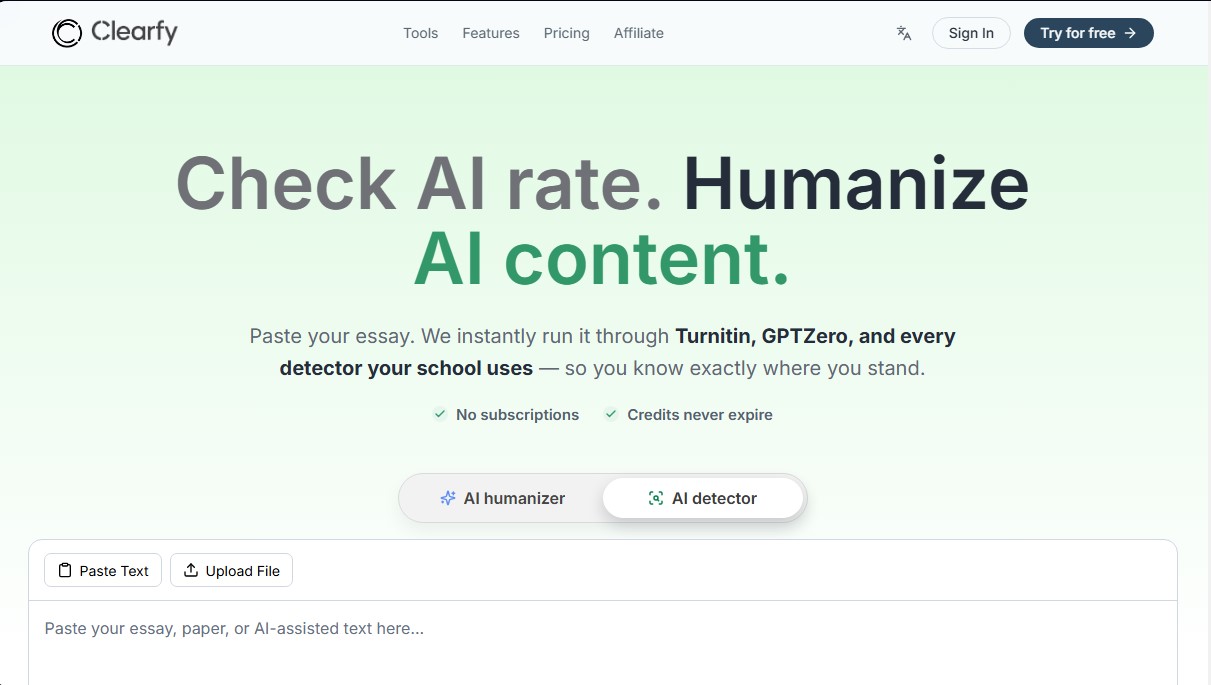
Clearfy’s AI detector analyzes essays, articles, and technical documents to determine their likelihood of synthetic origin. When processing a text, the tool provides an overall classification and detailed human-probability percentages, along with sentence-level signals that highlight specific passages that sound mechanical. This system allows users to verify their drafts against the detection standards of tools like Turnitin, GPTZero, Copyleaks, Originality.ai, and Winston AI, providing a clear diagnosis before final submission.
The technology behind its AI humanizer is based on proprietary models trained on over a million pages of real human writing, avoiding the use of synthetic data. This approach allows Clearfy’s high-quality paraphrasing to mimic how people structure sentences and choose vocabulary, while always maintaining the original meaning. To adapt to different needs, it offers three editing modes:
- Easy: Makes light changes for a quick review.
- Medium: Balances natural flow with the original structure.
- Aggressive: Performs a deep rewrite to completely transform the text's flow and cadence.
Key capabilities and practical benefits include:
- Multilingual support: Compatible with over 100 languages, making it easy to review international texts from any computer or mobile device.
- Sentence analysis: Allows for the identification of specific passages that lack naturalness, facilitating surgical and efficient editing.
- Privacy and security: The system extracts text from PDF, DOCX, or Markdown files without permanently storing documents on its servers.
- Optimized workspace: An interface designed for quick reading and agile editing of drafts up to 5,000 words.
Clearfy positions itself as an essential assistant for those who use artificial intelligence for support but need to ensure the final result has a professional and organic tone. By removing traces of repetitive phrases and predictable structures, this tool helps improve readability and digital content quality quickly and effectively.
Clearfy features and use cases
How to use Clearfy
Clearfy FAQ
What services does Clearfy provide?
Clearfy allows you to detect AI-generated content and humanize text so it mimics natural human writing patterns.
Do I need a monthly subscription to use Clearfy?
No, the tool operates on a pay-as-you-go credit system and does not require recurring subscriptions.
Do Clearfy credits expire?
Credits never expire, so you can buy them once and use them whenever you need to check or humanize your text.
Which AI detectors is Clearfy tested against?
The tool’s effectiveness is regularly verified against leading detectors such as Turnitin, GPTZero, Copyleaks, and Originality.ai.
Is there a minimum word count for scans?
You need a text of at least 50 words to use the AI detector.
Does Clearfy store the files or documents I upload?
No, files are only used to extract text during the process and are not permanently stored on the system.
How many languages does the tool support?
The system offers full multilingual support and works with over 100 different languages.
What kind of information does the Clearfy detector provide?
The detector provides an overall classification, probability percentages for human vs. AI authorship, and specific sentence-level insights.
Clearfy pricing and plans
Free ($0)
1,000 free credits upon sign-up.
Shared balance for both humanization and detection tools.
No credit card required.
Minimum requirement of 20 words for the humanizer and 50 words for the detector.
Starter ($19 - One-time payment)
45,000 words for rewriting and humanization.
315,000 words for AI detection.
Credits never expire.
Shared balance for both tools.
Supports up to 5,000 words per humanization scan and 15,000 characters per detection.
Plus ($49 - One-time payment)
130,000 words for rewriting and humanization.
910,000 words for AI detection.
Credits never expire.
Shared balance for both tools.
Supports up to 5,000 words per humanization scan and 15,000 characters per detection.
Pro ($99 - One-time payment)
270,000 words for rewriting and humanization.
1,890,000 words for AI detection.
Credits never expire.
Shared balance for both tools.
Supports up to 5,000 words per humanization scan and 15,000 characters per detection.
Max ($199 - One-time payment)
560,000 words for rewriting and humanization.
3,920,000 words for AI detection.
Credits never expire.
Shared balance for both tools.
Supports up to 5,000 words per humanization scan and 15,000 characters per detection.
Clearfy Screenshots
Clearfy user reviews
Write a review
Checking your session...
Clearfy Reviews
Loading reviews...
Clearfy alternatives


UltraHumanizer
Transform AI text into natural, human-like content. Customize styles, process documents, and preserve the original meaning to bypass automatic detection.

RewriteCmd
Rewrite and correct text in any macOS app using keyboard shortcuts. Use AI to change tone or translate instantly without copying and pasting.

Humanize Max
Transform AI text into natural, human-sounding content. Customize styles, adjust length, and rewrite sentences for free with no sign-up required.
AI Detector by Getsolved
Analyze writing patterns to detect AI text. Enhance clarity, verify facts, and check for plagiarism to ensure natural and original content.