Share
Collaborative environment for coding with AI agents and contextual code reviews. Sync conversations and changes in real-time with Git repository integration.
What is delta.dev?
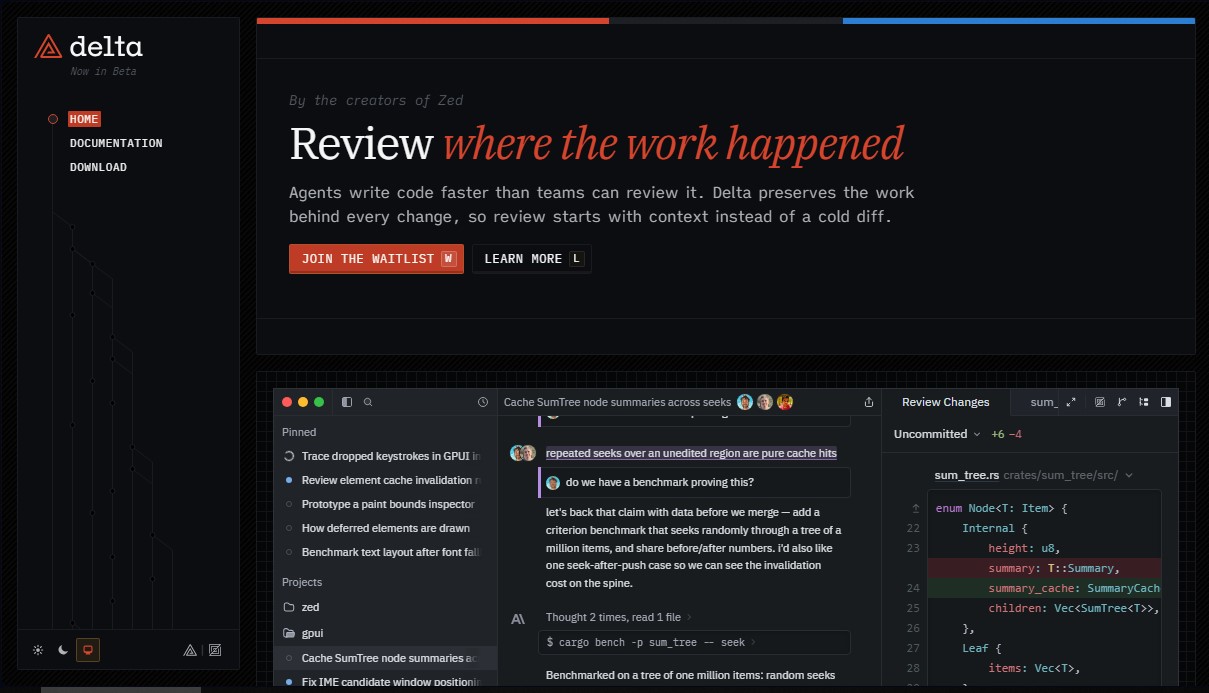
delta.dev is a multiplayer development environment designed to transform how teams collaborate with AI agents. Created by the team behind the Zed editor, this tool addresses a critical challenge in modern development: agents generate code faster than humans can oversee it. To solve this mismatch, delta.dev preserves the full context of every modification, allowing technical reviews to be based on original decisions and prompts instead of merely analyzing isolated diff files.
The application’s technical architecture is powered by DeltaDB, a next-generation replication system that unifies conversations and the worktree into a shared, real-time space. This approach ensures that every edit and dialogue is continuously captured between Git commits, maintaining full compatibility with traditional workflows. Built in Rust and optimized to run via WebAssembly and WebGL, the platform ensures high-speed performance on both the desktop via its native app and in the web browser.
The tool’s key features optimize agentic development through the following capabilities:
- Context-anchored reviews: Comments don’t become obsolete when code changes; they remain linked to the corresponding lines and evolve alongside the project.
- Cross-platform synchronization: Work stays synced across local teams, cloud executors, and the browser, allowing agents to keep operating even when your laptop is closed.
- Interoperability with external agents: It offers integration with tools like Claude Code, allowing terminal sessions to be instantly reflected in collaborative visual threads.
- High-performance interface: Designed to handle massive volumes of data, it allows for viewing full diffs and extensive transcripts without truncating information or crashing the system.
In delta.dev, the conversation thread functions as a living document where the developer’s cursor has full access. You can intervene at any point in the process, whether to comment on an AI’s "thought block," adjust an action plan, or fix a specific line of code. This structure ensures that the decision history is accessible to any team member in the future, eliminating uncertainty about the origin of changes.
This platform is an advanced technical solution for engineering teams looking to professionalize the use of language models in their workflow. By centralizing human-machine interaction in a shared environment, delta.dev ensures that software development is more transparent, faster, and more coordinated. The tool is currently in private beta, focusing on providing a robust infrastructure for the new reality of AI-assisted programming.
delta.dev features and use cases
How to use delta.dev
delta.dev FAQ
What is delta.dev and what exactly is it for?
It is a collaborative environment designed for coding alongside AI agents and reviewing their changes while maintaining the full context of the original conversation.
How does Delta integrate with my current Git workflow?
The tool runs on top of your Git repository, capturing every edit between commits. This allows your teammates to continue seeing a standard repository while you benefit from real-time synchronization.
Do I need to install an application to use delta.dev?
It is not required. You can open any workspace thread directly from your browser with the same performance as the desktop version, thanks to the use of Rust and WebAssembly.
What makes code reviews in Delta different from traditional platforms?
Unlike comments that become obsolete when a file changes, comments in this tool stay anchored to both the code and the conversation even as the work evolves.
Can I collaborate with other developers in real time within a thread?
Yes. You can invite your team via a link so they can watch the agent generate code live, add comments, or take over the task at any time.
What is DeltaDB and why is it important for the tool?
It is the database that enables the synchronized replication of both the conversation and the working tree across all participants and the cloud, ensuring everyone is working on the same version of the code.
How does delta.dev handle high-volume changes produced by agents?
The interface is optimized to display full diffs and complete transcripts without hiding information, allowing you to navigate the thread with the same speed and keyboard shortcuts you would use in a code editor.
How can I get access to Delta now that it’s in beta?
The tool is currently in a private beta phase. You need to register on the website to receive an invitation as the user base expands.
Does Delta work with external tools like Claude Code?
Yes. You can connect external agents and terminals so that sessions sync directly to a thread, allowing teammates to oversee progress and provide additional context.
delta.dev pricing and plans
Private Beta Plan (Delta)
Price: Visit the official website for details.
- Currently in invite-only closed beta.
- Multiplayer environment for coding with agents and collaborative code review.
- Real-time synchronization of conversations and code via DeltaDB.
- Full history of agent changes and decisions integrated into the workflow.
- Accessible via desktop app or browser (WebAssembly).
Personal Plan (Zed)
Price: $0 per month.
- Free next-generation code editor.
- 2,000 accepted edit prediction limit.
- Unlimited use with your own API keys or external agents (Claude Agent, Codex CLI, etc.).
Pro Plan (Zed)
Price: $10 per month.
- Unlimited edit predictions.
- Includes $5 in token credits.
- Usage-based billing applies after the initial $5 is exceeded.
Business Plan (Zed)
Price: $30 per user, per month.
- Unlimited edit predictions.
- Organization-wide AI model policies.
- Data governance controls and unified spending visibility.
- Role-based access controls (RBAC).
- Purchase order payment option available for teams of 25+ users.
delta.dev Screenshots
delta.dev user reviews
Write a review
Checking your session...
delta.dev Reviews
Loading reviews...
delta.dev alternatives

LaunchProof
Audit websites across various browsers and devices to detect security, performance, or accessibility flaws, offering reports with solutions to fix them.
Together Link
Connect coding agents to open models to cut costs. Keep your existing tools and settings while optimizing token usage in every session.


Sitelemetry
AI-powered web audit tool for security, SEO, accessibility, and AI visibility. Provides detailed evidence and technical remediation guides.