Share
Connect coding agents to open models to cut costs. Keep your existing tools and settings while optimizing token usage in every session.
What is Together Link?
Together Link is an open-source tool designed to integrate open language models directly into the workflows or harnesses that developers already use every day. This application acts as a technical bridge, connecting popular programming agents with Together AI infrastructure. Its primary function is to facilitate access to high-performance models without the need to leave the familiar interfaces, configurations, or histories of applications such as Claude Code, Claude Desktop, Codex, or the ChatGPT desktop client.
The technology behind Together Link is based on a gateway that translates data traffic between the user agent and AI inference endpoints. One of its most standout features is the Auto Router, an intelligent system that analyzes the complexity of each session's initial task. Depending on the difficulty, the router automatically redirects the workload: quick and simple tasks are processed using optimized, cost-effective models like GLM 5.3, while more complex programming challenges are sent to high-capacity frontier models, always ensuring the best balance between performance and efficiency.
Using this tool enables significant software development cost optimization for technical teams. By employing open-source models through Together Link, it is possible to drastically reduce token expenditures compared to traditional closed APIs. Furthermore, the system ensures operational continuity by keeping memory settings, terminal sessions, web search keys, and user preferences intact across every compatible platform.
Key functional features and practical benefits include:
- Simplified installation: Configured via a single command line on macOS or Linux operating systems, allowing for immediate deployment.
- Transparency and control: At the end of each session, the tool generates a detailed receipt showing exact token usage, making budget tracking effortless.
- Access to frontier models: Enables the use of models such as Kimi K3, DeepSeek V4.1 Flash, or MiniMax M3, which offer top-tier performance for coding tasks.
- Extended compatibility: Works natively with tools like OpenCode and Pi, allowing users to switch between different AI providers without leaving the console or development environment.
This solution is specifically aimed at programmers and companies seeking a flexible, open AI infrastructure. As an MIT-licensed tool, it offers the freedom required by professional environments that demand strict control over workflow and privacy, allowing AI agents with open models to run within the infrastructure the user already knows and masters. It is an ideal choice for those who want to harness the power of open-source models without the technical hurdles of a full platform migration.
Together Link features and use cases
How to use Together Link
Together Link FAQ
What is Together Link?
Together Link is an open-source tool that connects programming agents like Claude Code or Codex with Together AI’s open models to lower costs.
Which applications and agents are compatible with Together Link?
The tool works with Claude Code, Claude Desktop, ChatGPT Desktop, Codex, OpenCode, and Pi, allowing you to maintain your current settings and workflows.
How much money can I save by using Together Link?
Using open models through this platform can reduce token spending by fifty to eighty percent compared to closed commercial models.
How does the Together Link auto-router work?
The system analyzes the difficulty of the initial task in each session and selects the most efficient model, assigning simple tasks to lightweight models and complex problems to advanced ones.
Will I lose my settings or history when using Together Link with Claude or ChatGPT?
No, the tool uses separate profiles and independent sessions to ensure that your original settings, memory, and chat history remain intact.
What are the technical requirements to install Together Link?
To get started, you need a Together AI API key and a macOS or Linux operating system to run the installation and initial configuration command.
How can I track my spending within the tool?
Together Link prints a receipt with a detailed cost breakdown at the end of each session and allows you to check your cumulative total via a specific usage command.
Together Link pricing and plans
Together Link (Free Version)
- Free and open-source tool (MIT license).
- Connects coding agents (Claude Code, ChatGPT Desktop, Codex, etc.) with open models.
- Includes an Auto Router to optimize costs across models.
- Requires a Together AI API key; you only pay for the token consumption of the models used.
Serverless Inference (Pay-as-you-go)
- Billed per 1 million tokens consumed.
- Kimi K3: $3.00 (input) / $15.00 (output).
- GLM-5.3: $1.40 (input) / $4.40 (output).
- DeepSeek V4.1 Flash: $0.30 (input) / $1.20 (output).
- MiniMax M3: $0.30 (input) / $1.20 (output).
- Llama 3 8B Instruct Lite: $0.14 (input) / $0.14 (output).
- Certain experimental models, such as Ternary Bonsai 27B, are priced at $0.00.
Provisioned Throughput (PTU)
- Price: $0.05 per PTU/minute.
- Dedicated reserved capacity to guarantee performance.
- Throughput (tokens per minute) varies based on the selected model.
- Designed for teams scaling their inference that require fixed capacity.
Dedicated Inference (GPU Instances)
- NVIDIA HGX H100: $5.49 per GPU/hour (on-demand).
- NVIDIA HGX B200: $8.99 per GPU/hour (on-demand).
- Single-tenant instances with no shared resources.
- Support for custom models and auto-scaling for traffic spikes.
GPU Clusters (Cluster Computing)
- NVIDIA HGX H100: From $1.99 (Preemptible) to $3.99 (On-demand) per GPU/hour.
- NVIDIA HGX B200: From $4.09 (Preemptible) to $8.19 (On-demand) per GPU/hour.
- NVIDIA HGX H200: From $2.99 (Preemptible) to $5.99 (On-demand) per GPU/hour.
- Discounts available for capacity reservations ranging from 3 to 181+ days.
Fine-Tuning
- Cost per 1 million tokens in the training dataset.
- Llama 3.1 8B: $0.34 (SFT) / $0.84 (DPO).
- Qwen3.5 397B: $5.60 (SFT) / $14.00 (DPO).
- DeepSeek-V3.1: $7.00 (SFT) / $17.50 (DPO).
- Each training job is subject to a minimum charge (between $4.00 and $60.00 depending on the model).
Sandbox and Storage
- Code Sandbox: $0.0446 per vCPU/hour and $0.0149 per GiB of RAM/hour.
- Code Interpreter: $0.03 per session (maximum 60 minutes per session).
- Storage (Shared Filesystem): $0.16 per GiB per month.
Post-Training
- NVIDIA HGX B200: $9.00 per GPU/hour (promotional pricing through December 2026; regular price $11.00).
- On-demand training infrastructure billed per minute for each active model resource.
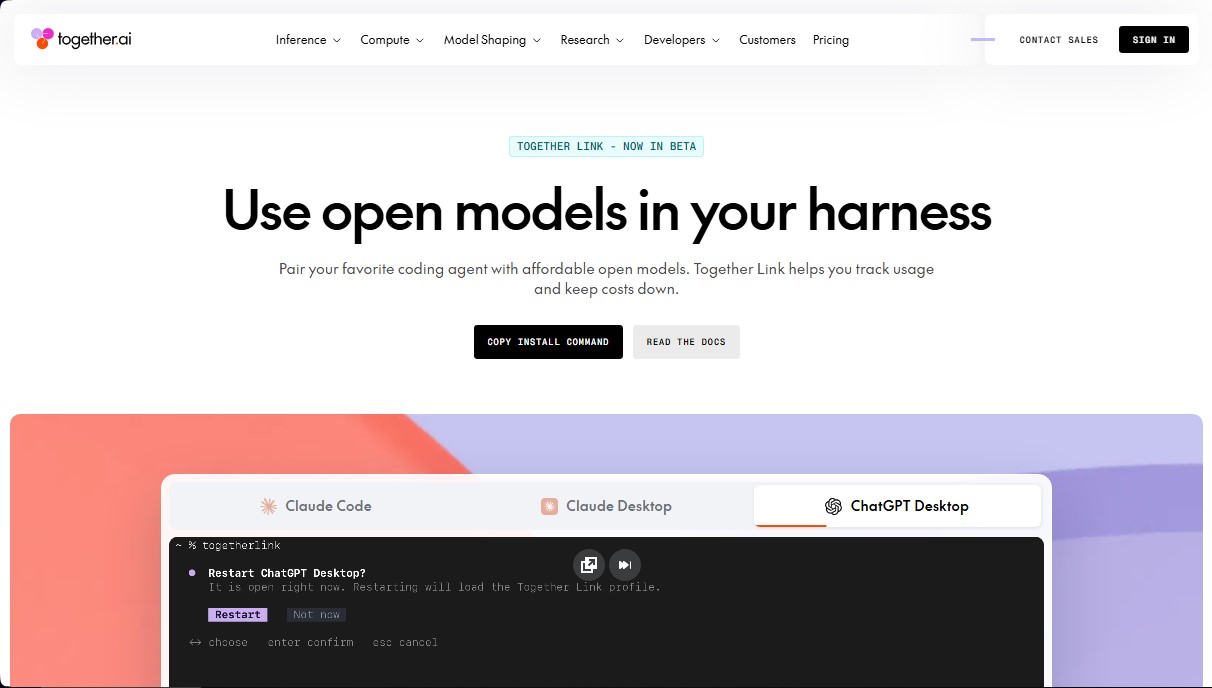
Together Link Screenshots
Together Link alternatives


Optimus by Iacon Autonomics
Autonomous researcher designing experiments and evaluating algorithms to train AI models. Automates improvement cycles for LLMs, robotics, and various complex systems.


Nuclr Commander
Workspace for running multiple AI agents in parallel with a file manager. Supports local or external models and remote mobile monitoring.