
Share
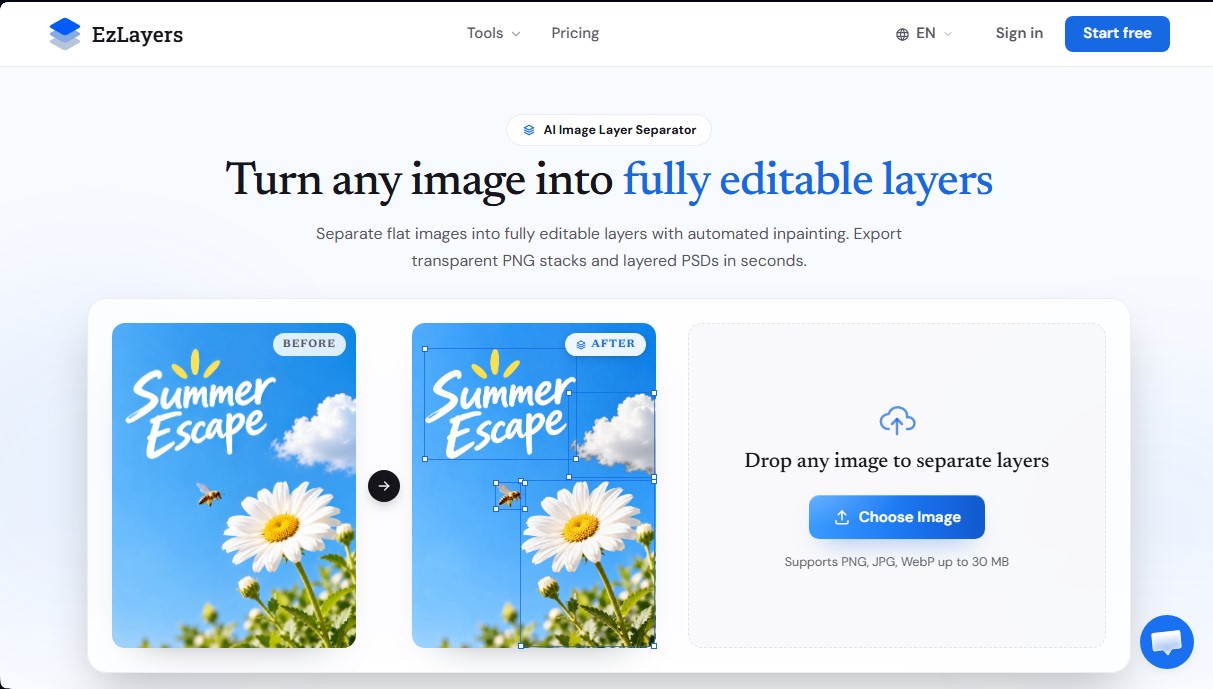
Split images into editable layers with AI. Automatically reconstruct the background and export PSD or PNG files ready to use in Photoshop or Figma.
What is EzLayers?
EzLayers is an advanced AI tool for automated image layer separation. Unlike conventional background removers that only extract a single subject, this application decomposes flat files (JPG, PNG, or WebP) into multiple independent and fully editable elements. Its primary function is to transform a static image into a structured file, allowing users to manipulate individual objects without leaving gaps or empty spaces in the original composition.
The operation of EzLayers is powered by an AI layer decomposition engine and amodal inpainting technology. When a file is uploaded from a computer, the system identifies subjects, text, and shadows, separating them into up to 16 distinct layers by default. The background reconstruction technology intelligently fills in textures, lighting, and cast shadows that were previously hidden behind objects. This ensures perfect visual continuity, providing the technical freedom to move, resize, or delete elements effortlessly.
Key functional capabilities and practical benefits include:
- True Multi-Layer Separation: Extracts discrete elements while maintaining the original stacking hierarchy and natural alpha transparency on the edges.
- Background Reconstruction (Inpainting): Prevents "holes" when moving objects, as the AI infers and paints the content that was once obscured.
- Text-Guided Segmentation: Users can enter prompts to help the AI identify and extract specific objects with greater precision.
- Interactive Canvas Editor: Allows for managing visibility, renaming elements, and reordering the stack directly in the browser before downloading.
- Professional Multi-Format Export: Generates native layered PSD files for Photoshop and Figma, as well as transparent PNG stacks and SVG vectors.
This tool is especially valuable for graphic designers, illustrators, and e-commerce teams who need to edit final files for which they do not have the original project source. It is also highly useful for marketing agencies performing quick scene swaps and print shops that require color separation or the preparation of cut paths.
By automating processes that would traditionally require hours of manual tracing with the pen tool, EzLayers optimizes the creative workflow. The platform supports output resolutions of up to 2K, ensuring that exported assets maintain the quality necessary for professional environments, mobile devices, or print media, while always maintaining data privacy, as images are not used for training public models.
EzLayers features and use cases
How to use EzLayers
EzLayers FAQ
What sets EzLayers apart from other conventional background removers?
Unlike tools that only remove the background, EzLayers breaks down the entire image into up to sixteen independent layers and uses AI to reconstruct hidden areas so there are no gaps.
Does EzLayers automatically fill in the background behind separated objects?
Yes, the smart vision engine reconstructs textures, lighting, and drop shadows in hidden areas, allowing you to move or resize any element without leaving empty spaces.
What file formats can I download after processing my image?
You can export your projects as stacks of transparent PNGs, layered PSD files compatible with Photoshop and Figma, or even SVG vector files and screen printing films.
How does the EzLayers credit system work for new users?
When you sign up, you receive twenty free credits to test the tool without needing to enter a credit card, which is enough for a full separation of up to four layers.
Can I redownload my files in a different format without spending more credits?
Yes, once the image has been processed by the AI, you can switch between formats like PNG or PSD and adjust the resolution locally in your browser at no additional cost.
What is the maximum export resolution supported by the tool?
Paid plans allow you to export high-definition layers at up to 2K resolution to match the original file, while the free plan is limited to 1K output.
Are my images protected and secure on the EzLayers platform?
Absolutely. Files are processed in secure, isolated environments and are never used to train public AI models. You retain exclusive ownership of all exported assets.
What types of image files can I upload for layer separation?
The platform supports PNG, JPG, and WebP uploads with a maximum file size of 30 MB to start the automatic decomposition process.
EzLayers pricing and plans
Free Version: 20 free credits upon sign-up.
Limit of up to 4 layers per image per separation.
Output resolution limited to 1K.
Free access to re-exports and local adjustments.
Starter: 9,9 $ per month (79,9 $ per year).
500 monthly credits.
16-layer total depth.
Region-specific editing for precision selections.
Lossless 2K resolution output.
Layered PSD and PNG export.
Full access to the web layer editor.
Restrictions: Standard processing queue, no batch uploads, and 30-layer limit.
Pro: 29,9 $ per month (239,9 $ per year).
2,000 monthly credits.
Up to 30+ layers of depth via region editing.
Priority GPU processing queue.
Lossless 2K resolution output.
Layered PSD and PNG export.
Full access to the web layer editor.
Restrictions: No batch uploads and 50-layer limit.
Studio: 69,9 $ per month (559,9 $ per year).
6,000 monthly credits.
Up to 50+ layers of depth.
Exclusive Batch Upload and processing feature.
Top-priority GPU processing queue.
Unlimited layers and region editing.
Lossless 2K resolution output and professional export.
Credit Packs (One-time payment): From 9,9 $ to 59,9 $.
Options for 380 credits (9,9 $), 1,150 credits (29,9 $), or 2,300 credits (59,9 $).
90-day validity.
16-layer depth and original resolution (no 1K limit).
Includes batch processing.
No auto-renewal.
EzLayers Screenshots
EzLayers alternatives

NeotypeLab
NeotypeLab uses AI to plan paint schemes for Gunpla, mecha girls and Zoids, with real hobby paint codes, a spraying sequence, a shopping list and an HD preview.


ImageToSTL.org
Convert JPG and PNG images into STL files for 3D printing using AI. Generate detailed 3D models ready for instant download.

Image to 3D
Convert 2D images and sketches into textured 3D models using AI. Export in GLB, STL, or USDZ for video games, 3D printing, and augmented reality.