

Share
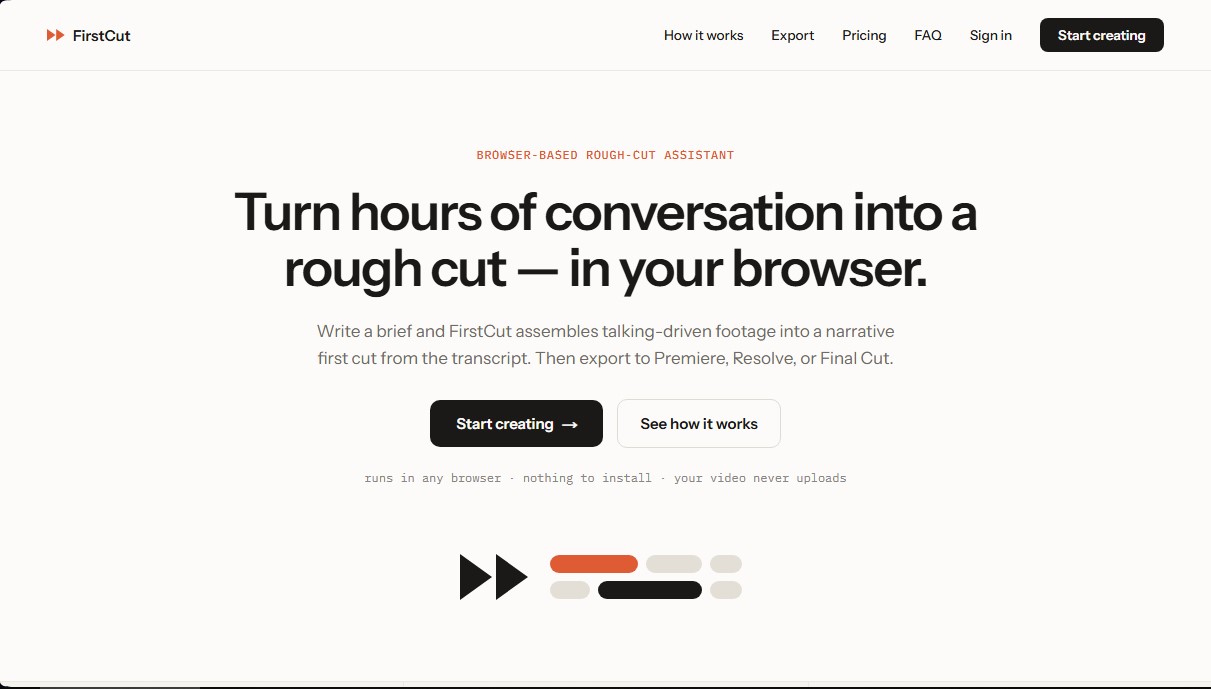
Create rough cuts of interviews and podcasts in-browser using transcripts. Export narrative sequences to Premiere, DaVinci Resolve, or Final Cut Pro.
What is FirstCut?
FirstCut is an artificial intelligence tool designed as a rough-cut assistant that operates entirely within your browser. Its primary purpose is to streamline the editing process for projects where spoken content is the core focus, transforming hours of footage into a structured narrative sequence in seconds. This application requires no software installation and allows editors to focus on storytelling rather than spending time manually searching for clips on the timeline.
The FirstCut workflow is divided into three key stages:
- Linking files: The user links their local footage. For security and speed, the video is never uploaded to the web; the tool only extracts and processes the audio track locally.
- Automatic transcription: The system generates a word-level accurate transcription in the cloud, quickly identifying every segment of speech.
- Instruction-based assembly: The user writes a short text or brief describing the desired structure. The AI analyzes the content and automatically assembles the corresponding cuts.
Technologically, FirstCut utilizes advanced language models and speech-to-text systems to interpret the context of conversations. It is not generative AI, as it does not create new visual or audio content; instead, it selects and organizes the most relevant moments from the original recordings based exclusively on the transcribed text. This approach is ideal for managing material from interviews, podcasts, documentaries, online courses, and webinars.
The tool acts as a highly efficient "pre-editor." Once the AI presents the proposed assembly, the user can make fine adjustments and refine the story before moving the work to their preferred software. Compatibility is one of its strengths, allowing sequences to be exported with their original timecodes using standard formats like FCPXML, EDL, and OTIO. This ensures a seamless transition to professional editors such as Adobe Premiere Pro, DaVinci Resolve, Final Cut Pro, or Media Composer.
Using FirstCut provides a direct practical benefit by eliminating the most tedious phase of video post-production. It allows for the instant iteration of different narrative arcs, testing various approaches to the same story without the need to manually drag clips. As a cloud-based solution, it does not consume local graphics processing (GPU) resources, making it easy to work from any device with an internet connection. It is a robust solution for professionals looking to optimize their video editing workflow through the strategic use of artificial intelligence applied to language.
FirstCut features and use cases
How to use FirstCut
FirstCut FAQ
Do I need to install any software to use FirstCut?
No, this tool runs entirely in any modern web browser without requiring any downloads or installations on your computer.
Does FirstCut upload my original video files to its servers?
No, your video always remains on your local drive; the browser only extracts and uploads the audio track to securely process the transcription.
Which video editors are compatible with FirstCut exports?
You can export your sequences directly to continue working in professional software like Premiere Pro, DaVinci Resolve, Final Cut Pro, or Media Composer.
How are the footage hours in my plan calculated?
We count the hours of original video you import for the initial transcription, regardless of the length of the final edit you decide to generate.
What happens if I reach my AI cut limit before the end of the month?
Your saved sequences will remain available, but to generate new edits, you will need to wait until the next billing cycle or purchase a one-time usage extension.
Does FirstCut offer a free version for new users?
Yes, the free plan allows you to import thirty minutes of footage and generate five cuts per month without needing to provide a credit card.
Does the AI generate new images or sounds for my project?
No, the tool only selects and organizes clips from your original files based on the conversation content; it never generates synthetic content.
Can I cancel my FirstCut subscription at any time?
Yes, you can cancel through your user dashboard whenever you like to avoid future charges. You will retain access until the end of your current billing period.
What happens to my transcriptions after three months?
FirstCut deletes the extracted audio and transcriptions after ninety days to protect your privacy. We recommend exporting your final work to your preferred editor before that deadline.
Can I get a refund if I’m not satisfied with the service?
Your initial subscription payment is refundable within the first fourteen days of purchase upon request. However, renewals and usage extensions are non-refundable.
FirstCut pricing and plans
Free
$0/month
30 minutes of imported footage per month.
5 AI-generated cuts per month.
Full editor and access to transcriptions.
Export to all available formats (Premiere, Resolve, Final Cut, etc.).
No credit card required.
Starter
$15/month (or $12/month billed annually)
5 hours of imported footage per month.
30 AI-generated cuts per month.
Includes all Free plan features.
Ability to purchase credit top-ups.
Email support.
Creator
$39/month (or $32/month billed annually)
15 hours of imported footage per month.
100 AI-generated cuts per month.
Includes all Starter plan features.
Priority generation queue.
Priority support.
Studio
$99/month (or $79/month billed annually)
40 hours of imported footage per month.
250 AI-generated cuts per month.
Includes all Creator plan features.
The platform's highest footage limits.
Direct line for feature requests.
Top-up options (available on paid plans)
Additional hour of footage: $3.
50 additional AI generations pack: $15.
Top-ups expire at the end of the current billing period or after seven days (whichever is longer).
FirstCut Screenshots
FirstCut alternatives

AI Video Text Remover
Use AI to remove subtitles, logos, and watermarks from your videos. Automatically reconstruct backgrounds for a clean, blur-free result.


KineMaster
Professional AI mobile video editor with auto captions, background removal, and object tracking. Features thousands of templates and 4K export.
Map Animation
Generate AI-powered animated route and map videos from text. Customize cinematic camera movements and export in high resolution and various formats.

Kapwing Hinglish Subtitles Generator
Generate automatic Hinglish captions for videos in 100+ languages. Includes AI-powered editing and dubbing tools to reach bilingual audiences.