
Share
AI agent that automates tasks based on your calendar. It runs workflows, prepares meetings, and follows up proactively, autonomously, and in sync.
What is Floatboat?
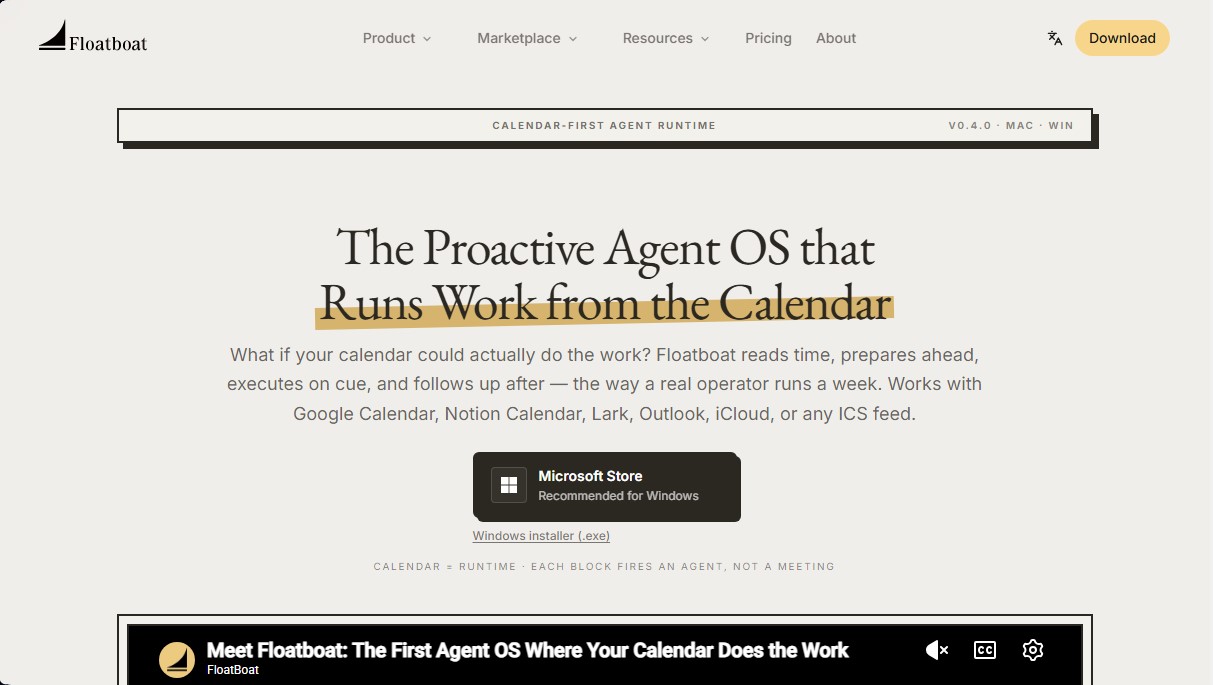
Floatboat is a proactive AI agent operating system designed to execute tasks directly from the user's calendar. Unlike traditional chatbots that require reactive interaction through manual prompts, this tool uses the calendar as a runtime, meaning every scheduled time block acts as a trigger for the artificial intelligence to autonomously prepare, execute, and follow up on tasks. It is compatible with leading platforms such as Google Calendar, Outlook, Notion Calendar, iCloud, and any ICS feed.
Floatboat’s operation is based on a structured four-stage workflow. First, it transforms the schedule into a dynamic execution environment. Second, it analyzes the rhythm of meetings and deadlines to classify the type of intervention required. Third, agents execute specific actions, such as preparing reports before a call or writing drafts before a deadline. Finally, the user maintains full control through a persistent Agent Workspace for each event, where files, decision history, and model selection are centralized.
On a technical level, the platform integrates more than 3,500 tools and APIs, including Slack, GitHub, Figma, Linear, and Google Drive. It utilizes native protocols like MCP (Model Context Protocol) and IACT, allowing agents to read local files on the computer and execute actions in external applications with granular, event-based permissions. Additionally, it incorporates an Auto Mode system that intelligently selects between models such as GPT-5, Claude, Gemini, or DeepSeek, optimizing reasoning capabilities and costs based on the task.
Key capabilities and benefits:
- Combo Store: A marketplace of reusable skills that transform complex inputs, such as voice notes, into final deliverables like presentations or follow-up emails.
- Workflow Store: Ready-to-use automations geared toward operational tasks, webhooks, and automated web browsing.
- FloatIM: A group chat where participants are local AI agents collaborating to produce research or technical documents.
- Local Privacy: Agents run locally by default, ensuring sensitive data stays on the user's device.
This tool is ideal for solopreneurs, content creators, and small teams that need to scale production without increasing administrative overhead. Available as a native app for Windows and Mac, Floatboat eliminates tool sprawl and centralizes daily work management within an execution-oriented interface, enabling a single person to manage workflows typically associated with much larger organizations.
Floatboat features and use cases
How to use Floatboat
Floatboat FAQ
What is Floatboat and how does its agent system work?
It is an operating system that turns your calendar into an execution engine, allowing intelligent agents to proactively prepare and perform tasks based on your schedule.
Which calendar services can I link with Floatboat?
The tool is compatible with Google Calendar, Notion Calendar, Lark, iCloud, Outlook, and any other source that provides an ICS link.
How is Floatboat different from other chat-based AI tools?
Unlike reactive chats, this platform doesn't wait for you to type a prompt; it activates automatically based on your calendar events and deadlines.
Can I connect Floatboat with apps like Slack or Notion?
Yes, the platform features over 3,500 integrations that allow you to work directly with tools like Slack, GitHub, Google Drive, Gmail, and Figma.
Which AI models are available on the platform?
It includes access to the most advanced models on the market, such as Claude, GPT, DeepSeek, and Gemini, without the need to configure external API keys or create additional accounts.
On which devices can I install the Floatboat app?
You can currently download and install the native desktop application for both Windows and macOS.
Is there a free version to try the tool?
Yes, the download is free and allows you to start working with complimentary credits. Premium paid plans are available for users who require higher processing capacity.
What is an Agent Workspace and what benefits does it offer?
It is a persistent workspace linked to each calendar event where files, action history, and AI-driven decisions are organized.
What are the Combo skills available in the Floatboat store?
They are specialized workflows that transform data inputs—such as voice notes or support tickets—into final documents and ready-to-use deliverables.
How does Floatboat guarantee the privacy of my local files?
The application runs locally and allows you to set specific permissions for each calendar event, ensuring that agents only access exactly what is necessary.
Floatboat pricing and plans
Free
0 $ per month forever.
- Start with initial free credits.
- Standard processing lane.
- Limited access to selected models and features.
- Unlimited storage with files saved locally on your computer.
- Batch document processing and AI-powered format conversion.
- Full AI browser for web action automation.
- Use the agent via Telegram and Feishu/Lark.
- Batch video downloading for transcription, translation, and subtitle embedding.
- Audio processing, speech-to-text conversion, and key point summarization.
- Free access to a massive skill library.
Lite
20 $ per month (1 $ for the first month). Annual option for 16.58 $ per month (199 $ billed annually).
- 5,000 monthly recurring credits.
- 300 daily recurring FloatSchedule credits.
- Exclusive access to DeepSeek models only.
- Standard processing lane.
- Unlimited local file storage.
- Batch document processing and format conversion.
- AI browser for web automation.
- Telegram and Feishu/Lark integration.
- Batch video and audio downloading and processing.
- Access to the skill library.
Pro
39.98 $ per month. Annual option for 33.98 $ per month (407.76 $ billed annually).
- 10,000 credits per month (customizable monthly usage).
- 300 daily recurring FloatSchedule credits.
- Unlimited concurrent tasks.
- Priority processing lane.
- Full access to all models and features.
- Early access to beta features.
- Unlimited local file storage.
- Batch document processing, AI browser, and Telegram/Lark integrations.
- Advanced video and audio tools (transcription and summarization).
- Access to the skill library.
Max
199.98 $ per month. Annual option for 166.98 $ per month (2,003.76 $ billed annually).
- 50,000 credits per month.
- 300 daily recurring FloatSchedule credits.
- Unlimited concurrent tasks.
- Priority processing lane.
- Full access to all models and features.
- Early access to beta features.
- Dedicated Account Manager support.
- Includes all document, video, audio processing, and AI browser features from previous plans.
- Unlimited local file storage.
Booster Pack (Add-on)
One-time payment of 12.99 $ per pack.
- 3,000 additional credits per pack.
- Credits valid for 1 year.
- Purchase limit of up to 20 packs per transaction.
- Does not affect current subscription renewal terms.
Floatboat Screenshots
Floatboat user reviews
Write a review
Checking your session...
Floatboat Reviews
Loading reviews...
Floatboat alternatives



TriggerFlow
Automate Windows apps without APIs using computer vision and AI. Manage PC fleets, monitor processes, and provide centralized remote control.

Relevance AI
Relevance AI lets companies design AI agents that take on work in sales, customer support, marketing, HR and operations, wired into the tools they already use.

