Fotor | AI Video Objects Remover
Share
Remove people, logos, text, and moving objects from your videos with AI. Automatically erase distractions for fast, professional results.
What is Fotor | AI Video Objects Remover?
Fotor AI Video Objects Remover is an advanced editing tool powered by artificial intelligence designed to automatically remove unwanted elements from video files. This application allows you to clean up footage by removing people, logos, watermarks, text, and moving objects without needing prior technical post-production knowledge. Its primary focus is to provide a fast and accessible solution for users who require professional results directly from their browser.
The platform's operation is supported by high-quality AI algorithms that identify the selected object and intelligently reconstruct the background. By using the brush tool over the element you want to erase, Fotor’s technology analyzes adjacent frames to fill the empty area, maintaining visual coherence and avoiding distracting distortions or blurring. The process is entirely online and can be executed from both computers and mobile devices, making it easy to edit on the go.
The core capabilities of this AI tool include:
- People removal: Allows you to erase bystanders or subjects who accidentally appear in the frame, ideal for videos recorded in public spaces or at the beach.
- Logo and watermark removal: Makes it easy to clean up content to customize it according to brand needs or to remove graphic distractions.
- Moving object management: The AI is capable of tracking and removing dynamic objects, such as cars or animals, while naturally integrating the background.
- Text and emoji cleanup: Useful for removing overlays in videos intended for social media or e-commerce marketing.
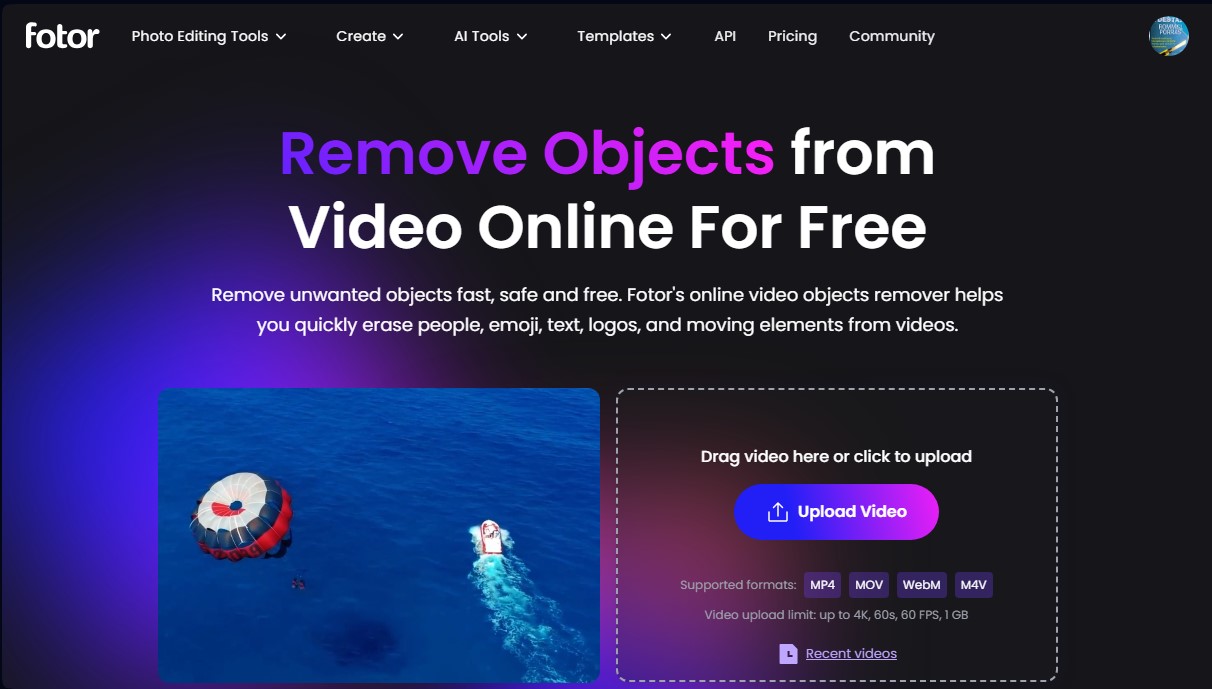
Regarding its technical specifications, the platform is compatible with the most widely used formats, such as MP4, MOV, WebM, and M4V. It supports files up to 1 GB in size, allowing for resolutions up to 4K and a frame rate of 60 FPS. The duration limit per clip is 60 seconds, making it an efficient solution for content creators, influencers, and marketing professionals looking to optimize their workflow without resorting to complex desktop software.
Security is a key aspect of Fotor AI Video Objects Remover, as it uses SSL encryption to protect files during the process. Additionally, edited videos are deleted from its servers after 24 hours, ensuring user privacy. The final result can be downloaded in MP4 format, ready to be used on platforms like Facebook, Instagram, or YouTube with a clean and professional finish. It is a practical alternative that saves time and money by avoiding the need for reshoots due to minor background errors.
Fotor | AI Video Objects Remover features and use cases
How to use Fotor | AI Video Objects Remover
Fotor | AI Video Objects Remover FAQ
Is Fotor AI Video Objects Remover free to use?
The tool allows you to generate three-second previews for free, though processing and downloading full videos requires twenty credits.
What kind of elements can I remove with Fotor AI Video Objects Remover?
You can easily erase people, logos, watermarks, text, emojis, and any moving objects that appear in your footage.
What file formats and limits does the platform support?
The system is compatible with MP4, MOV, WebM, and M4V formats, allowing for files up to one gigabyte, 4K resolution, and a maximum duration of sixty seconds.
Will my video lose quality when using Fotor AI Video Objects Remover?
No, the AI intelligently fills in the space left by the removed object to maintain sharpness and ensure the final result doesn't look blurry.
Can I use this tool from my mobile phone?
Yes, you can access the platform and edit your files from any device, whether it's a computer or a smartphone, through your web browser.
Is it safe to upload my personal videos to this editor?
Security is guaranteed via SSL encryption, and the platform automatically deletes all edited files after twenty-four hours to protect your privacy.
How do I download my files once I'm done editing?
After applying your changes and removing the desired objects, you can save the final result directly to your device in MP4 format.
Fotor | AI Video Objects Remover pricing and plans
Fotor Basic
Price: 0 US$ (Free forever).
Limited free credits.
Create preview videos up to 3 seconds for free.
Upload limits: files up to 4K, 60 seconds, 60 FPS, and 1 GB in size.
1 simultaneous generation and 2 AI agent chats.
Basic editing tools and templates.
512 MB cloud storage (30-day duration).
Watermarked exports in JPG, PNG, and PDF.
Fotor Pro
Price: 8.99 US$ per month (or 3.33 US$/mo billed annually).
100 credits per month (full-video object removal consumes 20 credits per video).
10 simultaneous generations.
Over 100 editing tools and 100,000+ templates and assets.
Access to exclusive AI models and custom styles.
2 GB cloud storage with device sync.
HD exports, no watermarks, and transparent backgrounds.
Fotor Pro+
Price: 19.99 US$ per month (or 7.49 US$/mo billed annually).
300 credits per month.
30 simultaneous generations.
AI batch editing (background remover and replacement).
Multiple brand kits and AI presentation generation.
100 GB cloud storage.
HD exports, no watermarks, and transparent background file downloads.
Fotor Max
Price: 39.99 US$ per month (or 15.99 US$/mo billed annually).
1,000 credits per month.
50 simultaneous generations.
5,000 AI agent chats and 10 simultaneous tasks.
Includes all advanced editing and portrait retouching tools.
500 GB cloud storage.
HD exports without watermarks.
Fotor | AI Video Objects Remover Screenshots
Fotor | AI Video Objects Remover alternatives

VideoWeb Video Generator
Generate professional AI videos from text or images. Features realistic avatars, automated scripts, and optimized formats for marketing and social media.

Listing Trailer
Transform real estate photos into professional videos with AI. Automate editing, music, and camera movement to make property listings stand out.

ToonBee AI
Generate animated videos from scripts with consistent characters across scenes. Includes AI voiceovers and music. Ideal for marketing, education, and social media.

Logo Animation AI
Create professional logo animations in seconds. Export 4K with transparent backgrounds and sound using templates or by describing motion with natural language.

Framewright
Generate vertical social media videos from your store's URL. Create weekly content with your products, prices, and brand colors using AI narration.