Share
Automatically generate video tutorials and guides via screen capture. Add AI narration and logical steps to document training and technical support processes.
What is guide ?
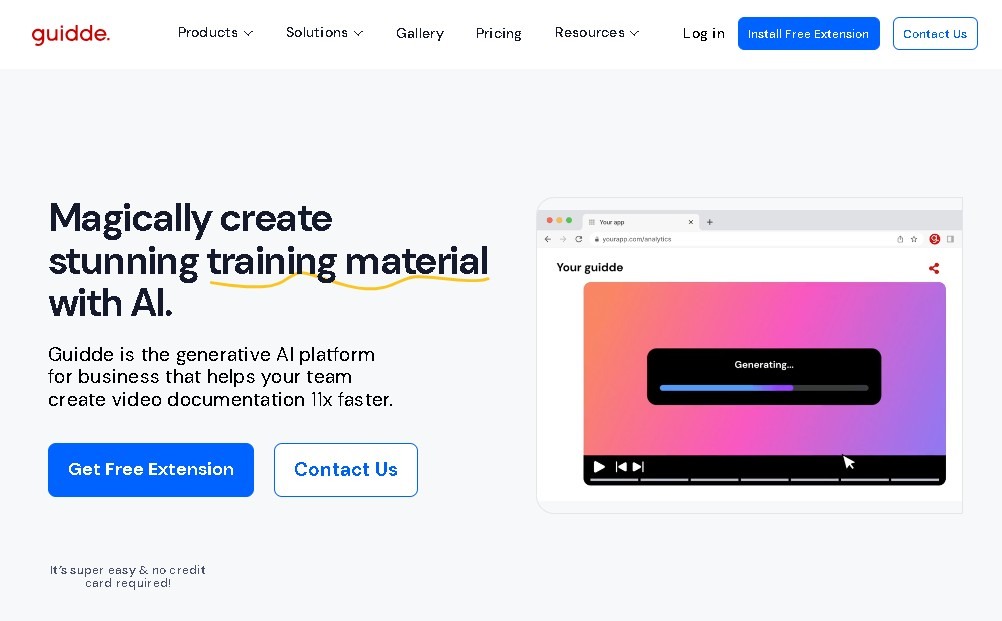
Guidde is an advanced platform powered by artificial intelligence designed for the automated creation of video documentation and step-by-step guides. This tool allows you to transform complex processes into high-quality visual tutorials without requiring any prior video editing knowledge. Its primary function is to capture actions performed on a computer or browser to automatically generate structured content that includes narration, subtitles, and professional animations.
Guidde’s technology is built on real-time workflow recognition. By activating its extension or application, the system records every click and movement, organizing the information into logical sequences. It then utilizes generative AI engines to add text-to-speech (TTS) voiceovers in multiple languages and hundreds of different voices. This eliminates the need for manual audio recording and ensures professional consistency across all materials.
Key capabilities of Guidde include:
- Smart workflow capture: Seamlessly record processes directly from your browser or desktop.
- Automatic tutorial generation: Instantly create video content with transitions and a logical structure immediately after capture.
- AI narration: Incorporate high-quality synthetic voices to explain each step, improving accessibility and learning.
- Editing and customization: Add visual elements, apply a custom brand kit, and use blurring features to protect sensitive information.
- Agile distribution: Share content via direct links, embed codes on websites, or export to formats like PDF and PPT presentations.
This solution is especially useful for operations, technical support, product, and HR departments. It significantly streamlines employee onboarding, the creation of Standard Operating Procedures (SOPs), and the resolution of common customer inquiries. By automating documentation, organizations drastically reduce the time spent explaining repetitive tasks, optimizing both internal and external knowledge transfer.
In addition to content creation, Guidde offers viewer analytics and advanced privacy controls. This allows teams to monitor the impact of their guides and ensure information reaches the right audience. It is a vital tool for any company looking to scale its training and technical support through the use of applied artificial intelligence for productivity.
guide features and use cases
How to use guide
guide FAQ
What exactly is Guidde and what is it used for?
Guidde is an AI-powered platform that allows you to automatically create video guides and step-by-step documentation by capturing your screen actions.
Is there a free version available to try Guidde?
Yes, there is a free plan that allows you to create up to 25 videos with basic recording features and shareable links.
How does the voiceover narration work in Guidde tutorials?
The tool uses artificial intelligence to generate professional voiceovers from text, offering hundreds of different voices across multiple languages.
Is it possible to remove the watermark from the videos?
To remove the platform's watermark, you must subscribe to one of the paid plans, such as Pro or Business.
Does Guidde allow for full-screen recording on my computer?
This feature is available starting with the Business plan, as lower-tier plans focus primarily on in-browser capture.
What formats can I export my guides in?
Depending on your subscription plan, you can export your content as a video, PDF, or PowerPoint presentation.
Can Guidde be used for team collaboration?
Yes, the Business and Enterprise plans offer specific collaboration features, privacy controls, and analytics for teams.
What are the benefits of using Guidde for technical support?
It helps reduce resolution times for customer inquiries by creating quick visual tutorials that explain complex processes in a simple way.
guide pricing and plans
Free Plan
- Price: €0 per month per creator.
- Limit of up to 25 "how-to" videos.
- Basic voice recording.
- Shareable links.
- Videos include Guidde watermark.
Pro Plan
- Price: Approximately €16 to €23 per month per creator.
- Unlimited video creation.
- Guidde watermark removal.
- Custom brand kit.
- Option to export videos or documents in PDF and PPT formats.
- Blurring and sensitive data redaction features.
Business Plan
- Price: Approximately €35 to €50 per month per creator.
- Unlimited AI narration (text-to-speech).
- Full-screen recording (outside of the browser environment).
- Privacy controls and analytics tools.
- Team collaboration features (up to 5 creators).
Enterprise Plan
- Price: Custom (Contact sales).
- Automated content translation.
- Single Sign-On (SSO).
- User role management and customer portals.
- Dedicated technical support.
guide Screenshots
guide alternatives


Nuclr Commander
Workspace for running multiple AI agents in parallel with a file manager. Supports local or external models and remote mobile monitoring.
rabbit OS3
Agentic OS that automates tasks and manages files, connecting your computers with AI models to run workflows using natural language.