
Share
AI platform for creating and editing social media videos. Generate auto-captions, convert horizontal to vertical, and easily optimize content.
What is Keyframes Studio?
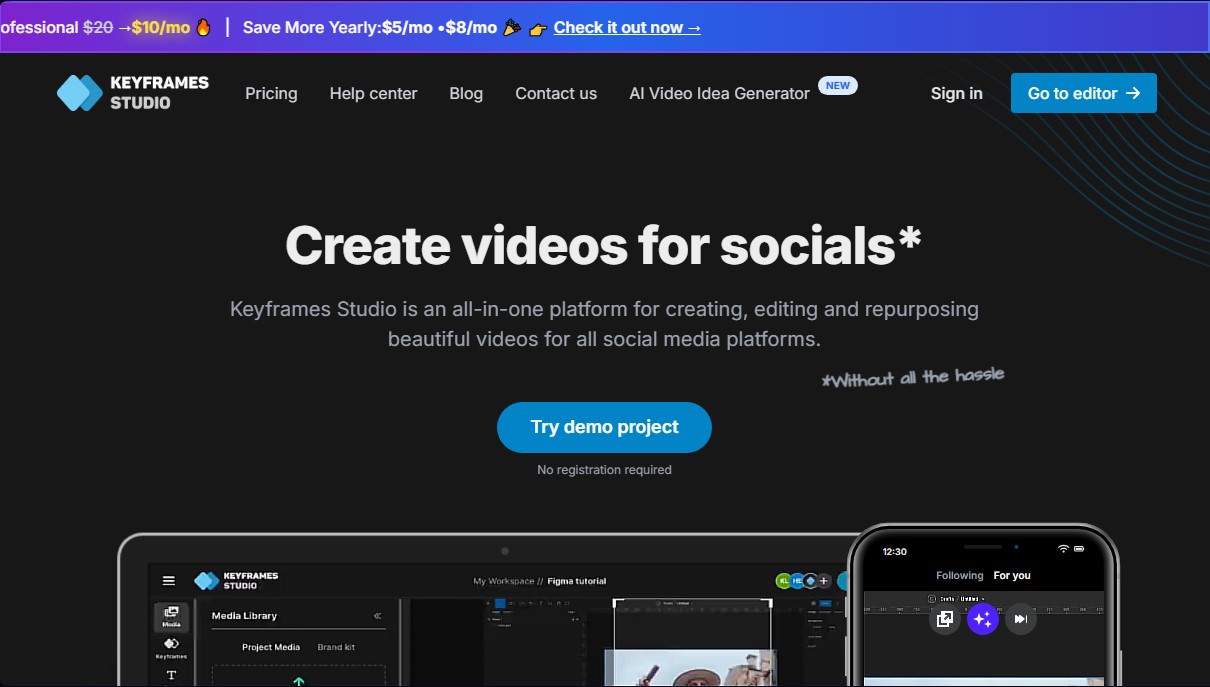
Keyframes Studio is an all-in-one platform designed for creating, editing, and adapting videos optimized for social media. Its primary function is to streamline the content transformation process, allowing horizontal videos to adapt perfectly to vertical formats for mobile devices without losing quality or visual narrative. It is an efficiency-oriented solution, ideal for content creators, social media managers, and digital agencies looking for agility without technical complications.
The tool uses artificial intelligence to automate the most tedious editing tasks. By analyzing the footage, Keyframes Studio can identify the most relevant parts of a video and generate automatic keyframes to control camera movement fluidly. Additionally, it features an advanced automatic subtitle generation system in over 12 languages, enabling karaoke-style word highlighting, which significantly improves audience retention and accessibility on platforms like TikTok, Instagram, or YouTube Shorts.
The cloud-based video editor stands out for being intuitive and requiring no prior post-production experience. It allows you to perform actions directly from your computer browser, such as trimming, adjusting zoom, adding transitions, and resizing clips with a real-time preview. It also includes tools for screen and webcam recording, making it easy to create tutorials or training videos instantly.
To enhance audiovisual pieces, the platform integrates resource libraries that include stock images, GIFs, and viral sounds. For professional use, Keyframes Studio boosts teamwork through collaborative spaces where it is possible to manage unlimited projects. Its brand kit feature allows you to save brand assets like logos, fonts, and corporate colors to ensure visual consistency across all exports.
Key capabilities include:
- AI Content Repurposing: Convert long or horizontal videos into short vertical clips ready for social media with just a few clicks.
- Smart Subtitling: Fast and accurate transcription that allows you to edit text and customize the visual design of the captions.
- Dynamic Camera Control: Use keyframes to automatically or manually guide the viewer's attention to points of interest in the video.
- Integrated Media Library: Access to sound banks, images, and graphic elements to enhance the professional finish.
- Brand and Team Management: Specific tools for agencies that facilitate collaboration and the use of reusable corporate assets.
This AI tool is especially useful for managing podcast channels, vlogs, software tutorials, and gaming content. By eliminating the need for heavy software or tedious manual processes, Keyframes Studio allows users to optimize their workflow and maximize the impact of their digital presence.
Keyframes Studio features and use cases
How to use Keyframes Studio
Keyframes Studio FAQ
What is Keyframes Studio and what is it used for?
Keyframes Studio is an all-in-one platform designed to quickly and easily create, edit, and repurpose videos for all social media networks.
How does artificial intelligence help in Keyframes Studio?
AI technology processes your videos to highlight the most important parts and automatically generates keyframes and eye-catching captions.
Do I need prior video editing experience?
No experience is required, as the tool focuses on simplicity and allows you to make adjustments like trimming or resizing intuitively.
What languages does the Keyframes Studio auto-caption generator support?
The automatic captioning system supports twelve different languages and offers the option to highlight words in a karaoke style.
Can I try the tool without signing up or using a credit card?
Yes, you can try the demo project and use the editor without needing to register or enter any payment details.
What is included in the brand kit for professionals?
The brand kit allows you to upload and save reusable assets such as fonts, colors, logos, and sounds to maintain consistency across all your videos.
Is it possible to collaborate with other team members in Keyframes Studio?
Yes, you can invite your team to a shared workspace to manage projects together efficiently.
How does the minute system for captions and AI generation work?
Each month you receive a set number of minutes based on your plan. This balance resets on the first of every month, and please note that unused minutes do not roll over.
What media resources does the built-in library offer?
The platform includes libraries of stock images, videos, GIFs, and a curated list of viral sounds to enhance your creations.
Can I cancel my subscription at any time?
Yes, you can cancel any paid plan immediately with just the click of a button from your settings.
Keyframes Studio pricing and plans
Free Version (Trial)
Allows you to use the editor with no time limits to test all features. No registration or credit card required.
- Full access to the video editor.
- Watermarked exports.
- Subscription required to remove watermarks or upon reaching certain usage limits.
Starter
$6 per month ($5 per month billed annually). The fastest way to start creating social media content.
- Unlimited projects.
- 5 seats (users).
- 20 GB storage.
- 60 minutes of subtitling per month.
- 30 minutes of AI generation per month.
- No watermarks.
- Brand kit not included.
Professional
$10 per month ($8 per month billed annually). Designed for businesses and agencies requiring greater organizational capacity.
- Unlimited projects.
- 20 seats (users).
- 50 GB storage.
- 120 minutes of subtitling per month.
- 60 minutes of AI generation per month.
- Includes brand kit (custom fonts, colors, and assets).
- No watermarks.
Enterprise
Custom pricing (contact our team). Tailored solutions adapted to specific needs.
- Unlimited projects.
- Custom number of seats.
- Custom storage.
- Custom subtitling and AI generation minutes.
- Includes brand kit.
- No watermarks.
Keyframes Studio Screenshots
Keyframes Studio alternatives



Osmo Studio
AI animation studio for professional motion graphics and videos. Control every detail, collaborate with teams, and export with transparent backgrounds.

AI Video Text Remover
Use AI to remove subtitles, logos, and watermarks from your videos. Automatically reconstruct backgrounds for a clean, blur-free result.