Kolva
Share
Kolva
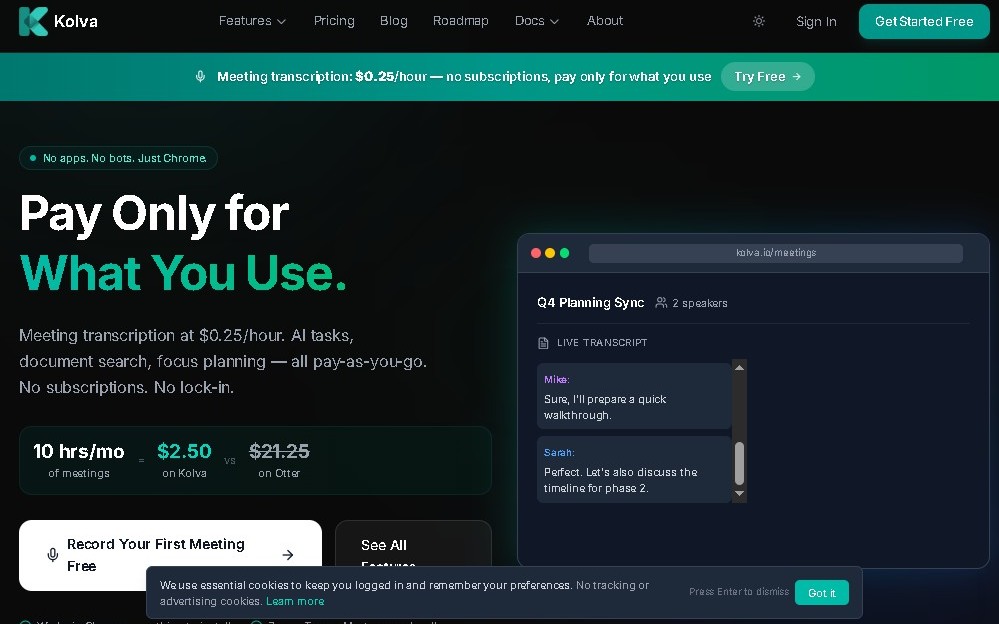
Transcribe and summarize meetings in your browser with pay-as-you-go. Manage tasks, search documents, and unify your workspace with no monthly fees or time limits.
General Information about Kolva
Kolva is an AI-powered productivity tool designed to capture, transcribe, and summarize meetings directly from your browser. This solution is primarily geared toward freelancers, remote teams, and professionals who manage large volumes of information and need to optimize note-taking during their work sessions. Its focus is on operational efficiency, allowing users to unify their workflow in a single digital space without the usual restrictions of monthly subscription platforms.
The platform utilizes advanced language models, integrating technologies like Claude and Gemini to process audio and generate accurate text. Unlike other transcription services, Kolva does not impose limits on meeting duration or storage capacity, making it easy to record long sessions on your computer without interruptions. The system works instantaneously, processing information in real time to provide immediate results once the session ends.
Key capabilities and practical benefits include:
- Automated transcription: Converts speech to text in real time with a high level of fidelity.
- AI summaries: Generates intelligent synopses that highlight the most relevant points of every conversation.
- Action item extraction: Automatically identifies pending tasks and commitments made during the meeting.
- Task scheduling: Uses artificial intelligence to organize calendars and manage workflows automatically.
- Semantic document search: Allows users to locate specific information within files and transcriptions stored in the workspace.
- Unified workspace: Integrates a smart timeline to visualize project evolution and previous interactions.
The core value of Kolva lies in its pay-as-you-go model, a structure that allows users to pay exclusively for the meetings they record, eliminating fixed fees. This makes it a flexible option for those seeking smart task organization without long-term financial commitments. By unifying meeting capture with document management, it reduces tool sprawl and improves information traceability.
From a technical standpoint, it is important to consider that the tool's performance depends on a stable internet connection. While the use of cutting-edge AI models ensures powerful analytical capabilities, the system may face occasional challenges when interpreting nuanced language or prioritizing extremely complex tasks that require specific human context. Even so, its ability to centralize information positions it as a robust assistant for both corporate and personal knowledge management.
Features and Use Cases of Kolva
How Kolva Works
Frequently Asked Questions about Kolva
How much does it cost to use Kolva for my meetings?
The service costs $0.25 per hour, and you only pay for the actual time you record.
Is there a monthly fee or subscription for Kolva?
No, the platform does not have subscriptions or fixed fees, as it operates exclusively on a pay-as-you-go model.
Does Kolva have a time limit for meetings?
There are no time restrictions, so you can record sessions of unlimited length directly from your browser.
What additional features does Kolva offer besides transcription?
The tool uses artificial intelligence to schedule tasks, search documents, and unify your workspace with Claude and Gemini.
Where is my data stored, and is there a storage limit?
Kolva offers unlimited storage for all your meetings and notes, so you never have to worry about available space.
Can I get a refund if I decide to stop using the service?
Refunds are not issued for any amounts paid, in accordance with the tool’s billing policy.
Do I need to install any software to use Kolva?
There is no need to install bulky software, as the tool captures and transcribes any meeting directly from your browser.
Kolva Pricing
Pay-As-You-Go Plan
Price: 0,25 $ per meeting hour (options starting at 0,01 $ per unit).
- Instant meeting capture, transcription, and summarization directly from your browser.
- AI-driven extraction of key action items.
- Unified workspace with Claude and Gemini integration.
- Task scheduling and document search capabilities.
- Smart task organization and timeline.
- Unlimited data and recording storage.
- No limits on meeting duration.
- No monthly fees or subscriptions; pay only for recorded time.
- No refunds.
Kolva Screenshots