
Share
Convert flat images into editable, transparent layers with AI. Separate objects and text while reconstructing the background for Photoshop, Figma, or Sketch.
What is LayerGrab?
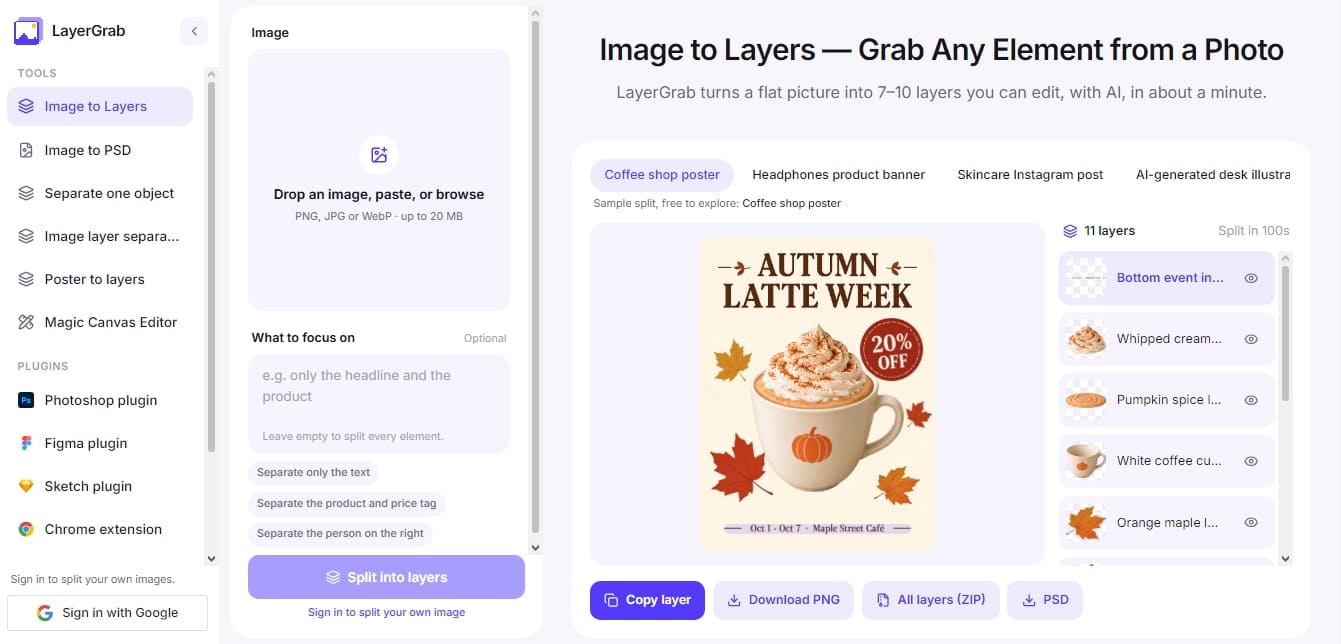
LayerGrab is an AI tool designed to automatically deconstruct flat images into editable layers. Its primary function is to transform static files in PNG, JPG, or WebP formats into a set of up to 16 independent transparent layers, facilitating the manipulation of specific elements without compromising the visual integrity of the overall composition. This solution is particularly useful for graphic designers, marketing professionals, and creators who need to extract components from complex layouts or work with assets when the original source file is unavailable.
The platform’s functionality is powered by advanced segmentation and generative AI models, such as Qwen-Image-Layered, which identify and separate every component of an image—be it products, graphics, or text blocks. In a process lasting between 60 and 100 seconds, the tool not only isolates elements into layers with descriptive names but also applies background inpainting to fill in areas hidden behind the extracted objects. This ensures that when an element is moved or removed, the background appears fully reconstructed without any gaps.
LayerGrab’s capabilities offer extensive functional versatility:
Intelligent Layer Separation: Splits an image into multiple individual elements or allows for the extraction of a specific object using custom prompts.
Multi-format Export: Results can be downloaded as individual PNG images, a comprehensive ZIP file, or a layered PSD document compatible with professional editing software.
Native Integration: Includes plugins for Photoshop, Figma, and Sketch, along with a Chrome extension to capture and process elements directly from a desktop browser.
From a practical perspective, LayerGrab makes it possible to edit AI-generated images, allowing users to move or resize objects without needing to run new generations. It also simplifies updating posters or banners where original text must be replaced; while text is extracted as an image layer rather than an editable font, the reconstructed background allows for a clean overlay of new typography. It is an effective solution for reconstructing flat designs and recovering the hierarchy of elements in files where the original source has been lost.
It is worth noting that the tool does not preserve cast shadows, and very fine text may exhibit slight color variations when redrawn by the model. As an AI-based system, segmentation may vary slightly between runs, though it consistently optimizes the arrangement of elements for immediate use in design tools.
LayerGrab features and use cases
How to use LayerGrab
LayerGrab FAQ
What is LayerGrab and what is it used for?
It is an AI-powered tool that splits a flat image into editable transparent layers, allowing you to separate individual elements and automatically reconstruct the background.
What file formats does LayerGrab support for image processing?
You can upload PNG, JPG, or WebP files up to 20 MB in size to perform layer separation.
Can text in an image be edited after using LayerGrab?
Text is extracted as a transparent image layer rather than editable typography, so you will need to hide that layer and type new text over the clean background.
Is it possible to try LayerGrab for free?
Yes, new accounts in supported regions receive 30 free credits for testing, and you can also explore the interactive examples on the website at no cost.
Which design programs can I use LayerGrab plugins with?
Specific plugins are available for Photoshop, Figma, and Sketch, along with a Chrome extension to process images directly from your browser.
Can I export the final result as a Photoshop file?
Yes, the tool allows you to download the entire set of layers directly in PSD format or as individual PNG files within a ZIP archive.
How many layers does LayerGrab generate for each processed image?
It typically generates between 7 and 10 descriptively named layers, though it can separate up to 16 distinct elements depending on the complexity of the original image.
How long does it take for LayerGrab to separate elements from a photo?
The AI analysis and layering process is usually completed within 60 to 100 seconds per image.
What happens to object shadows when they are separated into layers?
LayerGrab does not preserve drop shadows; therefore, an element that cast a shadow on the original background might appear to "float" if moved from its initial position.
How are credits deducted when performing a split in LayerGrab?
Each layer generated by the AI consumes credits, including the reconstructed background. You are only charged for layers that the system successfully returns.
LayerGrab pricing and plans
Free Version (Trial)
30 free credits for new accounts in supported regions (enough for up to a 3-layer breakdown).
Free access to sample splits without needing to register.
View layer names and positions in breakdowns locked due to insufficient credits.
Basic Plan
Price: 12 $ per month (or 99 $ per year).
1,200 credits per month (equivalent to about 120 layers).
Approx. cost of 0.10 $ per layer generated.
Full access to the web app and all plugins (Photoshop, Figma, Sketch, and Chrome).
Export options in PNG, ZIP, and PSD.
Restriction: Monthly credits do not roll over to the following month.
Premium Plan
Price: 36 $ per month (or 299 $ per year).
3,600 credits per month (equivalent to about 450 layers).
Reduced price of 0.08 $ per layer generated.
Full access to the web app and all plugins (Photoshop, Figma, Sketch, and Chrome).
Export options in PNG, ZIP, and PSD.
Restriction: Monthly credits do not roll over to the following month.
Credit Packs (One-time payment)
Price: Starting at 20 $ (one-time payment, no subscription).
20 $ option: 1,800 credits (approx. 180 layers).
60 $ option: 6,600 credits (approx. 660 layers).
Credits expire one year after purchase.
Ideal for occasional users who do not require a monthly subscription.
LayerGrab Screenshots
LayerGrab alternatives

NeotypeLab
NeotypeLab uses AI to plan paint schemes for Gunpla, mecha girls and Zoids, with real hobby paint codes, a spraying sequence, a shopping list and an HD preview.



ImageToSTL.org
Convert JPG and PNG images into STL files for 3D printing using AI. Generate detailed 3D models ready for instant download.

Image to 3D
Convert 2D images and sketches into textured 3D models using AI. Export in GLB, STL, or USDZ for video games, 3D printing, and augmented reality.