

Share
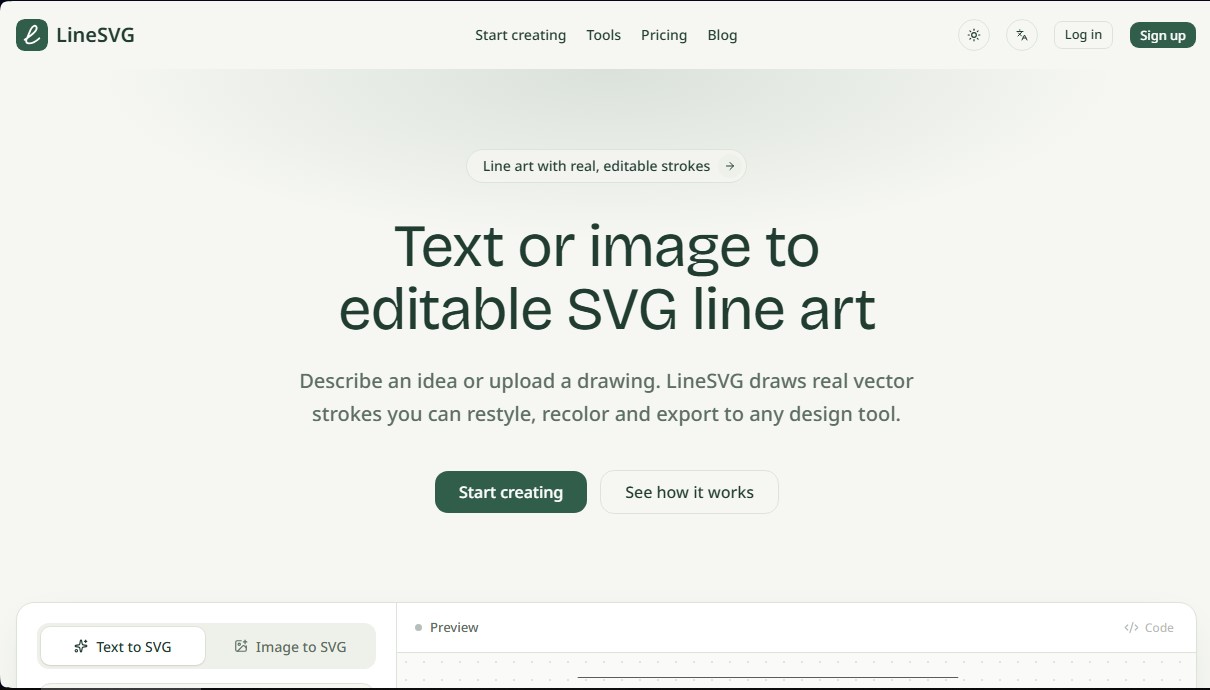
Convert text and images into vector line art with real, editable strokes. Adjust line weight or color and export the SVG file for your design editor.
What is LineSVG?
LineSVG is an artificial intelligence tool specialized in creating vector line art from text descriptions or existing images. Its primary function is to generate SVG files with editable strokes, setting it apart from conventional vectorizers that typically deliver closed shapes or filled paths that merely mimic lines. This technology allows users to obtain a flexible design base where they can adjust line weight, color, and stroke style (solid or dashed) directly within the platform or in their preferred desktop editing software.
The system operates through an intuitive three-phase workflow. First, the user enters a detailed descriptive prompt or uploads a JPG, PNG, or WebP image up to 20 MB. Next, the AI begins generating the paths progressively, allowing you to visualize the vector being drawn in real-time on the canvas. Finally, the user can customize stroke attributes before exporting. LineSVG uses advanced algorithms to interpret shapes and structures, transforming them into clean strokes that preserve the visual hierarchy of the original idea.
The application's capabilities cover various creative and technical needs through its specific tools:
- Line Art Generator: Create illustrations from scratch by describing concepts, such as vintage objects or minimalist landscapes.
- Photo-to-Vector Conversion: Transform photographs into real line drawings, reconstructing the image with editable vectors instead of applying a simple edge filter.
- One-Line Drawing: A feature optimized for creating portraits or figures in a continuous stroke, ideal for embroidery and pen plotters.
- Botanical and Technical Art: Allows for the generation of plant illustrations where stems remain as strokes and fruits or flowers can maintain independent solid fills.
- Professional Compatibility: Files are fully compatible with tools like Adobe Illustrator, Figma, Inkscape, and cutting software such as Cricut Design Space.
LineSVG is highly useful for graphic designers, illustrators, and professionals working with laser cutting, engraving, or digital printing. By providing SVG code or a downloadable file with organized layers and real strokes, the tool facilitates seamless integration into web projects or physical manufacturing. Its practical approach eliminates the need to manually redraw raster images, offering a professional, scalable, and fully customizable result for any creative workflow.
LineSVG features and use cases
How to use LineSVG
LineSVG FAQ
What sets LineSVG apart from traditional image-to-vector converters?
Unlike other software that creates filled outlines, this tool generates actual vector paths that you can edit and customize to fit your needs.
Can I use my own photos to create line art in LineSVG?
Yes, you can upload PNG, JPG, or WebP files, and the tool will automatically transform them into clean, professional-looking line art.
Can I adjust the line thickness after the design is generated?
Yes, LineSVG lets you adjust the stroke width, change colors, and apply dashed line styles directly from the dashboard.
Which design programs are compatible with files exported from LineSVG?
The resulting SVG files are fully compatible with professional tools like Figma, Adobe Illustrator, Inkscape, and Affinity Designer.
How does the credit system for generating new designs work?
Each image generation or conversion uses a fixed number of credits, which can be purchased through monthly subscriptions or one-time credit packs.
Does LineSVG offer a free trial?
Yes, new users receive welcome credits upon sign-up to try it out, and there is also a live demo available on the website.
What file types can I download after creating my design?
You can export your final design as an SVG vector file, a PNG image, or even copy the code directly for web projects.
LineSVG pricing and plans
Free
0 $
10 welcome credits (valid for 30 days).
Each generation consumes 10 credits.
Text and image-to-SVG generation.
Progressive generation previews.
Stroke width, color, and dash controls.
SVG export and code inspection.
No daily credit bonuses.
Basic
50 $/mo (or 20 $/mo with 240 $ annual billing)
500 credits every month.
Creation history and saved versions.
Text and image-to-SVG generation.
Progressive previews and editable stroke controls.
SVG export and code inspection.
Monthly credits expire after 30 days.
Option to top up with credit packs.
Pro
100 $/mo (or 40 $/mo with 480 $ annual billing)
1,500 credits every month.
Creation history and saved versions.
Text and image-to-SVG generation.
Progressive previews and editable stroke controls.
SVG export and code inspection.
Monthly credits expire after 30 days.
Option to top up with credit packs.
Enterprise
200 $/mo (or 80 $/mo with 960 $ annual billing)
4,000 credits every month.
Creation history and saved versions.
Text and image-to-SVG generation.
Progressive previews and editable stroke controls.
SVG export and code inspection.
Monthly credits expire after 30 days.
Option to top up with credit packs.
Lifetime
1,999 $ (one-time payment)
5,000 credits every month for life.
Creation history and saved versions.
Text and image-to-SVG generation.
Progressive previews and editable stroke controls.
SVG export and code inspection.
Monthly credits expire after 30 days.
Option to top up with credit packs.
LineSVG Screenshots
LineSVG alternatives

NeotypeLab
NeotypeLab uses AI to plan paint schemes for Gunpla, mecha girls and Zoids, with real hobby paint codes, a spraying sequence, a shopping list and an HD preview.



ImageToSTL.org
Convert JPG and PNG images into STL files for 3D printing using AI. Generate detailed 3D models ready for instant download.

Image to 3D
Convert 2D images and sketches into textured 3D models using AI. Export in GLB, STL, or USDZ for video games, 3D printing, and augmented reality.