
Share
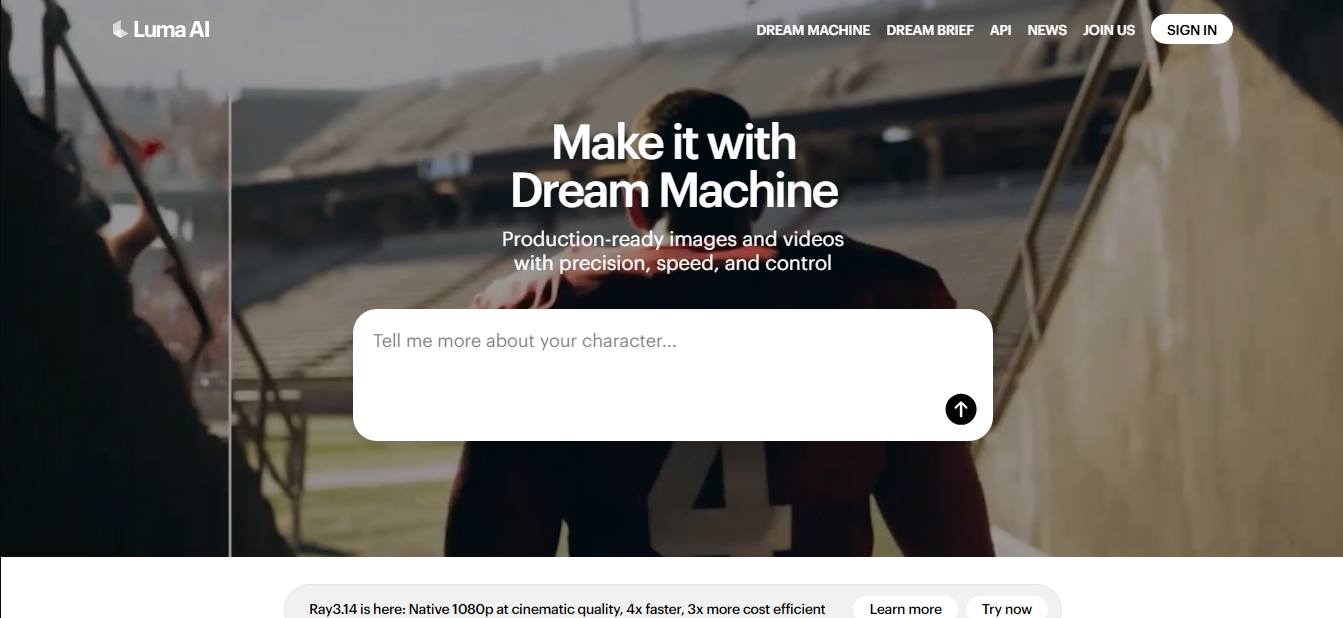
Create realistic, cinematic 1080p videos and images from text or photos. It stands out for its fluid motion, precision, control, and speed.
What is Luma AI?
Luma AI is a multimodal artificial intelligence platform designed for the generation of high-quality cinematic images and videos. Its primary purpose is to enable creative professionals, designers, and filmmakers to transform text prompts or static images into dynamic visual content with an exceptional level of realism. Through its Dream Machine tool, users can conceptualize and visualize complex sequences directly from their computer or iOS mobile device.
The tool's technical architecture is built on advanced models such as Ray3.14, its most powerful engine to date. This technology allows for native video creation in 1080p resolution, featuring optimized processing speeds and enhanced visual stability. Luma AI's artificial intelligence does more than just generate content; it applies a multimodal general intelligence approach capable of understanding and operating under the laws of physics, resulting in coherent motion and logical event sequences.
Key functional capabilities include:
Text-to-Video Generation: Creating detailed scenes through precise descriptions of characters and environments.
Image-to-Video Conversion: Animating photographs or illustrations while maintaining the fidelity of the original source material.
Ray3 Modify: A specific model for hybrid workflows that allows users to modify performances and actions with superior motion consistency.
Visual Reasoning Models: The system is capable of producing ultra-realistic details and following a logical visual narrative, making it one of the first models to integrate reasoning capabilities into video.
HDR Support and 4K Upscaling: The ability to up-res content for professional-grade production results, including high dynamic range for deeper color depth.
For enterprises and developers, Luma AI offers a robust API that simplifies the integration of its image and video generation models into third-party products. This enables the scaling of visual content production while maintaining total control over aesthetics and technical quality. The platform is positioned as a comprehensive solution for visual storytelling, supporting everything from rapid prototyping to the creation of final assets for ad campaigns or educational projects.
Using Luma AI is particularly beneficial for those looking to optimize production timelines without sacrificing a professional finish. By focusing on inference efficiency and utilizing Terminal Velocity Matching, the tool offers an advanced alternative for high-definition content generation, allowing users to focus on creative expression while the AI manages the technical complexities of animation and rendering.
Luma AI features and use cases
How to use Luma AI
Luma AI FAQ
What is Luma AI and what is its primary goal?
Luma AI is a multimodal artificial intelligence platform designed to generate and understand the physical world, enabling the creation of realistic images and videos with high precision and speed.
What features does Dream Machine offer within Luma AI?
Dream Machine is the tool that allows users to conceptualize and visualize videos from text or images, using the platform's most advanced models to tell visual stories.
What are the advantages of the new Luma AI Ray3.14 model?
This professional-grade model offers native 1080p video generation with cinematic quality, while being four times faster and three times more cost-effective than previous versions.
Is it possible to use Luma AI for free?
Yes, the free plan allows you to generate up to eight videos per month in draft mode with limited resolution and a watermark, strictly for non-commercial use.
Which Luma AI subscription removes watermarks and allows for commercial use?
To remove watermarks and obtain commercial use rights, you must subscribe to the Plus, Unlimited, or Enterprise plans.
On which devices is the Dream Machine tool available?
You can access Dream Machine and create content through the official website as well as via its dedicated app for iOS devices.
What is the maximum duration for videos generated with Luma AI?
The maximum generation length varies depending on the model and the chosen plan, allowing for the creation of five- or ten-second clips with coherent motion.
What is the maximum resolution Luma AI content can achieve?
Paid plans allow for resolutions up to 4K through a high-fidelity upscaling process that maintains visual stability and consistency.
Does Luma AI offer solutions for developers and businesses?
Yes, the platform provides a specific API for building and scaling creative products by integrating its high-quality video and image generation models.
What does the Luma AI Ray3 Modify feature allow you to do?
This feature is designed for hybrid workflows that require precise control over character acting and performance within generated videos.
Luma AI pricing and plans
Free
$0 per month
8 videos (in draft mode).
Limited use with draft resolution.
Low-priority processing.
Non-commercial use only.
Includes watermarks.
1 concurrent generation limit and 5-second maximum duration.
Lite
$7.99 per month
3,200 monthly credits (approx. 50 videos in draft mode).
Full access to the Ray3 model.
4K resolution with upscaling (up-res).
High-priority processing.
Non-commercial use only.
Includes watermarks.
2 concurrent generations limit and 10-second maximum duration.
Plus
$23.99 per month
10,000 monthly credits (approx. 160 videos in draft mode).
Full access to the Ray3 model.
4K resolution with upscaling and HDR.
High-priority processing.
Commercial use allowed.
No watermarks.
4 concurrent generations limit and 10-second maximum duration.
Unlimited
$75.99 per month
10,000 monthly credits and unlimited use in "Relaxed" mode.
Full access to the Ray3 model.
4K resolution with upscaling and HDR.
High-priority processing.
Commercial use allowed.
No watermarks.
4 concurrent generations limit and 10-second maximum duration.
Enterprise
Contact sales for pricing
20,000 monthly credits.
Full access to the Ray3 model.
4K resolution with upscaling and HDR.
Highest priority processing.
Commercial use allowed and no watermarks.
Advanced privacy: the model is not trained on input or output data.
4 concurrent generations limit and 10-second maximum duration.
Luma AI Screenshots
Luma AI alternatives

BurningBridgesAI.app
Turn a photo into Drake’s viral dance. AI automatically recreates the choreography and gestures so you can star in the trend without recording a thing.

VideoWeb Video Generator
Generate professional AI videos from text or images. Features realistic avatars, automated scripts, and optimized formats for marketing and social media.

Motion Transfer AI Video Generator
Animate character photos using reference videos. Precisely transfer gestures, dances, and body movements from a clip to an image for realistic results.


AlreadyRan
AlreadyRan brings dozens of AI image, video and audio models into one web studio with a single credit balance and the cost shown before every generation.
