

Share
Transform real-world locations into Minecraft maps for Java and Bedrock. Generate worlds with realistic buildings and terrain in your browser. No installation required.
What is MapMC?
MapMC is a specialized tool for converting real-world geographic data into playable Minecraft worlds. Unlike other generators, this platform operates entirely within your browser, eliminating the need to install mods or run complex command lines on your computer. Its primary function is to allow any user to transform an exact location on the planet into an explorable map, compatible with both the Java and Bedrock editions.
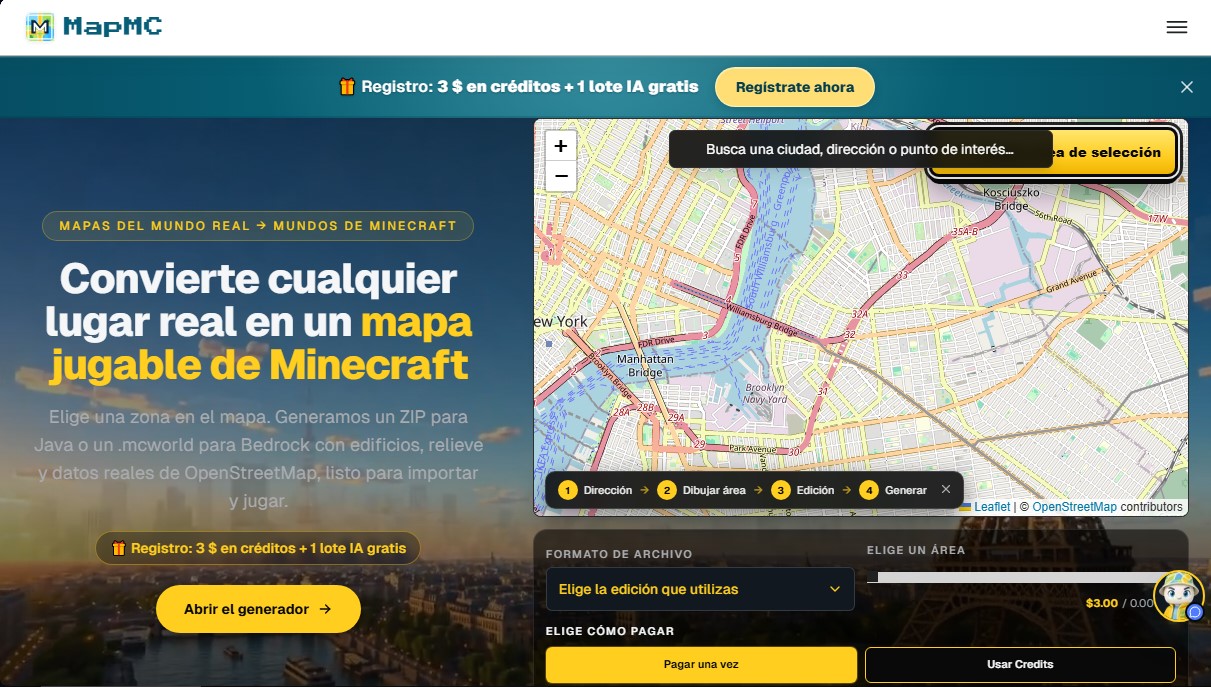
MapMC works by extracting public data from OpenStreetMap (OSM). Using the Arnis engine developed in the Rust language, the application processes technical information regarding terrain relief, road networks, buildings, water bodies, and land cover. The system translates these coordinates and structures into Minecraft blocks, respecting the actual layout of the selected area. Users simply need to define an area on the interactive map—up to 22 km²—and the generator handles the remote processing and file packaging.
Among its technical capabilities, its flexibility for customizing generated worlds stands out. Users can configure specific parameters, such as enabling or disabling building interiors, roof designs, or vegetation density before starting the creation process. Once the processing is complete—which typically takes between 10 and 20 minutes for large areas—the tool provides a direct download of a .zip file for Java or an .mcworld file for Bedrock. The latter format makes it easy to use immediately on mobile devices, consoles, or tablets, enabling cross-platform play.
This application is highly useful for players looking to recreate real cities, educators wanting to explore specific geographic environments immersively, or content creators who need precise structural foundations for their projects. MapMC ensures that maps are not just visual snapshots but fully navigable environments with updated terrain and building data.
Key features and benefits of MapMC:
- Cloud-based Minecraft map generator with no local hardware requirements.
- Export compatibility with Java Edition and .mcworld files for Bedrock.
- Real-world data processing via the Arnis engine for optimal structural accuracy.
- Ability to generate everything from small neighborhoods to large 22 km² expanses.
- Intuitive interface accessible from mobile devices or any modern web browser.
- Functional customization of elements such as terrain, water, and urban structures.
By using OpenStreetMap data, the fidelity of the resulting map depends on the mapping information available in that database. It is an efficient solution for automatically obtaining Minecraft worlds of real-life locations, providing a solid technical and geographic starting point.
MapMC features and use cases
How to use MapMC
MapMC FAQ
What is MapMC and what does it do?
It’s a web-based tool that allows you to convert any real-world location into a playable Minecraft map using OpenStreetMap cartographic data.
Can I try MapMC for free?
Yes. When you sign up, you receive $3 in free credits, which allows you to generate a small world of approximately half a square kilometer at no cost.
Do I need to install any software to use MapMC?
No, the tool works directly in your computer or mobile device's web browser without the need to download additional software or deal with technical configurations.
Which Minecraft editions are compatible with the tool?
You can export your worlds for both Java Edition in a compressed format and Bedrock Edition via .mcworld files.
Why is my MapMC map appearing mostly empty or without buildings?
This happens if the selected area has limited documented information on OpenStreetMap. We recommend choosing urban areas or cities to ensure a higher level of detail.
How long are generated files kept on the platform?
World files remain available for download for thirty days before they are deleted from the servers.
What is the maximum land area I can convert into a single map?
The current limit allows you to generate areas of up to 22 square kilometers per processed world.
What happens if my world fails to generate?
If a generation error meets the requirements of the refund policy, the credits used will be automatically restored to your account.
Do MapMC credits have an expiration date?
No, the credit balance you add to your account does not expire, and you can use it whenever you need it without any time limits.
Can I use the generated maps to create YouTube content or for live streams?
Yes, the world files you generate belong to you and can be used in your projects, as long as you comply with Mojang’s brand guidelines for monetized content.
MapMC pricing and plans
Free Sign-up
3 $ in welcome credits (equivalent to a 0.5 km² world).
1 free AI batch.
Unlimited free access to the Seed Map and all platform search tools.
Pay per Area (One-time payment)
From 3 $ to 15 $ per generation.
3 $ for 0.5 km² areas.
5 $ for 3.1 km² areas.
10 $ for 10 km² areas.
15 $ for the maximum limit of 22 km² per world.
Choose between Java (.zip) or Bedrock (.mcworld) formats.
Downloads available for 30 days after generation.
Plus Plan
9.90 $ (one-time payment)
1500 total credits (includes a 510-credit bonus).
Capacity to generate approximately 5 standard 0.5 km² areas.
Credit balance never expires.
Access to AI features.
Pro Plan
19.00 $ (one-time payment)
3500 total credits (includes a 1600-credit bonus).
Capacity to generate approximately 11 standard 0.5 km² areas.
Credit balance never expires.
Access to AI features.
Plan Studio
49.00 $ (one-time payment)
10,000 total credits (includes a 5100-credit bonus).
Capacity to generate approximately 33 standard 0.5 km² areas.
Credit balance never expires.
Access to AI features.
MapMC Screenshots
MapMC alternatives

NeotypeLab
NeotypeLab uses AI to plan paint schemes for Gunpla, mecha girls and Zoids, with real hobby paint codes, a spraying sequence, a shopping list and an HD preview.



ImageToSTL.org
Convert JPG and PNG images into STL files for 3D printing using AI. Generate detailed 3D models ready for instant download.

Image to 3D
Convert 2D images and sketches into textured 3D models using AI. Export in GLB, STL, or USDZ for video games, 3D printing, and augmented reality.